
粉丝4216获赞1.4万
相关视频
 01:59
 08:33查看AI文稿AI文稿
嗨,各位网友,我是谢老师,今天我来讲一下手持手机云台稳定器的简易操作, 我们看一下这是我新买回来的那个手机手持云台稳定器, 我用的是手机是 oppo 阿罗幺幺,首先把手 扫描说明书上的 有个 app 下坠, app 下载有两个,一个是苹果手机的,一个是安卓的,我这个是 oppo l 幺幺呢是安卓的,那我下载 下载到这个安装,安装好我们可以看到手机上安装好会有 一个 app, 把手机的蓝牙打开, 这些前期工作先做好,我们就开始操作我们的手持手机云台稳定器,我们简称为稳定器。稳定器的 操作呢,我们先了解一下稳定器的结构, 我这台呢是山竹,山竹稳定器,那这个稳定器呢,有三个马达, 我们打开可以看得到 这里一个马达, 这里有个马达,这里有个马达,这个马达呢就控制手机的向上向下翻滚, 这个马达呢就控制我们手机的左右左边,右边也靠这个马达,下面这个马达呢,这个马达呢是 导向哈,导向马达就是我们走的时候就靠他来控制我们的行动轨迹,根据我们的行动轨迹来控制我们的那个手机删除稳定器呢,这个操作呢, 最关键的一步哈,我现在用过来我才才发现哈,就是我上上一个视频讲的这一看那个配重看,这个配重看我已经张 上去了,当时我也不知道他用了干什么,现在已经明白了,配送开主要是用来调整平衡平衡,我们把手机手机装到,装到那个稳定器上, 粘到稳定器上,你把它粘起来,夹起来,夹到稳定器上,这是第一步要做的,夹起来,夹到以后呢,我们可以看到这个手机,这个手机这样子是不行的,他偏转 这稳定器,这这一个工具呢最重要的就要调整这个手机的那个要横屏,现在这样子,横屏不了,横屏不了,我们这么样子呢,这里有个拉管,这可以拉伸的,我们可推拉推拉 啊,这样就差不多平衡了,这就水平,意思要手手机的水平差一点点,我们往这边拉一点点,那手机就已经水平了,我们看到这个手机水平 只有调了这一步以后,就是做了那个平衡以后,我们才能够启动这个电源券,这个是电源券。第二步我们才能够打开,打开电源 才能够打开电源,按一下他哈这个电源键出现了指示灯, 一个是电源指示灯,一个是模式指示灯,在这里两个两指指示灯,这个呢是摇拐,就控制他上下,这个 手机上下上上推就是上按负左左边右边左边右边这个摇滚,就控制这这个上下左右的转转,手机转动的问意思, 然后呢打开电源键以后呢?第三步我们要启动我们手机的那个 app, 就刚才我们安装的那个 app, 打开 app 这里有个连接, 要一定要用连接点连接,那么这就启动 成功了,其实那个拍拍起来很简单哈,就是这么简单啊,我们这样子往往上往下往左往右, 就这么简单,效果还是不错的,他的主要功能就是我们的视频拍摄的时候运动,拍摄的时候就防止他抖动,那个视频方面抖动,这个就是解决这么一个效果, 而且这个效果还是不错的,确实是不错,完走动起来的时候,那个画面,你看他都根本就不会改变,是吧?那个手机的稳定在同一个那个导向组上,他不会, 他的优点就是防抖动功能是很强大的,其实 他我都没有感觉到很大的什么用处了哈,在使用过程中呢,我感觉到这个他的优点就是对画面的稳定性比较好一点哈,确实是这个拍摄的的画面再也没有抖动的了。他的缺点 就是这个稳定器啊,还是蛮重的哈,就这样手持的拿住的话,不算手机都有一斤左右。我们平常假如是一般这样子拿住的话,长久拍摄的话,我们还是感觉到这样东西是比较重的, 稳定器还是比较重的,所以比较辛苦。第二个呢就是这个手柄,这个手柄太短了,假如我们要拍高一点的那个视频的话,那就 这个手就要举高,相对比较奶,虽然他这里有个有个加长哈,但是我们要另外配 本来有一些呢,可能有些人家设置的厂家。好的,那这就怎么样呢?这里还可以延伸一下,延伸一下,拉伸一下,那么他就可以哎,能够长到五十公分,再长二十公分左右呢,我们这个云台呢,我认为还是比较好,他两个缺点,一个是太重了,第二个就是那个 手柄,手柄太短,没有延伸的机会哈,空间哎,这些装备啊,根据个人所需哈, 哎,没有时候呢,像这个来说是功能是很单一的,你们认为值得花这个钱去买吗?哎,各位网友, 今天就简单讲到这里,后面还有一个手机手持云台稳定器的提高片,今天就讲到这里,各位网友拜拜。
791冬哥科普 01:23查看AI文稿AI文稿
具体的情况就能知道了,现在我,我来用这个权威,权威作用模式,我手柄转向他会跟着转, 然后 手柄上下转向,他是不动的,我手柄抚养,他会跟着跟随着动。
116飞正宗吃货 04:58查看AI文稿AI文稿
大家柠檬三操作指南。好,首先我们看一下怎样进行匹配。那因为我们跟大家是深度合作的,所以不需要装任何 app, 也可以直接进行连接,然后直接用到我们自带的录像的这样的一个 app。 那首先我们看到 这个云台上面,他会前面有两个按键,这个是拍摄键,然后这个是,呃,功能键,对吧?那在这个背面他还会有一个按键,这个叫模式选择键,那我们同时按住这三个按键, 然后你会发现他上面的灯按久了,大概三秒钟左右吧,他就会闪起来,对吧?那闪起来就会进入到一个匹配的模式,这时候你的手机哎,就会发现有一个连接,对吧?那点击连接就好了,那整个操作非常的简单啊,比一天蓝牙耳机还简单。好,点击完 完成,那完成以后我们就可以装上去,然后怎么装就要好了,那我们看到其实它上面是有贴标的啊,然后按照这个贴标文字的方向,我们放好手机就可以了,那 不需要说啊,放的位置非常的准确,大概是在手机中部就 ok 了,哎,这时候你会发现东倒西歪,对吧?那不用担心,那接下来我们教大家怎样去用, 那我们开机了以后啊,首先啊,先让我回复一下啊,再教大家怎么去用。那装上去以后呢,其实我们这按键有什么作用啊?每一个按键都非常重要。 好,那首先给大家讲一下我们前面的按键,那这个叫功能键,那就很简单,所有的功能其实他都可以去实现。比如说我们在相机里面主要用的一个是拍照,对吧?我们单击的话是进行 拍照和录像的切换,可以看到现在是录像,然后再按一下是切换到拍照,对吧?那由这个单机就可以实现拍照跟这个录像的切换。那假如有些朋友说我不喜欢竖屏去拍东西,我喜欢横屏,对吧?那这时候你只需要双击, 双击的时候他就进入到一个横屏的模式,那再双击他要切换到竖屏, 双击是进行这个啊,横屏竖屏的切换,那这是双击,对吧?那还有第三击,那如果连续三击,我们看一下一二三, 好,他就会进入到一个休眠的模式,那比如说我们拍着拍着让他暂停的时候,就可以用这样的一个啊模式休眠,那要再启动怎么办呢?我们同样的按三下他就激活了,那同样 再进入到这个相机的模式,再按一下他就一键能进入了,他这个操作非常的差。那除了这些以外, 我们有些朋友假如想用这个来直播怎么办呢?那这时候就要用到我们这个食指去操作的这个啊,叫做模式的选择键,三下的话,他就会切换前置跟后置, ok, 这样子就可以切换了。三下 给一二三,好,那按三下基本上就这样子,那如果比如说我拿着这个云台 a 挪了一下, 然后放回来发现,哎,你在正中的位置,对吧?或者我们切换到,你会发现这个不是我选入的正中央,对吧?那你只需要在这个选这个啊,用的选择线里面双击,他就能回复到正宗来,我们再看一 现在脚我不练了,换一下方向,对吧?但是不正的这时候只需要我双击哎,他马上就可以飞到正中间了,他这个操作非常的利索,非常的爽。双击没到中间,然后三下他就可以切换 前后置,然后这操作都非常的简单,那接下来我们就可以正式的去拍摄了,那比如说我们现在切换到录像模式哎,然后按一下这个 录影键啊,他就是录像了,那我们在录像的时候往往会涉及到一个变焦,对吧?那变焦的话我们在侧面 看一下,侧面这里有一个变焦的按钮,往上推的话,我们看一下画面啊,他就进行放大啊,那在录像里面的话,我们目前最高是十倍的啊,变焦,那如果往下 跟我们音量键操作其实差不多了,往下推他就是这个缩小,对吧?那最小的话我们甚至可以锁到这个超广角,假如我想看到整个店的所有的全景,怎么办呢?我们看到这里面还有个摇杆键,对吧?那摇杆就很简单了啊,只要我向这边摇, 那就看到左边的,看这边就看左边的,对吧?好,那如果想看一下天花板,天花板有没有掉一些钓鳍啊? 哎,没有,这个店还是很合规的,对吧?那么看一下地下有没有清理垃圾,对吧?哎,非常的干净,所以呢,我们这个摇杆键可以前后左右上下的进行 调动啊,这样子你就很方便去拍摄,如果你想关机的话,怎么办呢啊?同样的,我们长按这个大概是。
1329小祥优品 00:52查看AI文稿AI文稿
下面可以看一下半根髓模式,所谓半根髓模式,他的只有航向轴是 跟着旋转的,抚养轴和横滚轴是锁定的,这个时候手机的指示灯显示在 hf 上,手柄转向时候他会跟着转向, 是跟着你手动的,剩下的都是一个稳定模式,咱们看一下 出去了。
72飞正宗吃货 04:58查看AI文稿AI文稿
哎,各位小伙伴大家好啊,华为除了手机还有什么?还有它丰富的智能生态,包括丰富的配件,数码产品。作为一名爱和主,户外拍摄肯定是非常重要的 啊,分享自己的生活或者是拍些视频都是非常不错的,那如果我们画面拍着非常抖,那效果可能就大大降低了,所以今天给大家带来一款介入华为鸿蒙系统的哎手持云台,它就是这款来自 happy treat 痘印手持云台, 最主要的是它是接入华为的,可以接入鸿蒙系统,那这样的话在我们华为手机上使用的时候也就更加便利啊,有自动的弹窗连接更加方便,设置也更加的快速。那具体的使用就让我们一起来看一下吧, 画面之所以这么稳定,就是因为有了他们俩,这样你才能拍出绝世大片。首先这个开不去的手持平台,这款是进入鸿蒙的,所以他可以在手机 app 上进行快速的设置,那我们打开包装来一起看一下, 对,一个大大的派,但他不是菠萝派,然后一个快速双手手册,哇,打开以后, 金属的机壁非常有质感,折叠的机身,那收纳起来也非常方便,你看我这样轻轻一折,他就可以打开来了,不错不错,那这样的话外出携带就非常方便了,一个摇杆 可以调节云台的方向,一个电源还有一个录制按钮,还有一个蜗牛可以用来放大缩小,最后还有一个扳机用来固定视角。包装内除了电源数据线以外,还有一个底座,可以固定在桌上使用, 方便我们固定机位摆拍摄,延时摄影啊等等的一些内容,那整齐的外观,大家可以看到,设计的十分简洁,非常轻便,而外观呢也非常好看。 首次使用我们长按电源开机,然后在 app 上可以将它配对,配对完成后,我们就可以在手机上进行啊设置,查看它的状态,当然我们可以连按三 g 来呼出弹窗,快速进行设置, 看像是设置云台的啊,跟随模式,摇杆灵敏度,查看电量都是可以通过华为鸿蒙系统来实现的。使用时将手机夹上,最大 可适配七点二寸的大屏手机, iphone pro max 也可以轻松适应。那在侧面我们可以看到它有个镂空的设计,可以防止夹到电源按键,那背面因为是华为版本,所以还有一个华为的红棚 logo, 功能上长按电源开机,一键还可以切换横竖屏,使用非常方便。 另外现在很多手机都支持广角拍摄,但很多机币设计不合理,就会导致机币的露出,而这款在使用时就没有任何影响。 作为手持云台,最重要的还是防抖,配备了三轴的铝合金机币的手持云台,即使在画面非常抖动的时候,他也能稳定的消除。呃,抖动,像机头一样稳定, 那我们来室外实际看一下,可以看到右上角的画面完全没有抖动,真的太神奇了,再看这一个都跑 搞起来了,还是那么稳定,所以你看如果是这样户外直播他也可以轻松应付。软件上他还有跟随模式,像人物镜头跟随,哎,画面跟随,那这样的话,拍摄一些动态的物体,哎也能跟的更加的稳定。 在软件功能上还有一些呃稀奇苛刻啊等等的模板玩法,能让我们更加轻松的拍出一些大片, 他还有手势识别来快速拍摄,一天十二小时的工作续航,完全能满足 我们日常使用户外直播,带上这个云台就能让你的画面始终稳定。另外如果你也想让你的音质有有更好的提升,那这款来自开不去的麦克风绝对适合你。那我们再来对比下效果, 那现在的话就是开启岭闸卖的,那再让我们把这个啊岭闸卖给去了,大家来听一下, 那现在呢,就是没有拧开麦的声音,这个效果还是很明显的,另外接收器与云台也不会互相干扰。 好了,那这么一款来自痘印的 type 去派手持云台啊华为版大家觉得怎么样呢啊,上手非常简单,功能也非常强大,最主要的是拍的稳,如果让你的拍这画面有非质的飞跃,那这款云台绝对适合你。
 12:02查看AI文稿AI文稿
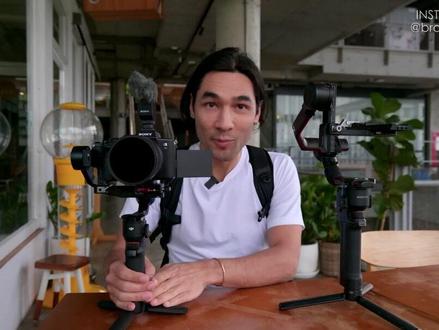
how's it going on brandon lee and today i'm gonna be walking around with the dji rs3 mini gimbal this is a smaller version of the rs3 this is not a sponsored video by the way this is just my own personal thoughts on this i've been using this gimbal actually for over a month now i took it all around morocco i filmed in harsh conditions after all this traveling this gimbal has been a lifesaver because the reduction in size, the reduction and weight means it's easier to get through airport security because they don't get us suspicious it's easier to film on the street it's easier to pack in my backpack it's just overall to be a much more practical travel gimbal than anything i've ever used before and for comparison i have the dji rs2 gimbal with me i don't have the rs3 but here's the rs2 and here's the rs3 mini it's so much smaller and so much easier to travel with one thing you should know though you can't remove the handle so on the rs2 you can take the handle off just like that right and then you can travel with it like this with the rs3 mini the handle doesn't come off but it's so much shorter anyway, they handle so much smaller that i don't really feel the need to remove it the functions are very similar the main difference here is the size and when i've been using the r3 mini this has been my main setup this is the sony a7s3 and the tamaron 17 to 28 millimeter lens and the gimbal performs beautifully i would say with this setup and it still feels really light in my hand like i can shoot all day with this and not get tired so anyway don't take my word for it we're about to walk around and do some shooting and you can see how the footage looks? 嗯, i have my gimbal and pantel fall of mode the fall speed is slow so what i like to do is sort of move it around until the shot looks right to me that looks pretty decent and then i squeeze the trigger so the triggers being squeezed by my finger here that locks it off now i'm in full walk mode and let's walk here's a little tip for high action kinds of gimbal shots you don't want to be looking at your lcd the whole time when i was running up those stairs i wasn't looking at where i was filming i was looking ahead of me and i was looking at my feet not only did i save myself from potentially falling down also it makes the shot steadier because you're more sure footed you know where you're going more when you're looking at your environment and you're less likely to stumble or make little mistakes like that that will find their way into your shot i'm gonna hand over the gimbal and menit is gonna give it a try so we're gonna see how it looks in a different person's hands let's go oh now i'm going to use my tiny little monopod another reason it's good to have a lightweight gimbal is because if you want to use a flimsy monopod like this it's better to not put too much weight at the other end you get three custom modes on the gimbal with the m button and i'm mode one which is pan tilt follow on my gimbal so what i'm gonna do is set my frame okay, i wanted to look about like that looking sort of straight down and now i just changed over to mode three custom and i turned off pan tilt and follow so now it's an all lock mode so that's a quick way to get your framing you just set your framing in pantel follow mode and then you switch over to all lock mode and it just holds that frame for you so let's say you want to do a really smooth tilt up with the gimbal well most of the time you use pantel follow mode for that right so it follows your pan and your tilt well on dji gimbals you have in the custom mode you have the option to enable or disable any axis independently so in this case i have disabled everything except for the tilt axis which means when i tilt down i don't have to worry about accidentally panning and that makes it so much easier for me to do a shot like this where i pull up and i tilt up at the same time i'm going to show you how it changed lenses with this gimbal first of all i single press the power button that puts it to sleep then i just lock off my axis but this tilt axis has a 45 degree position so i lock it tilting up like this and then i can see what i'm doing as i change out lenses now this is completely out of balance right but let's see if the gimbal will still reorient itself properly if i take it off sleep mode not too bad we're completely off balance and it's still able to get back to neutral position which means that the motors are pretty strong okay, this next shot i'm about to do is technically tricky so i'm gonna walk you through how i'm gonna do it with all the details and all the settings and stuff so first of all i switched out my lens i now have the tamaron 28 to 200 super zoom lens and i'm going to zoom this in to 125 that's pretty far zoomed in because i want to give this gimbal a stress test to see if it can handle longer focal lengths because usually longer focal lengths will show your shake more i'm gonna remove the nd filter and and i'll explain why in a second, i am going to put my gimbal in all lock mode, i'm going to use the briefcase handle for a little extra stability as i walk and now i'll get into the camera camera settings in this shot minit is gonna be my actor and he will walk from a bright area to a dark area and i need the camera to automatically adjust the exposure and the way i'm gonna do that is by putting my camera into shutter priority mode that means the shutter stays the same 150th of a second and the aperture automatically adjusts itself in the scene next, i have to deal with the focus this is going to be a tricky scene to focus because menit is walking behind several foreground, obstacles like poles and trees and things like that and i don't want the camera to focus on those objects by mistake so here's the magic trick i'm going to use the gimbal's bluetooth connection to switch the camera between af and mf during the scene while i'm filming and here's how i do it the gimbal has a record button that record button will bluetooth control your cameras record button but i'm going to remap my record button on my camera so i've gone into my menu i've gone into my custom key settings and i've remapped it so that this record button is a f m f toggle which means every time i hit the record button it switches between autofocus and manual focus therefore when the gimbals connected via bluetooth to the camera the record button on the gimbal also controls a fmf toggle every time i hit this record button on the gimbal, it will switch the camera to af or to mf now here's the tip for sony camera users in order to make this button responsive enough you need to set your subject shift sensitivity on your camera to five and i set the subject shift speed to three because that's a nice medium speed okay so that's all the technical stuff now let's go actually try this out and see how it works miss you here's a new feature of the rs3 mini that's kind of cool it has native vertical mode so all you do is you unlatch in the front here then you press the little button in the back and slide this off and then you slide it back into some grooves there and you lock it in in so with a lot of gimbals you know you have to use a cage or you have to add an extra piece or something with this one there's nothing extra that you have to add it's pretty fast okay now some of my overall thoughts about the rs3 mini i've had this gimbal for over two months now because i was part of the launch campaign so they gave me a gimbal to keep and i took it to morocco i did a lot of real shooting with it this is the gimbal that i will continue to use because it's basically the same gimbal as the rs3, but it's smaller and lighter so for me that's an all around win fits really well into a backpack let's say i want to pack this up right, i could do the half fold here so that's where i lock it like this the full fold is where you release it completely but there's a position you can lock it there it's called half fold then i can just quickly remove this arm so in a few seconds it's down for this size if this handle was longer then it wouldn't fit in horizontally on my backpack like you seeing here you know other gimbals that are maybe an inch or two inches longer in the handle or if they have longer arms that protrude out ah a little bit further they don't drop in horizontally, so then you have to fit them in vertically and that creates its own headaches because sometimes the backpack won't have a nice spot for the handle to drop in there, uh or you have to you know put them in a special case and carry them separately the other ronan gimbals do have this detachable handle but that leaves some exposed contacts when you detach it and when you reattach it like this i found that sometimes i would forget to completely close this wing nut here and the handle would summarily fall off i'd much prefer just to drop in a gimbal with a shorter handle one more thing to mention here the locks are manual they're not automatic like on the rs3 not really a big deal because when i unlock it or lock it usually it's because i'm balancing the gimbal and with the rs3 because the locks were automatic i would find that sometimes it would close itself automatically it would lock itself and then i would have to manually unlock it in order to rebalance it and that got annoying, so i really don't mind just operating the locks manually, so those are my thoughts for the rs3 mini, i have put this gimbal through hell and it's performed really well and i'm going to continue to use it on my shoots, so thanks for watching once again i'm brandon lee if you want to learn more from me, i have a film school it's called unscripted studio the link is in the description of this video, please click like and subscribe and i will see you in the next video。
181秃头摄影


