soundshifter使用教程
这是我一个多月之前拍的开箱,当时 southerbrenner 推出他最新一代的音乐智能穿戴产品,分别有三款。我拿到的这个是 core, 属于终端型号,基础款叫 powse, 高端款叫 core steal。 从包装盒上可以看到扣的四个核心功能,分别是节拍器、调音表、分贝仪和智能手表。 讲真,我也是第一次听说桑 na brand 这个牌子。在这之前,我从来没有想过有一天会有一款手表是 designed for musicians, 专门为了音乐家而设计。 所以整个开箱的过程,虽然我还不太清楚他是如何被使用的,甚至如何把表从表带上摘下来我都不会,但我一直是处于有点小感动的状态啊。现在经过了这一个多月的使用,我 我想也应该可以跟大家分享一下。那么这段时间陆陆续续也有其他 up 做了相关的视频演示啊,所以太细之莫及的东西我就不说了啊,这期视频咱们就直接围绕 sunbrand 啊,围绕 core 这款产品。 所以说我认为值得一提的啊,几个亮点和槽点。可以说节拍器是桑的 brand 啊,最核心的功能啊,也是我觉得最不该有槽点的功能。 但偏偏就有人站出来说啊,我为什么要花钱买一只带震动的节拍器呢啊,那些机械节拍器啊, 电子节拍器啊,或者移动端的节拍器 up 不一样用吗?那么会不会有一种情况啊,你的乐器音量盖住了你节拍器的音量,尤其我们在用电子管音箱练琴的时候啊,或者整个乐队排练 的时候,你是很难听清楚节拍器的,即便你有一个很大声的啊,外放设备来播放节拍器,我相信时间久了,这种枯燥且大音量的节拍器也不会给你带来什么好的体验。 那么这个时候有人说了啊,我的 iwatch 上啊, iwatch 上也可以实现带震动的节外器功能,那么有两点 iwatch 是做不到的。第一点是震动的强度,虽然手机震动啊或者智能穿戴设备的震动已经不新鲜了,但是 我第一次见识 chandebrana 的震动强度时,还是让我吓了一跳啊。当时就光光我在这个旋转表盘切换这个功能模式的时候,这种强劲的震感就让我非常惊讶,而作为 节拍器使得震感就更加强劲了。 我是非常惊讶啊,他居然是从这么小的一个体积里啊释放出来。在官方说明中还特意强调了他的震感是普通手机的三到六倍啊,甚至是七倍。我相信没有一点技术含量或者是硬成本是无法做到这一点。 那么第二个 iwatch 做不到的就是 sunbrand 可以通过手机的 app 同时连接啊舞台 sundabrand, 并且让这舞台设备同步播放节拍或者停止。那假设是一个五人乐队的话 啊,就可以一人佩戴一个,避免排练或者演出的时候节拍混乱的情况发生啊。另外,为了 确保这个节拍器的实用性, southerbrenner 还给用户提供了几种不同佩戴方式的绑带啊,我亲自测试过啊,相对来说,佩戴在手腕上的震感可能会弱一些,主要原因在于我们的两只手都是要参与演奏的 啊,所以在双手运动过程中会削弱这种震感,这个时候如果你用的是这个臂环勒在大臂上啊,或者是脚环上啊,甚至用长的绑带勒在胸前啊,震感就非常非常明显。 调音表是我第二个喜欢的功能,你可以很容易的把表盘从表带上摘下来啊,然后把表盘吸附在卷弦器上就可以,而且磁力非常大,你根本不用担心整个排练或者演奏的过程会掉下来啊,能使用结束后再把表盘 取下来啊,装回这个表带非常的方便,尤其像我这种使用完调音表经常乱放的人啊,再也不用花很多时间去找调音表。那么会有一些人说了啊,我一直在使用免费的移动端 app 来调音。 怎么说呢,我弹电吉他比较多啊,电吉他本身的音量就很小,手机 app 有时候会拾取不到,如果打开音箱去调音呢,我又会觉得很吵,尤其有演出排练的乐队,就更需要在静音的条件下调音啊, 所以在这种情况下,手机 app 是完全不可用。再就是啊,这么多年,我依然认为啊,只有这种看得见摸得着的实体工具才是最快捷方便,并且更值得信赖。关于这个分贝 位移,很多人会觉得挺鸡肋的啊,太搞笑了,我为什么要知道我平时练琴是多少分贝啊,嘿嘿哈哈哈嘿嘿嘿哈哈哈。 但其实这个分配仪的设计初衷啊,也不仅仅是让你去看数据,它其实更重要的是起到一个检测并启动保护机制的作用。 我第一次佩戴三德 brain 的弹琴的时候,因为当时音量开的比较大,没一会他就一直在震动,报警, 报警的目的是为了提醒你此时要保护听力。那我们看到啊,库尔的包装盒里给你提供了一个小罐子,里面是有一副硅胶耳塞的,当 shot brand 提醒你的分贝超标的时候,你就可以把这副耳塞用上智能手表。 讲的部分其实特别简单, sunburner 通过 app 连接到手机上之后,就可以同步看到你手机上所有的推送通知了啊。如果此时你你正在弹琴啊,或者在做运动,没办法听到手机提示或者不方便携带手机的时候, 桑 spread 呢,会通过震动的方式啊,为你推送手机上的通知,避免你错过一些比较重要的电话啊,或者微信通知, 除此以外就没了啊。可能对于一些人来说又是一个很激烈的功能,但是对我而言,我倒是觉得啊,不够了啊,还是那句话, 你为啥非要拿它去跟 i watch 比智能环节。另外,库尔还提供了秒表和计时器的功能,这些我就不一一介绍了, 不然呢,整体的操作方式我个人觉得也是比较容易上手。单击唤醒屏幕,长键进入下一层读短键返回上一层读旋转表盘进行功能选择或是调节参数。 单击定义节拍区速率,双击启动节拍器或者启动计时器。秒表同样双击可以暂停等等。总体来说还是挺便捷的啊,基本上不会让你觉得有哪些地方的操作啊非常复杂或者操作逻辑不合理,然后开始说说槽点啊, 相信这是大家最关心的话。先说一个,不痛不痒,就是这个表盘太光滑,旋转他的时候啊,多少有一点打滑,如果上面有一些肌理增加摩擦力的话,我觉得体验会更好。再就是关于他的售价 这块争议,我觉得还是挺大的啊。拿我这个块举例啊,售价一千七百九十九元,大多数人的第一反应肯定是啊,什么?这钱我还不如买个 i watchse。 那拜托, i watch 的优势在于智能领域啊,你当时消费的初衷可是节拍器,调音表或者分贝剂啊,这几个领域 i watch 还是不如三,不然的, 所以焦点拉回来一千七百九十九,可能你还是觉得有点多,那你就不妨考虑啊, pos 这个型号,再看一下售价七百九十九, 可能觉得还是有点贵对吧,毕竟这个价格就只剩节拍器了。所以我想表达的是什么?首先,三个 pro 呢,他就是一个为了专业需求而打造的产品, 但凡专业的设备,往往就很容易寂寞啊,他就注定不可能像 i watch 那样适用于所有人,很难让你看一眼就觉得啊,这我必须要买啊。但如果你只是需要一个能静音的啊,强力震动的节拍器, 并且可以五人同步的啊,可能这笔钱你就不得不花。那也有人从来就不用节拍器啊,调音表一向靠手机啊,就算卖七十九元,他也一样会觉得贵啊。所以到底要不要花这笔钱去升级节拍器的需求?我相信每个人所处在的这个阶段不同, 实际遇到的使用场景也不同,所以看待这款产品的角度也会不同。那么这期对于 seven brand 我个人的使用体验分享就到这了,我们下期再见。

粉丝1.2万获赞6.0万
相关视频
 00:59查看AI文稿AI文稿
兄弟们,我实在没想到一款软件可以把中端机的音质拉升到旗舰机才有的水平,我们随便打开一首音乐,对比一下效果 怎么样,有没有一种梦回小米十 s 的感觉。好了,话不多说,今天分享给大家。首先我们打开这个,在这里搜索小康玩机,点进去找到安卓通用,这里的话有一个手机音质增强, 我们单独勾选保存他一下,然后给他长按下载安装一下。我们首次打开的话,这里有一个前往去找到刚刚下载的这个应用,把这个权限给他打开。接着我们回到这个软件场景预设这里,选择一个人声, 然后这个音量增益可以稍微打开一点。接着我们来到高级,如果想听这种低音炮的感觉的话,可以把这两个给他全部打开。然后我们来测试一下效果,这是开启的状态,这是关闭的状态。
978小康 35:001830耳鼻喉申琪
 11:30查看AI文稿AI文稿
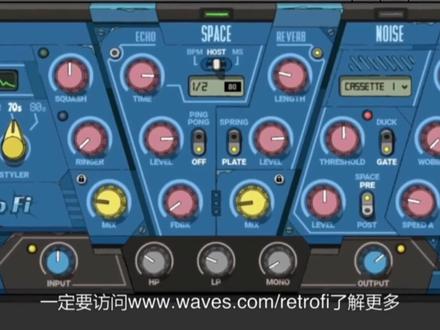
what is up guys? in this video? i'm gonna show you how to take your sounds back to the past using waves retrofi we're gonna use the plugin across three styles of music and we're gonna go from this we can take something a little more poppy instantly given a more synthway vibe whether you produce hip hop pop or synth wave if you want to inject a low fire aesthetic into your music, i'm going to show you how to create these distinctive, nostalgic and retro sounds with retrofi before we jump back to the past make sure you hit that subscribe button and ring that bell right now to keep up on future content and all the latest tips tricks and more from waves audio let's start off with the jazz hop vibe i got these drums going instead of going around looking for the perfect low fight drum samples you can take pretty much any drum sound or loop and give it that vibe fast let's run it through the device let's bring that mix control all the way up and then i'll use the squash to tighten it up we'll use a space to give it a touch of depth with a little echo and then we can use a little vinyl noise to give it that rawness this is just a threshold real quick just to make that destruction groove right along with the beat all right moving on to the base we can use the mechanics to give it a touch of that worn vibe with a wow and wobble the noise to give it a little grit and then we can use the device to add a little distortion if it's too much just dial it back with a mix control let's check retrofi out on some keys now we can add more personality to it it sounds like an old recording let's start by adding a little echo and reverb with the space we run it through the then we can use the ringer just a touch and you get that dirty old upright vibe then of course we'll add those imperfections and fluctuations with the mechanics there's a lot of piano vsts out there and those are cool but with retrofi you can take pretty much any piano vst or sample you already have in your library and give it that sound instantly less on this track we got the guitar chords big shout out to the amazing guitarist sam turkle make sure you check him out first we run it through the device let's roll off some of those highs and lows we'll put it in that space then i'll give it that old school worn concept vibe with the mechanics for this next track with a more electro pop swing style let's age it a little bit now as you saw with retrofi it's super easy and quick to dial in the right amount of nostalgia, but it also comes jam packed with factory artist presets starting out with the drums i want to give it a straight up to set vibe i like this cassette preset i think it could use a little bit more noise to help cut through the mix so i'm gonna knock that up on the noise module all right next let's work that baseline check out some of the artist presets i'm happy with this preset by mark ralph called eighty squash base so moving on to the keys cut those roads cords swinging let's give it a more retro vibe dope preset here by lu diaz called retro roads lift so i'm gonna go with that and we also got some vocals here and he's like what if the camp breathe tell me, i'm like yeah what you gonna? do kill me? who well it came through with the preset called gritty old vocals all right for this last example, we've got something with the more chillway vibe pretty basic not too stimulating so let's give it a little more character even just turning under device with a flat response you can hear the degradation there let's not put the dumbs in that synth wave zone switch up the device control try to give it that old video check boom box vibe one more thing i'm gonna do is i'm gonna record in some automation with a threshold on the noise we're gonna enhance the group with the breathing noise layer check it out all right let's work the baseline now want to give it that air wolf on vhs vibe let's dial that up let's work the synth line now so you see like anything you put rectrophye on just takes it back next we got the vocals but i can't control so first thing i'll do i'll open up obox and get that vocal quarter sound i'll just preset four you below in the description in case you want that give the whole track sort of vapor wave kind of sound is it gonna lower the bpm of the whole thing and then down on the master channel we're gonna put sound shifter and we're gonna just knock it down to third then we'll use retrofi to put it in that zone there you go guys that's just a few of the many ways you can use waves retrofi across different styles of music if you produce anything low fire retro nostalgic and you haven't already definitely head over to waves com retrofi to learn more if there's anything you want us to show you with retrofi, let us know in the comments below and make sure you hit that like and subscribe button to keep up with all the latest news tip tricks and more from waves audio。


