z790 hero和apex选哪个

粉丝3.7万获赞30.0万
相关视频
 00:25查看AI文稿AI文稿
话说这七轮大哥黑我翻车,这个后续啊出来了啊兄弟们,机主呢?加钱上了这个 apx 啊,这个主板现在就是七九零的新 apx, apx 的话轻轻松松八千频率过车啊,一点问题没有啊,看见了吗? tm 五一个多小时了啊, yc 过侧八千 c 四零叉 mp 啊,完美解决啊!只能说一句话,兄弟们, apx 永远的神!感谢你们支持,再见啊兄弟们。
 02:34查看AI文稿AI文稿
华硕新版本的 g 七九零你知道有哪些吗?新版的黑色 apex, dark hero 还有白色延伸 formula 也回归了。众所周知,肉姐呢,非常喜欢白色主板,所以这一次啊,为大家测试的是 top 和 dark hero。 black hero 对比上一代的 hero 啊,供电方面没有什么变化,一样的二十加一项强大供电动态灯效的灯板,主板自带金属背板。不同的是呢, 扎克 hero 取消了硬盘的过展卡, mdr 接口,直接做到了主板上支持五个固态,一个 p c i e 五点零和 p c i e 四点零。内存频率呢,从七千八的上限升到了八千上限,无线网卡也升级到了 白漆,华硕贴心的做了易拆式天线,咦,不用拧直插就可以啦。 top pro 对比 top plus, 供电上没有变化, 依旧是十六加一,像和 top plus 一样的显卡,易拆件一样的四个 pcie 四点零 m 点二接口。内存呢,从七千二的上限啊提升至了七千八的上限,看来这七九零 top pro 主要还是在内存频率上有所提升, 虽然呢 wifi 还是 wifi 六 e, 但是天线升级了嘛,哎,易拆设计, ok, 下面呢,我们就上机测试一下这款 dark hero 表现如何。以下是测试平台,超频测试中啊,幺三七百 kf 最高只拉到了全合五点七,内存呢到七千八频率, 因为这一代的幺三七百 k 体质呢,普遍差一点,温度也很高,超频上线也比较低,而且即使在磨平的情况下,单抗满载也很难压住,甚至呢,他的发热量啊,比幺三九百 k 还要弱。这下啊,压力给到了各位散热厂商的身上。不过作为游戏党呢, 完全不用担心这个问题,因为在游戏测试中啊,幺四七百 kf 的温度也就六十度左右,所以手机前的你如果是单纯的游戏党,只要不满载烤机,他就不会出现高温降频的现象。当然呢,如果您是渲染或者转码之类的工作需求, 尽量啊还是降压或者选择一个非常高端的水冷,这样呢,才能够保证性能的充分发挥。最后啊,我们用幺三九百 k 在这块 dark hero 上做超频测试,关闭小核心,大核超到五点九, 内存呢,也到了八千频率。总结一下,如果你手咬死七百 k 啊,可能由于 cpu 本身体质的问题, 即便使用这种四五千块钱的达克 q 肉也不会超的太高,还不如使用幺三九百 k 的超频性能会更强,而且十四代 u 还会带来高功耗高温度的困扰。只能说,哎,主板不错, you 差点事。
 06:45查看AI文稿AI文稿
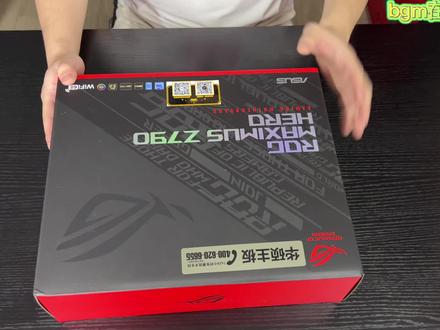
今天带大家开箱一下这个 lg 最新的最七九零芯片组的纯雪 lg 黑若的主板啊,黑若算是纯雪 lg 的入门版本啊,但是他也算是对吧,纯雪的高贵,纯雪家族当中的一员啊。这个打开,打开盖子,我们可以看到这个是新的防尘盖,这盖子 还是蛮厚的哈。盖子线放到一边,我们拿出主板本体。其实说到这次 hero, 我觉得他升级最大的就是跟以往的黑若不同,这次的 hero 也带背板,以前只有在弗木拉和 extreme 系列的主板上面他才有背板的, 但是这次黑手也带了一个背板,据说是为了防止四零九零过重,把这个主板给压弯啊。这个主板非常的重啊,拿在手里非常的有分量,我觉得可能都比一些中端的低端的显卡要重了,真的很重。好,主板 我们先放在一边,看一下箱子里其他的配件啊,这是一个主板防静电的一个绝缘塑料薄膜。然后我们接着看一下下面一个比较厚实的鸡蛋壳卡。托。 好,这里是一块的主板的 m 点二扩展口,这块卡是支持 pcie 五点零的啊,等三星的我 pc 五点零固材出来了,也就是可能有些小伙伴已经知道了是九九零 pro 啊。 那个硬盘的四 k 读写的提升是非常大的,日常使用的时候可以有感觉到比较明显的提升。好,这个硬盘卡可以插在我们的那个 pcr e 插槽上,然后里面可以装在我们扩展的这个 md 二接口,应该是可以扩展两个啊,可以扩展两个 md 二的 pca 五点零的固态硬盘。好,这里是主板的 boss u 盘, 终于把这个 boss 升级成了这个优盘啊,以前发光盘过来我们都没什么用的,这个优盘对吧,可以留个纪念,自己也可以用用,还是很不错的,希望其他厂商可以赶紧跟进。好,这里是一个凹记的信仰的小袋子, 一个针织针织材料的袋子。好,这个是信仰卡片, 可以加入 lg 会员。这个是败家之眼的贴纸对吧?每一代主管都会附赠这样的贴纸,纯学版的贴纸和非纯学版的贴纸是不一样的,这个就是纯学版的贴纸,大家看一下还是比较酷的 好,说明书不用看系列,开个玩笑啊。 好,接下来我们看一下这个,这个大家以前可能都没有见过,这个是这一代,因为这一代是支持了第第二五内存吗?对吧?我们纯血系列的主板都是支持第第二五内存的,第二五内存的因为频率非常高,所以它发热量也非常高,所以这个是装在这里, 装在这里之后呢,我们就可以把一把这个应该是九厘米的风扇,这样拧在上面,他就可以从上面对着内层去进行一个吹风,给内层散热, 内层可以稳定在更高的频率上去运行。这个是硬盘的扎踏线,这个是一个小的橡胶塞子啊,也不知道他是塞在哪里的,这个应该是给固态硬盘去去去更换,这个导流电可以用上的, 这也是刚才那个橡胶的小塞子。 m 点二的那个底座,我们也可以去选用这种传统的底座和螺丝结构哈,如果你不想用那个快拆结构的话啊,这个也是, 这是那个小的这个垫子,评论区如果有小伙伴知道这个小的垫子是干什么的,可以发一个弹幕说一下。这个是主板的灯光,神光同步的延长线,五福三针的延长线啊, 这个是我们固态硬盘的那个塑料快拆卡扣底座。好,那配件我们看到这里就看完了,接下来我们再看一下主板的本体吧。好,接下来我们就看到这个主板的本体了啊,我们要把这个膜爱斯基莫人给他撕掉 啊,非常的舒爽啊,这里的膜我们也给它撕掉。 好,这个就是我们看到的 lg 幺七零零一七九零芯片组的这个插口,南桥芯片在这个底下,这里还有一张膜,我们给他撕了两张。整体的设计 丽媛和 z 六九零差不多啊,但是总体的这个做工感觉要更加厚重,更加有质感一些,包括这个里面添加了一个背板,对吧? 其实有背板就是让大家感觉是超高端主板,就比高端主板又更近了一步,我觉得还是很不错的哈,而且拿的时候不扎手啊,对吧,拿在手上很舒服,完全不扎手。好,我们再可以看到这里 是主板的启动按键啊,如果说我们在开放式平台的话,就不用再用螺丝刀短键开机了,可以直接按一下这个就启动了。 这里是主板的这个故障灯,根据他的这个灯显示的两个数字,我们可以对应到说明书,查看主板是哪个地方有故障,帮助我们快速的去判断哪个部分引起我们不能正常开机。好,这里是显卡的快拆按钮啊, 在 z 六九零上就已经出现了,但是这次有升级啊,之前按下去就直接按下去了,但是他这次按下去看到这个眼,他是按下去会自动回 带的啊,就非常的方便啊,属于改进后的这个希望大家也可以尽快普及吧,这个功能用起来很方便,这是我们的 typec 接口,看到这里的 四拼风扇接针有一二三四有四个 cpu 的供电是双八拼的,还有一二三四,下面还有四个,也就是说他一共有八个四拼的风扇接针,五伏三针的接口有一二, 这里三一共有三个五负三针的灯光接口。哈,好,我们看到这个开关,这个开关是他可以给我们去自动调节 pcie 插槽,是跑在 pcie 几上的,比如说跑在 pcie 三点零,四点零还是五点零上,他一共有几个档位的开关?一个档位, 两个档位,还有最左边的这个三个档位啊,一共有三个档位。像以前如果我们是选用 pc 三点零的延长线,然后去选择服装显卡的话,那就很麻烦,要 先把显卡直接插在主板上,进入系统之后在 boss 里面把它调到 dcie 三点零模式,然后再竖装显卡才能点亮电脑。现在我们就可以直接用这个开关调节,这是一个比较方便的选择吧。最后我们来看一下接口方面,这个是 boss 更新按钮 啊,这个是 ctrcmos 按钮,这里有个 hdmi 接口,用于和显输出的四个 usb 接口,下面有一个雷电接口和一个更高规格的 usb 接口。 usb 接口总共是有一二三四五六七八九九个 usb 接口, 二点五 g 的网线接口,三个随口,其中有两个是雷电接口,下面这两个是 wifi 六一的天线,下面就是音频输出和光线输出的音频接口了。好,这张主板我们就看到这里,接下来我们用它来装一台顶配的 og 全家桶机器,小伙伴们敬请期待吧!
665ROG玩家国度授权号 02:17查看AI文稿AI文稿
基加终于开窍了,终于把板子设计的这么漂亮了,今天给大家开箱一下我们基加的冰雕,哎,你没听错,不是哈尔滨的冰雕,是基加的冰雕。你还记得上一代的基加板子长什么样吗?基加板子一般 在这个位置啊,他设计的其实这个 logo 不亮的,看起来黑漆漆的遮盖板子,你看这个地方,他这个 logo 是会亮的,而且这下边还有个大 logo, 我觉得这个设计啊就是帅。 别人都在玩 wifi, 六一啊,还有 wifi 六?没搞明白,他已经是 wifi 七了,看到没有,他这个内存条四根已经可以搞定,八千以上 都在八千,他直接叉 p 打开就可以支持到八二六六,所以你的内存只要你内存好,他就可以搞得住。这升级大吗?算是蛮大的,大的第一个点是什么? 就是关于这个内存苗,因为现在这一段很多之前说八千啊,七千多啊,其实很多就是上一一上七千多就很很难稳得住,我说这一点的意义是什么?就是这一段就现在主流的游戏啊,都是 fps 游戏吧, fpfps 游戏他都吃内存苗的屏幕, 然后现在很多低谷的,像什么六千四啊,六千八,这个都没问题,在网上走的话七千七千二,七千六,你没发现销量不好吗?就是原因是很多板子稳不住,很多动不动要 ipax 啊,动不动要什么啊,什么太丢啊这些这种说有几个问题大家回答一下啊, 一般如果两根槽支持八千,这个板子得多少钱?可以脑补一下。然后还有一个,如果这个板子可以支持四根槽八千你觉得得多少钱?但是你都没有。没有没有,看他有其他的设计吗?巧思吗? 这些地方快拆呢。这个东西还拧螺丝的,无所谓,不用拧,快拆啊。哎呦,这个板子出现其实是为十四代准备。什么意思啊?十四代 cpu 还有他的 显卡,你看这个后面有个这东西,你看我才发现,你看这什么东西知道吧?这啥?据说这个主板这个显卡的插槽可以承受十公斤的重量,你说显卡不会再歪了? 那到时候插上显卡,你站上去吧。十公斤你想什么东西?
937大头杭州-电脑客栈 01:24查看AI文稿AI文稿
呃,远程超频那个这个哥们呢?是情况是他找了不知道多少个人去抄这个黑二柔曼搞这个七千六就七千八上,八千上不去, 然后呢,他就是最近的一次成绩就是七千六的 c 三四,然后也是搞的说搞了有五六个小时,然后这哥们找到我,反正也就一会的事情,目前 yc 过车快十圈没有问题,就顶着这个九十度高温在跑, 板子是黑二柔,然后我们看一下电压啊,有需要的自己去抄这个作业 s a 是一点二五,看到吧, 然后我们看一下 v d d q 啊,这里是一点四三啊,然后 m c v 在下面 应该是这个这个这个不是 m c v 应该是哦,这个我给的是一点四,就一点四三和一点四码 i v r 一点四三, m c v 一点四,它没有显示出来 啊,内存电压这边给的是一点六啊,需要的朋友自己操作一下啊,没有一点问题。 hero 啊,七千八的 c 三二啊, y c 过色,目前实圈没有问题,都顶着九十度高温在跑,封闭即将过色中。
 14:00查看AI文稿AI文稿
right, okay, okay, let's try again ok, ok? oh boy? yes, yes! my giga hurts i was fortunate enough to join elmore and the aces rglc team in breaking the nine gigahertz cpu frequency barrier with a liquid helium cooled intel cori, nine thirteen and nine hundredk rapta lake cpu in this video i want to share some behind the scenes clips and information on how we achieved this record the journey began on november fifteen twenty twenty two when i received a message from the aces rgoc team that they were planning a liquid helium overclocking session in two weeks i have previously attended aces oc sessions including those where liquid helium is used and sometimes i upload videos of the extreme overclocking achievements on this channel having missed the raptor lake oc session due to my european travels earlier this year i was eager to make it this time in case you missed it elmore broke the ten year old cpu frequency record at the previous asus oc session that oc session was scheduled for the week of december five to nine with the liquid helium session planned for the very last day from december five onwards the asus rog oc team was busy sorting through several cpus they wanted to find out if any of the chips had more potential than the core i nine thirty nine hundredk record chip in the meantime i was busy setting up a raptor lake system with the ek delta to tech i will share more information about that system and the overclocking results in a future video the aces rglc team for the liquid helium session consists of the usual suspects soonhoe safe disc peter tan or shamino and john elmor, soon hall and john were each manning their system to pretest disebuse at the same time shimino helped in case any issues or interesting findings popped up along with the wrapped lake cpu and of course the maximus z seven ninety apex motherboard we also used utter specific extreme overclocking tools obviously there's the usual elmore labs equipment which includes the kth for temperature monitoring the hlt, three hundred heater backplate to keep the motherboard pcb heated the pmd to check the power consumption and the soon to be released a volcano and into pot for well cooling the cpu i will leave links to the elmo lapse product in the description below the team also prepared two session specific tools to make our lives easier when the helium flows a diy oc panel and a big red slow mode button for the big day intel sent over a film crew to tape our liquid helium session the room filled up pretty quickly with the cameras and film crew liquid helium overclocking sessions are intense so it's crucial to planted day well, even the preparation phase can be stressful if last minute changes have to be made to the run plan we usually set up the screen recording on both systems and a webcam to capture discession i may upload the complete footage of the session sometime in the future or it may already be up on elmore's youtube channel let's go to the action elmore was first up to try helium with the current thirteen and hundred k record chip first we cool down the sabute to minus one hundred and ninety six degrees salsius and do a sanity check on the frequency overclock on liquid nitrogen when everything is ready we get the liquid helium flowing overclocking with liquid helium is definitely more intense than liquid nitrogen that's not only because it's expensive and you only have a limited quantity available, but also because you're dealing with much lower temperatures we had about one hundred leaders of liquid helium available, which gives us about one hour of runtime in an ideal situation fortunately this cpu is excellent with extreme temperatures and didn't coal bug until almost minus, two hundred and sixty degrees celsius that's thirteen kelvin above absolute zero the first run lasted about ten minutes while we quickly improved upon the current world record achieving eight, thousand nine hundred and twenty five megahertz we didn't come close to are target of nine gigahertz after about twenty five minutes the system was beginning to have issues booting up due to the cold temperatures and we made the decision to move on to the backup system as elmore and chamino switched over to the second system we also swapped over the storage and our validation button in the meantime, soon whole work to get the first system back up and running for another attempt our second system was ready in about four minutes for run two we tried another core eye nine wrapped a lake cpu this cpu had been pretested and is about one hundred megaher's worse than a record chip, so it had potential unfortunately this chip was unable to cope with temperatures below minus two hundred degrees salseus, so it had no chance of benefiting from the liquid helium temperatures after three or four attempts in ten minutes, we decided to bring out a third backup system it took less than ten minutes to prepare the third system for a liquid helium attempt the cpu in this system was similar to the chip from the second system in terms of frequency but we hope it would cope much better with the colder temperatures while that was the case it still could not match this chip from our first system so after about ten minutes we decided to switch back to our primary system and give it another shot soon hole deserves a lot of credit for the way he got the first system back up and running and kept it ready for another run tensions were pretty high at this point because we had nothing to show for so far to make matters worse we seem to be running low unlike with helium the team felt we had one more shot at this i will leave you now to watch what happens next without any commentary so you can enjoy the action live hey, yong, i don't think he stands a chance, i think judging oh and most i can pull it out and pull for feet one time it's very big right now。 除,除非,除非是第一。 maybe you have one show up, but i don't think i can yeah well, it is it is 关了跟我走,没有关。哎,一直在留哦,不是很慢,反正你那里有开就好。 yeah。 唯一一个 and try whenever you feel like that one shot okay let's try it no castle we saw it okay, okay let's try again let's try again one one higher okay, try it yeah go! okay! okay! one more ready yeah okay! prepare pie fast going down attempt yeah, it was going like you picked up by that it's getting very very well, you did one even higher right? yes, yes, yes! my giga hurts first nine giga hurts wake up guys wow, i was all signed to win this day following the nine gigahertz validation soonhole attempted to break additional world records in pi fast and super pi one m using that same nine gigahertz c view and whatever liquid helium was left in the tank, the cpu around both benchmarks at eight point forty four giga herds with a temperature of approximately minus, two hundred and twenty degrees celsius, the results are equally impressive the pi fast new world record is six point eight five seconds an improvement of one hundred and ten milliseconds from the previous world record the new super pie one m record is three point eight to two seconds which is an improvement of nine milliseconds from the previous world record overall this was a pretty memorable day not only because we broke the nine gigahertz barrier, but also how it happened it was pretty much our last shot when it happened also this is a magical superior that seems to be made for liquid helium, i've never seen a chip that can run such low temperatures so consistently to end the video i want to thank aces and intel teams for inviting me to this oc session and their continued support see you next time。
2323Lordzzz 02:02查看AI文稿AI文稿
华硕主板,你是真坑我啊,华硕呀华硕啊,你可是真坑人呐,今天装了一套机器啊,这个是最新出的这个 g 七与伦大个黑种啊, cpu 是幺四九百 k 盒装,然后是八千频率的,窒息啊,这个内存在华硕的支持列表里是有的啊,他是支持这个内存条的, 但是划出这个主板非常不严谨啊,这个内存条现在我们上机只能稳定在七千频率,给大家看一下这个桌面啊,现在的频率是七千啊,这是 tm 五跑了一个多小时了, yc 也过侧了啊,七千二到上去都跑一会就死机啊,只能七千使用, 然后我这个内存是四十八 g 的内存。四十八 g 的内存其实并不是特别吃这个 cpu 的 imc 的啊,只能说这个主板还是有问题啊,就是拜奥斯也刷过了,都是最新的,他依然支持不上高频,哪怕说你八千不上,你给我上一个七 七千八七千六也行吧,只能七千使用。现在机器现在客户这边不认了,人客户不想要,想退货,你说机器我怎么整啊,我还有一套 g 家的主板,我准备拿 g 家的主板试一下这个内存到底能上到多少, 不信这个邪啊,兄弟们啊,我把这个内,把这套内存和 gpu 装在这个 g 家的七九零叉上啊,也是十四代主板,这个版才两千多啊,我看看这个主板到底能上多少频率。 经过我一番调试啊,这颗幺四九零零 k 啊,在这个 g 家的主板上能上到七千六频率啊,就这个 cpu 的确体质有点差啊,才 sp 九十二 m, 然后那个 cp 分啊,是这个八十五算雷油了 啊,在机架主板上可以七千六稳定使用啊,现在是测试没有问题啊,但是在华硕上只能使七千,而且我还而且还有人私信我啊,说这个大哥黑肉有很多人上高频上不去啊,六千八都上不去,只能降频。 有有想买大哥黑肉或准备买大哥黑肉这个主板的啊,一定要注意一下啊,不要上高频内存啊,估计得,估计他得等到后续更新半小时才能解决这个上不去内存高频的问题。 如果说你预算充足,兄弟们直接搞 apx 啊,搞什么黑肉啊, apx 才是最牛逼的。兄弟们,你们有用这个主板的,出现问题的可以留言在评论区,我看看到底有多少人有问题啊。
 00:15查看AI文稿AI文稿
大过年的你给我整这事啊?看下这主板啊,这个抖音中这个大明白都可多了,看看啊,迪霸检测灯亮仨灯,处理器灯亮、 bga 灯亮、 bot 灯亮,这种问题怎么解决来,有人明白不?
 00:49
 01:57查看AI文稿AI文稿
聊到现在的心态,这张 apex 音号在之前某一次重启的时候怎么都开不了机,怎么都进不了 bios, 一直卡到了第八个九九那个代码, 刷了半小时,换了 cpu 的,换了硬盘,换了电源,什么都换完了,扣了半小时电池,免于刷了半小时,切换了半小时版本, 呃,放了进店他依然没有办法开机卡。九九,联系官方客服是让我联系本地经销商,然后呢?经销商那边呢?我有认识的人确信本地是没有货的,想让官方问一下怎么样处理,怎么样可以尽快的换货,因为注册了一年换新, 官方讲没有办法先联系本地经销商,就一直拖着,两天之后实在没办法我又拿出来重新开机,好,可以进去了, 那么 ok, 应该就是静电问题,没有放干净。好,我自己的问题,今天拿了一张新的 apex in call, 刚刚放到了我的测试平台上面。那目前的情况呢?主板在不停的自动通,断电 通电断电通电断电啊,这边八幺四的一个指示灯也是一直在好,然后开关机 没有任何的一个反应,本来呢是用的是一个一千三百瓦的安耐克的电源,好换成了酷冷一千瓦,嗯, cp 本来是一个幺三六零零 k f 换成了幺四六零零 k f, 内存 条本来是雷克萨的战神之刃,现在换成了应该是小绿条,请告诉我我还有什么能换的?哦对了,刚才联系了客服,请您联系本地经销商处理,我真的谢谢你,话说。
76贰号基地


