盖世小鸡t4腾讯定制版怎么获取
今天呢,给大家开箱一下深深最近新入手的一款手柄,盖世小鸡 t 四幻境,满满的赛博朋克元素,也是国内首款一体式定制的双霍尔手柄,对比传统的 alps 摇杆,不仅拥有更好的手感和精度, 同时呢也拥有更长的使用寿命。而在 fps 游戏过程中呢,提速幻境也支持用体感来控制方向,这点呢,可以大大提升你的游戏舒适性哦,再加上霍尔班基出色的机械手感,真的上可以获得一个非常不错的游戏体验。那操作之外的一些点呢?除了常规按键之外,这款手柄的背部还有两个 定义的配件,支持红功能和连发红的话呢,我们可以录制十二步操作,一键爆发,这也算是手残党的福音版,不过小缺点是有可能会误触进行见仁见智,下载 game sir tsk 之后呢,就可以立马 改建了,可以调整摇杆、扳机有效范围以及马达的震动强度等一系列参数。机身光向呢,也可以通过软件编程其定义。 要说缺点的话呢,可能就是不支持蓝牙连接了,不过这个手柄的价格呢,足够让我忘记他的缺点。如果呢,你没有体验过手柄游戏,正在犹豫要不要入坑,那么深深觉得盖世小鸡祭祀幻境非常适合作为你的第一款入门产品。

粉丝2.4万获赞9.2万
相关视频
 01:39查看AI文稿AI文稿
首先呢,下载固件包,这个在公众号搜索软件源吧,回复该是小机器,插上发射器和连接 type 数据线,拔出数据线,同时按住手柄上面的记忆盒,不要松开按键,迅速插上数据线, 此时右下手柄从蓝变为紫色。打开我们提前下载的软件宝, 选择枪杀般孤剑, 点击第一个程序,并允许 因为是监控单窗口所以 看不到,接下来炒作, 第一个程序是手柄抢锁, 第二个是发射器强刷,打开后不用管爆病毒啥的,没有毒。两个软件运行完后就可以正常的 pc 端使用了,包括一些主流应用都可以看到手柄。 而在 c 音上面,你可以在左上角点击 c, 进入后点击控制,其选项里面就可以配置你的专属控制器了。
521多次拒绝邓紫棋 08:55查看AI文稿AI文稿
今天又新到了一个腾讯云游戏的手柄,之前刷标准固件没有做视频,现在做一个。自从这一个手柄可以刷标准固件以后, 这小黄鱼的价格也涨了挺多的,现在出手也挺划算了,如果有只有一个,两个就留着自己玩也挺好。这个手柄摸起来手感挺不错的, 两个都在闪烁。我还没有插接收器,文字版本的升级固件教程我也做了,可能比较直观一点, 在头条搜一下历史文章就可以了。发的挺早, 刷骨架的软件 私信回复手柄固件链接就会自动发给你。通过长按开始键可以切换通道。这个没有灯光的是我之前刷的,现在可以切换模式, 原厂这个就不可以,一直按也没有反应。也就是说除了腾讯自家的游戏,其他的游戏在玩的时候会有一些问题, 有些不切换通道的话,根本就没法用,识别不出来。 两个接收器 刷的时候很简单,长按 g 和 s 同时插入数据线, 成功的话指示灯会由蓝色变为紫色。打开升级软件,上边会有两个版本号,直接点击 升级就可以了。等进度条走完以后,然后点确定指示灯会重新变为蓝色,则代表升级完成。拔下手柄放到一边就可以了。接收器和手柄的软件不可以同时打开,这一点要注意一下。 打开接收器的升级程序,插入接收器以后,同样会显示两个版本,等待升级完成。确定一下, 关闭所有软件就可以了。重新插拔一下接收器,打开手柄他们就会自动连接了, 试一下切换模式也正常。 换到电视上玩一下腾讯定制的游戏,指示灯不再闪烁,就说明手柄和接收器已经配对完成了。 打开一个游戏试一下。 需要注意的是,有些时候这个按键会不大一样, 自己稍微熟悉一下就可以了,功能是一样的, 欧卡二可以用手柄来玩一下, 基本没什么问题,操作上基本没有延时 插回电视上 看一下,这个活动还没有有没有啊, 每桌五百个,现在还可以领, 没有领过的朋友可以去去领一下,虽然每周只有五百个,但是这个真的特别好领啊。 先测试一下游戏,玩下球球飞车吧, 没有什么问题, 不过他有些按键键位会不太对,毕竟是腾讯定制的吗,熟悉一下就好。 然后就是小鸡模拟器, 挺怀旧的,有些人一般都是 拿出原来的手柄配个对,打个对战可以, fc 游戏估计很多七零后,八零后玩的比较多吧, 可以看到两个手柄现在都可以找到了,一会测试一下可不可以打对战。
127软硬改 00:29
 00:40查看AI文稿AI文稿
以前有同学说我推荐的手柄贵,这只手柄又便宜又好用,它可以用二点四 g 无线玩电脑游戏,也可以原声无线玩 switch 游戏。它还可以用蓝牙连接苹果 ls 手机和安卓手机和电视。 关键是他还有六轴陀螺仪,在 ns 游戏里面可以用体感瞄准,这就是盖世小吉的 tspro 手柄。手柄带两个倍键按键,可以自定义,还有透明的灯光, 随机附赠了手机支架,它的价格是一百多块钱。另外它还有有限版本,价格更低。支持多平台、多种连接方式,功能丰富的手柄,不想来一个吗?
 00:59查看AI文稿AI文稿
霍尔腰杆加霍尔班机,一百六十八万可编程, rgb 灯效歪射圈,这点噱头算是让这手柄玩明白了。今天带大家看看这款盖世小鸡的新品 t 四幻境,正面拳头把手凹点的材质,一百六十八万可编程,可随音乐律动、末日四种的灯效,可以说兼顾颜值和手感。定制的一体式霍尔腰杆回中机械性能更好,而且无死, 摆脱了传统摇杆的磨损问题,号称可承受五百万次摆动,双面上应该把你送走不成问题。搭配电磁或耳扳机,在有玩赛车游戏时, 每次不同的按压力度都能精准的反映在油门轻重上,让你驾驶感受飞行。而在 fps 游戏里,六周陀螺仪的体感标准让你心随手动,快人一步。而 且原声支持 switch absy, 全机械按键加上三层结构,中置硅胶弹力,让按键快速响应的同时也有着导电胶的 q 弹手感。在 tc 幻境的官方驱动上,还能对摇杆、扳机震动以及一键红做出各种调, 无论是 pc 上还是 sv 十上都能让你爽到飞起。这次该是小鸡十周年,还可以领取专属福利优惠,如果你刚好想入手一把手柄,那就来看看该是小鸡 tc 幻境吧!
1.8万擦擦玩游戏 03:08查看AI文稿AI文稿
用了将近一个月,小鸡踢丝换镜值不值得买?注意啊,他是有线手柄,所以他没有电池,更没有无线,仅仅是可分离的 usb 线而已。有线手柄还敢卖一百九十九,底气从哪来呢? 首先就是临死区调教的霍尔摇杆,总结和手感都做的很不错,四个主力按键是我用过的 v 道按键,你算得上体验非常不错的这一档了, 线程适中,按压的力度很舒服,回弹有力。微动十字键中规中矩,两个尖尖的手感一致性也比较好。霍尔二百五十五级限行扳机调教的也非常到位,灵敏轻触即可出发, 几乎没有无效的区间,还可以在软件里开启快速扳机功能,对 fps 玩家来说真的是太友好了。那两个倍键支持红定义,最大可录制十二步操作。倍键的位置呢,也非常不错啊,基本不会 物处,按压的力度也比较适中,算是倍健力相当不错的内胆了。当然了,最大的卖点呢,还得回到外形的设计上,正面版全透明,其他区域呢,磨砂半透,黑色电路板配金色走线,看上去就很酷。 这个 led 灯透过导光管能形成两侧对称式的光条,再加上 logo 灯也有灯效,总体来说,正面给人的感觉就是 有些凌乱,而且灯光开启后呢,反而把黑金色的主板呢,显得不是那么的酷炫了。 过于耀眼的灯光呢,也让我在晚上使用的时候呢,总觉得会分神,眼睛的余光总是会不自觉的被手柄的灯光所吸引。好在灯光是可以自定义亮度和颜色的,所以对于光污染爱好者来说呢,渴望度其实挺高,那玩阴游的时候氛围感也不错,不过呢,在晚上 游玩的话,我会选择关闭灯光或者用很低很低的亮度。那由于这个手柄支持 ns 平台,所以即便 tsk 是一款有线手柄,但他依然支持六轴提感功能,我也只能跪了啊。 默认的四 g 震动力度呢已经非常猛烈了,软件里还能再调大一点,我感觉呢是可以拿来做按摩了。不过呢,由于右马达尺寸偏大,整体的震动细腻感呢就差了点意思啊。底部还配备了三点五耳机接口,可以在 ns 平台使用。 那这一个月的体验下来呢,在 pc 平台上玩三 a 肯定是没啥毛病的,总体表现呢,属于很不错的内胆,那非要挑点毛病的话,就是扳机键的阻尼稍微轻了一点。此外呢,没有明确的标注是有线手柄这一点的,对粗心大意的玩家来说肯定是不友好。 一百九十九的售价对于现在卷到起飞的手柄行业来说有点偏高了。不过考虑到其扎实的做工,精致的模具以及大胆的灯光设计啊,我个人是比较推荐 pc 用户购买的,尤其是光污染爱好者 在设置里面呢,把自动待机关掉,那不使用的时候也能作为一个摆件放在那,挺好的,不过纠结无限的朋友呢,就可以忽略掉了。好,以上就是本期怀旧病的所有内容,都看到这了,点个赞再走呗。 那也欢迎订阅我的频道,获取有趣的电网更新,我是江城子,下期节目再见。拜拜。
 02:24查看AI文稿AI文稿
新手零基础学手柄教程之前,先给大家表演个才艺,确定下盒子里面什么都没有把好,接下来我们帮手慢慢的伸进去,耶耶耶,好像有东西让我拿出来看看是啥哇, 是手柄呀!惊不惊喜?意不意外?想学吗?好话不多说,这期给大家讲讲 tc pro 手柄背后四案件如何自定义。我们平时玩游戏一般都是这样拿手柄的, 不知道大家有没有发现,如果操作右摇杆的时候,想操作 a 键、 b 键、 xjy 键就特别困难,而背后的 m 一、 m 二、 m 三、 m 四案件却很好操作到,聪明的玩家就会想到我帮背后四案件自定义成为 a 键、 bgmx 键和歪键来上教程。为了直观让大家看懂操作,我们在手机安装个小机模拟器进行键位测试。蓝牙配对好手柄后,比如我们帮 m 四按键自定义为 x 按键,先按住 m 四按键,不要放 在,同时按住 star, 看见后松手,手柄摇杆会变紫色, m 四键也就进入改键模式。那么我们要帮 m 四作为 x 散键就比较简单了, 只要按下 x 按键,再去按下背后的 m 四按键,摇杆就会变成蓝色,这个时候测试就会发现按下 m 四按键就变成 x 按键了。再比如我们要帮 m 三设置成 b 按键也是一样,同时按住 m 三后盖儿,看见紫色后, 放手按下 b 按键后,再按下 m 三按键就设定好了 m e 和 m 二,设置方法也是一样。 然后我们再进行测试就会发现 m 一、 m 二、 m 三、 m 四按键就变成 a 键、 b 键、 x 键和歪键, 这样我们玩的时候就符合大众操作习惯了,当然你要自定义成手柄的,其他案件也可以,方法都是一样的,简单吧。好了,需要手柄的可以在视频下方订购哦。
454手柄教官 03:42查看AI文稿AI文稿
今天朱明哥给大家开箱的是小鸡提示, pro 手柄自带一个支架,电视电脑可以用的接收器数据线一根,说明书一份,贴纸一份, 这就是小吉迪斯 pro 的配件,自带支架,非常不错哦。迪斯 pro 全身采用半透明的设计,可以清晰的看到里边的一些构造, 并且 abs 外是有炫彩灯光的,当然了灯光也可以进行调节。此外后背还有四个按键,这四个按键呢,可以在电脑上进行使用,比如你设置一些无功能按键之类的。这款手柄除了支持手机电视电脑, 还支持什么意见?嗯,麻油也可以哦。手柄的充电口采用 tfc 接口,如果你的手机接口也是 tsc 的,那么可以共用一个充电线,这个也是非常不错的。 正面的沃瓦处呢,进行过一些磨砂之类的处理,所以摸起来不会粘手汗,比如你手心的出汗了,轻轻一擦他就没有了。沃瓦的螺纹呢,有防汗的一个功能,所以在一百多的这个价位里头,第四个是非常具有性价比的, 这也是手柄哥一直给大家推荐这款手柄的一个原因。那说了这么多,这款手柄可以在安卓或者苹果使用 mc 吗?没问题,这款手机可以支持咱们安卓、苹果国服国际服的 mc。 呃,无论你是苹果 ios 十三以上的多少系统,十三点四,十三点五,十四点二,十四点七,这些都是可以的。 那有人又不是说来说一个,你是不是在吹牛逼啊,是骡子是马,拉出来溜溜。 b 加 home, 咱们配对苹果平板蓝牙配对以后呢,直接就可以操作 mc, 不需要进行其他的任何设置,可以看一下咱们的手柄的灵敏度 和三十块钱的寿命还是有很大的区别的哦,看一下这个速度是均衡的。 那小伙伴们可能问了,那国际服可以吗?咱们的国际服也是可以的,只要你下载就可以。 现在咱们看一下手柄哥的平板,手柄哥的平板系统是 ios 十四点七点一,随后如果更新 ios 十五的话,他也是可以支持使用的,这一点大家放心,跑掉的也是没有问题的。 如果你还不会跑调的,可以发一下说并格之前的作品,如果你已经购买过,说并可以给不会的小伙伴分享一下你的跑调大方法,包括一些零格起步、越步,这些都是没问题的哦。 如果你也想使用这款手柄,可以看一下咱们视频左下角的小黄车,手柄哥店铺购买的小伙伴都会送一对猫爪的摇杆帽,这个腰杆帽呢,你可以套在这个手柄上头, 非常的帅气。在这里给大家讲一下咱们这个东西怎么套,套的方法有两种,一种就是用开水把它烫一下,还有一种方法呢,比较粗暴一些,就是你把它翻转过来, 翻转过来的摇杆帽就是这个样子,接下来咱们把摇杆帽放上去,然后呢对好方向, 好的,这样咱们就把这个摇感冒给大家装好了,这就是这里装摇感冒的一个方法。 除了这些手柄歌,还有一些比较详细的教学,比如咱们如何连接电视电脑, mc 的一些操作教学,这个在别家都是没有的,所以如果你想购买什么,记得认准手柄歌红色的 logo, 谨防上当受骗哦!
3170手柄哥子俊 00:22查看AI文稿AI文稿
这款小机 tc pro 手柄真的没话说,半透明磨砂机身,右侧还带炫彩灯按键,触感和握感都不错,背后四个按键还可以红编程,连接手机相当一盘赛车,很流畅。自带背夹方便安装手机,玩起来更方便。 连接 ip 同样可以无延时畅玩,二点四 g 接收器可以连接电脑、 ipad, 没有任何的卡顿,延迟一百出头,全平台手柄值得充。
360手柄与书斋 03:32
 01:05
 09:26查看AI文稿AI文稿
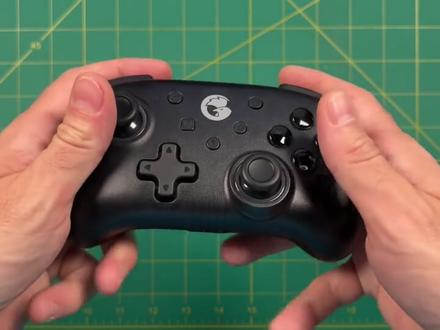
hey, everyone, this is russ for much grain core we're gonna jump right into this one this is the game thirty four mini controller and the company reached out to me and asked me to do a review of their controller and if you know anything about me, i cannot turn away a good controller so we're gonna test this one out and see how it works now i'm a pretty big fan of the game sir x two which is a telescopic controller that works with cell phones and so based on the merits of that controller alone i decided to try this one out, not a lot going on with the box here it charges with the usb c and it comes with a brief instruction manual and it looks basically just like a mini modern controller it feels a lot like it too for example with the buttons themselves they feel a lot like xbox buttons and the buttons have a transparent look to them and i think that's because they light up try out here in a minute, i will mention that the button layout is more nintendo switch style than xbox style and so abn xy are swapped if you're used to the controls on an xbox and like i mentioned it just feels like a mini controller like it's just got less space for your fingers at the bottom let's talk about the d pad for a second so this is a rubber membrane d pad here very reminiscent of some old school d pads the d pad itself has a rubbery grippy texture to it and it does feel pretty good but all the same your fingers don't slide very naturally across the d pad they just get a little bit stuck when you're using it which will be great for like platform games but not so great with fighting games as far as the analog sticks they feel exactly like xbox analog sticks and they do click down l three and arthree up top you have start select home screen capture and turbo buttons now let's try out these triggers and moment of truth here they are digital so they don't use an analog input this is just on or off the shoulder buttons are fine they're nice and responsive and they are easy to push across the entire button so no problems there overall i don't mind the triggers, but it is gonna limit your gameplay experience if you're planning on using this on a pc, but for something like nintendo switch or classic games no problem there yeah overall it's actually a pretty comfortable controller to hold on the back here you see not a lot going on i wish that some of these controllers would actually show the labels of what button to push to turn on certain systems but there's nothing here it does say that the battery is eight hundred million hours as far as the plastic itself it's a little bit grippy and i like the fact that it's transparent i love transparent things so this is kind of cool to me, but the texture itself feels pretty good not too cheap yeah in a nutshell that's how the device feels in terms of size it's almost exactly the size of two sticks of carry gold pure irish butter so if you've ever tried to use some butter to play games you're gonna know exactly what this feels like now for some strange reason you're not a huge fan of butter then let's try something else to compare the size against and i think an xbox series controller is gonna be a good comparison surprisingly this spacing and the size of the analog sticks and the buttons are almost exactly like the xbox series controller as you can see here if i put analog to analog they're almost the exact same distance apart and on top of that when you put them kind of side by side you can see that the buttons themselves too are equally sized and distanced on top of that the d pad is about the same space it's almost like they took the direct design of an xbox controller and then just shrunk down the stuff around it okay let's set some mood lighting and we'll test out some of these lights and as you can see here just starting it up there's some blue that's around the log sticks and then each of the individual face buttons have their own color too i think it looks pretty nice so now let's try it in full dark conditions and this is pretty good too it's also a little bit bright so if you're going to be playing in the dark this might be a little bit distracting personally i kind of like it, but you may not okay i don't want you getting scared so let's go ahead and turn the lights back on and let's actually try testing this with some devices first things first let's pair it with mandrite phones we're gonna hold down the x button and then press the home button to start the connection and just hold it for a few seconds and then it's gonna start blinking on the right side of the device and just like that you can then pair it to your phone and i was able to connect first try no problems here and so let's test out some emulation here we're gonna start with the virtual tennis on the psp emulator called ppsspp as you can see here it's controlling really well both the d pad and the analog stick are working out of the box and this is kind of a cool use case you know it's such a small and compact controller it's easy to take around with you and play with your phone and despite being very compact it's actually very comfortable to use okay, let's try it out with some platforming games we'll start with mario world running on retroark and it's running really well this d pad actually is pretty good with platformers as far as input lag you know this is a bluetooth connection and i am detecting a little bit of input lag, but overall it's not too bad one thing i am noticing as i'm playing it is that this controller despite being small is pretty thick like it's not something i was expecting, but it does kind of feel a little bit like holding a burrito this thing has got some heft to it it's not a heavy controller by any means it's actually pretty light but all the same it does take a little bit of getting used to the fact that it's so thick when you're holding it between your fingers and i'm not sure if this was done on purple, but i don't find it any more ergonomic than something that wouldn't be as thick anyway overall when it comes to android gameplay this seems to be working really well by the way i'm running a google pixel three right here with a snapdragon eight forty five processor and this device can play most gamecube games pretty well okay let's switch it up literally with a different platform here's the nintendo switch now to pair this one you hold on the top button when you're in this switch pairing menu and it'll take a minute but it'll recognize the controller and then just hit l and r and off you go now when it comes to supported devices i would actually argue that the switch is probably the most compatible device with this control in addition to having the screenshot and home buttons that are compatible with the nintendo switch it has the ability to use gyroscopic controls and on top of that once you've paired the device to the controller you can use the button to actually start up the game from standby speaking other features let's try out some of these different color options so let's dim the lights down a little bit more and what you want to do is hold down the turbo button and then click the l three button that's going to cycle through your various color options now on top of that you can hold down the turbo button and then double click the l three button and that's actually going to cycle through various different color schemes and so for example you can have a pulsing rainbow light or you can use this pulse display to cycle through the colors too overall i think this cycling through the colors one is my favorite right now now unfortunately when it comes to bluetooth this can only pair wirelessly with iphone, android and the switch if you want to play pc games you have to actually plug it in physically, but once you have it plugged in it actually works really well, no need to do any additional parents so here i am running a steam game called hades and it's working really well and one of the nice things about it being wired like this is there's no input delay at all it feels really nice so for all if you're looking for a compact pc controller this might be a pretty good option now that being said at a retail price of thirty to thirty five dollars you definitely have other options available, but in terms of a nice light up one like this it's a pretty good price now in addition to windows pc gaming this does work on linux boxes running emulek as well as botacera and just like with windows pc there's no additional pairing all you have to do is plug it in and it's gonna work out just fine and much like with windows gaming this runs really well there's no input delay and it feels really good so again if you have a retro game setup and you're gonna be playing it say on your desk or something somewhere you're not gonna really mind having a cord then this might be a good option and i think if you pair that with the wireless capabilities of the switch as well as an android phone or even your iphone i think that's a pretty good value all total okay let's talk a little bit about competition i think in this condensed handheld space this sn thirty pro from eight bit dough is probably gonna be your best comparison now this controller has a little bit of a different approach this is basically a super nintendo controller with some extra buttons and some ps four style analogue sticks in this one costs about ten dollars more this is forty to forty five dollars and you can usually find it on amazon but it has really nice build quality and it feels really good especially for classic games now this game sir t four many is a different story this is basically condensed to xbox controller so i think if you're gonna play modern controllers i would prefer the t four, but if i'm gonna focus solely on retro gaming i think i like the sn thirty pro better okay in terms of weight this is a hundred and fifty five grams that's pretty light weight it's actually about half the weight of an xbox series controller, but compared to the ape bit dough controller it's actually a little bit heavier so i think when it comes to comparison to an xbox or ps four controller yeah it's a lot lighter, but if you really want ultra portability i think the ape bit dough is quite a bit lighter and smaller, but in the end do i recommend this controller for the price and really it's gonna depend on you if you want something compact then sure maybe that'll work out pretty well, but i would say if you have anything beyond medium sized hands you're probably not gonna want this controller although it's a pretty sleek looking controller and i do like the rgb coloring going on here it's nowhere near as comfortable is something like a true xbox controller all the same if you're looking for something that's a little bit portable this might be something worth checking out anyway, that's it for this video i hope you liked it let me know if you have any questions in the comments below and we'll see you next time happy gaming。
29油管科技TV 01:03查看AI文稿AI文稿
上一个手柄刚用三个月就坏了,毕竟会间歇性不回弹,卡键问题肯定是不能继续使用了。就买了个新手柄,但需要到二十号才发货。又在淘宝上买了一个评价非常好的国产 xbox 三六零手柄, 才三十五块钱,从深圳发货需要四天,等不及了,只能在京东选个本地仓的便宜手柄。最后买了盖世小 gt 四 w 有限手柄, 大概七十到八十块钱。本来只是过度用随便玩玩,没想到小鸡的手柄这么好,真的完全出乎我的意料。这个手柄的案件和班机回弹都非常有力,直白点说就是很硬, 符合低端价格的手感,仿佛在告诉你,不用担心又立案就行了。对比下其他的手柄, 七八十块钱能买到啥样子的?北通斯巴达还是雷神 g 二零?或者说判模一大,还是制动基础款。接下来是十三十五块钱的国产 xbox 三六零手柄。
20秋叶知秋 01:14查看AI文稿AI文稿
让你的手机变成死未吃!其实用手机就可以玩死未吃游戏,只需要一个手柄和一个游戏模拟器就可以搞定,这是来自该生小鸡的叉二游戏头顶配合美国 ns 工作时间发的蛋蛋模拟器,最新版本就可以在手机上免费玩死未吃游戏支持包括包括摩天顿、暗黑三、赛尔达等游戏,我们先玩一把游戏试试。 手表是拉伸式的设计,能兼容市面上大多数手机的长度。 ps 四级别的摇杆,手感和操作 质感都不错,这个摇杆也是可爱式的,在游戏的时候可以多一些操作。可活动 tsc 接口,手机插拔都不会损坏。尾插通过 ticc 接口实现有线连接,玩游戏没有延迟感,同时还可以边玩游戏边充电。手柄的背部有防滑垫设计,不用担心手出汗的问题,随便相中八根一性能的提升,安装刷一下大灯、清洗器,兼容的游戏体验也得到了提升。 玩一下毁灭战士这个游戏,给大家看一下效果, 这画质动画都很丝滑,同时还支持游戏存档, 就算你换手机了也可以接着玩。增加了云补丁功能,解决了卡顿和巨石等 bug 问题。 还增加了远程启动游戏的功能,玩家无需下载游戏就可以远程启动自己电脑或硬盘中的游戏。这次还新增了免费 vip, 以上功能都是可以无限制体验的。他不仅可以玩随便吃游戏,还可以玩手机原型游戏和云游戏,想玩的手游都有。有了这个手柄,再也不用买卡了,零花钱真是省了一天呀!
54真真百货


