bose耳机怎么连接腾讯小微
好,我这边已经下载好了那个 boss 音乐这个官方 app, 然后现在我们可以开盖看一下 boss app 会有什么显示。还在显示正在为二赛充电。那我们拿出来 耳机会自动连接吗?没有,稍等一下啊,我重新连一下 他耳机里面说已准备好了,你的日子为什么还得用上呢?他还要进蓝牙,手都不看。再重新连一次。好,现在连上 我还是显示 正在连接。好,现在连上了,重点是。

粉丝53获赞722
相关视频
 00:41查看AI文稿AI文稿
首先拿起耳机,弹出耳机面盖,然后点击 boss app, 点击连接产品,选择耳机和音频设备,点击添加, 弹出后点击进去,按照提示按住充电盒内的按钮不动,直到耳机上的指示灯闪烁蓝光, 点击配对,弹出后点击准备就绪,点击开始连接 app 成功, app 可以调节降噪以及通透模式的切换,可以调节耳机音量的大小。
772悦音电讯 00:21查看AI文稿AI文稿
bose 耳机如何重新配对?第一步,在手机桌面点击打开设置第二步,进入设置界面,点击蓝牙 第三步,在蓝牙界面点击 os 耳机叹号图标,最后点击忽略设备,即可重新配对。
210summershine 00:47查看AI文稿AI文稿
首先拿起右耳罩,找到蓝牙开关,然后按住蓝牙开关不动,直到蓝灯闪烁,进入配对模式,打开手机设置,点击蓝牙下划,找到要连接的耳机蓝牙名称,点击耳机蓝牙 连接成功。打开 boss 音乐,点击加号,选择耳机和音频设备,点击添加,点击耳机标识, 点击准备就绪,点击开始连接成功。界面可以调节耳机的降落,耳机的音量调节, 右上角设置下拉,找到技术信息,可以看到部件信息、序列号以及生产日期等。
414悦音电讯 00:30查看AI文稿AI文稿
今天跟大家说一下 bosk 三十五重新连接手机,首先打开电源,把开关向右拉,产品上面的灯变成慢闪的蓝色, 这样跟着手机打开蓝牙搜索周边的设备,看到这个产品连接成功之后就可以使用了。
206Ben Deng 00:49查看AI文稿AI文稿
啊,想和我一样在设备之间无缝切换吗? 本期教你 boss qc 小枣耳机在不同设备之间动动手指就能完成切换的蓝牙多点连接和切换教程。我们将手机和笔记本电脑通过蓝牙连接上 boss qc 小枣耳机,点击蓝牙选项后,在界面中就能看到已经连接好的当前设备和另一台设备,到这里,准备工作就已经完成。 在学习看视频时,如果有来电需要接听,只需要轻按耳机右侧耳罩中间按键,即刻将设备切换为手机,轻松接听电话。当通话完毕后,设备将自动切换回启哦! 真的是科技改变生活,真人性化!好了,本期视频就到这里,记得点赞加关注,有什么想要看的,想要了解的及时告诉我们呦!
1100BOSE 04:34查看AI文稿AI文稿
both quiet comfort earbuds too personalize the audio to fit your ears so you can enjoy deep immersive sound in the world's best noise cancellation in this video will help you unbox and set up your earbuds let's begin by opening the box the first thing you'll see is the charging case scan this qr code with your mobile device's camera to download the bose music app we recommend downloading this app because it allows you to access additional features, customize settings and receive software updates while the app is downloading open the charging case to reveal your quiet comfort earbuds too when you open the charging case for the first time your earbuds will enter pairing mode in the earbuds status like blinks blue once the app finishes downloading open it tap connect a product and then choose headphones and frames a scan will begin searching for your earbuds once they appear tap connect and then tap pair you can name your product whatever, you'd like follow the remaining app instructions to complete setup once your earbuds are set up check to see if you have an update available if you do the update will begin transferring automatically you can continue to use your earbuds normally we'll let you know when your update is ready to install the transfer will pause if you put your earbuds in the case, but we'll resume the next time you connect them to this device once it's finished transferring follow the app instructions to install the update back inside the box remove this divider to reveal a quick start guide underneath that you will find the fitkit containing additional ear tips and stability bands the size, one stability bands and medium size ear tips come already attached to the earbuds let's put the earbuds on and see how they fit each earbud has a left or right marking insert the earbud so the ear tips it's comfortably in your ear canal slightly rotate the earbud back until the stability ban rests against the back of your ear and creates a comfortable seal repeat these steps for the other earbud at the start of each session your earbuds will play a quick orchestral tone our custom tune technology uses the sound of the tone in your ears to individually calibrate each butt producing personalized audio in the world's best noise cancellation custom tune works best when the earbuds form a comfortable seal to check your fit you can run an ear tip fit test within the bose music app, tap this settings gear and then select ear tip fit test, tap run test and then check your results if one or both of your earbuds need adjustment try changing the ear tip or stability band mix and match the sizes until you find the best fit for you please note you may need a different size for each year after you've made a change try the earbuds back on and run another ear tip fit test finally back inside the box you will find a usb c charging cable and an important safety booklet a full charge powers your earbuds for up to six hours when you're done listening place them back in the case to power them off align the charging contacts on the right earbud with the charging pins on the right side of the charging case and then place it into the case until it magnetically snaps into place your charging case can provide an additional three full charges to your ear butts when it's time to charge the case connect the smaller end of the usb cable into the usb c port on the bottom of the case connect the other end to a usba wall charger and then plug it into a power outlet the charging case status light will glow amber while charging and solid white when fully charged you're all set up for additional support visit our website。
277北京友洋数码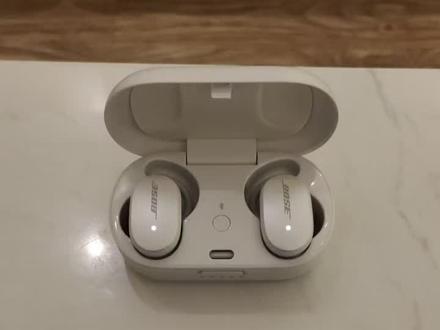 00:55查看AI文稿AI文稿
大家好,之前很多顾客问 boss 无线消噪耳机怎样同时连接两个手机, 今天我跟大家分享一下怎么去操作。首先耳机打开电源盒子,跟第一台 设备连接成功之后下载 boss 音乐做软件,点击软件连接耳机成功之后,在主界面的左下方有个蓝牙,点进去 之后在下方添加新设备,确定耳机会进入 一个被匹配的状态。第二台手机打开蓝牙搜索连接成功之后就可以使用,更多的操作可以关注我。
42Ben Deng 00:42查看AI文稿AI文稿
呃,这款耳机呢,最多可以存储八个配对设备。呃,电源键右滑一次 啊,就是切换一个设备,如果你想清除之前跟他连接的设备呢,只需要将电源键右滑 并按住啊,十秒钟左右啊,就可以清除之前跟他连过的所有蓝牙设备。好,那这就是这款耳机的一些简单操作啊,下一个视频呢,咱们讲解一下 他 app 的一个使用。好,再见。
150Bose石家庄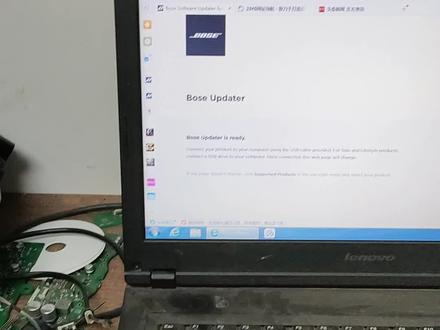 00:45查看AI文稿AI文稿
那个由于那个评论区还有发表的那个呃作品都不能带网址,所以我只能就这样大大概给大家讲一下。就是说我们先找到这个应用, 然后把把耳机盒接上,接上那个数据线,接到电脑上,然后把左右左右放到这个电池盒里面,然后稍等之后我们会发现他网页有变化, 然后点这个更新就可以左右这这样,然后到百分之百就可以配对了。
232兔子耳机音箱维修 00:39查看AI文稿AI文稿
both sunsball free 连接之后呢?打开 boss 的 app, 还有一个防丢模式查找我的耳塞 可以定位到位置, 可以通过播放声音进行查找。声音呢是由小变大。 put your fucking hands on。
 01:20查看AI文稿AI文稿
哈喽,小伙伴,好多小伙伴问我主播那个蓝牙耳机怎么连接手机?那个,呃,第一呢?我们所有的蓝牙设备,蓝牙耳机设备主耳一定是有,主耳上一定是有灯的,如果我们拿出来,然后不管通过什么方式,如果灯不亮的话,那么这耳机是是坏的, 我们一定要让他蓝牙灯亮起来,然后我们再去找个手机,呃,这个是福瑞,福瑞,然后这个蓝牙灯亮起来是蓝色的,还有 q 七三零的,有 q 七三零蓝牙灯 是这样的,然后上这个下面绿色是电源灯,上面是那个蓝牙灯,但是我们一定要等到蓝牙灯闪蓝颜色的时候 才可以去连连手机,去查找手机。那帮我开下车, 我也给你录个周日三。可以,那个我们在在在手机设置里面蓝牙打开,蓝牙打开之后我们再在这个上面是以配对设备,下面是可用设备,可用设备一定找前面那个, 我们那个可连接的设备前面一定有一个耳机符号,一定有耳机符号,那我们连这个东西,连这个就可以连上我们的手机,然后就可以进行使用。
61兔子耳机音箱维修 01:23查看AI文稿AI文稿
大家好,之前有很多顾客问 boss 的耳机能不能两副耳机连一个手机, 那今天我为大家示范一下。首先把第一个设备打开电源,在手机上面下载 boss 卡内这软件,下载完点击设备, 打开软件之后,耳机跟设备连接成功之后,在下方有两个耳机的一个图标,点一下按,继续 跟着第二个设备打开电源,进入一个被匹配的状 状态,点击入门 往下拉,跟着看到两个设备 添加,这样的话呢,就可以通过一台手机实现连接两副耳机的一个功能。
23Ben Deng 00:57查看AI文稿AI文稿
哈曼卡顿付爱珍无线蓝牙耳机使用教程, 打开充电仓,指示灯亮起,在手机上搜索并连接,连接成功, 单点耳机可暂停和播放音乐,连续点两次可切换歌曲。哈曼卡顿官方 app 可以设置耳机的各项功能,分爱真无线耳机可以通过手势进行多项操作, 不赖,还支持腾讯小微语音助手,乐享智能生活。小微是干嘛的?给我放一首周杰伦的歌 当充电仓背部的指示灯闪烁白光,表示耳机正在充电。充电仓背部的指示灯闪烁红光,表示充电仓正在充电。
501哈曼·卡顿官方旗舰店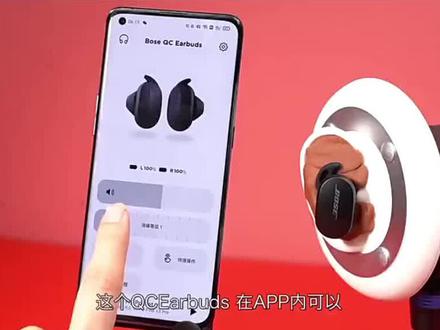 00:40查看AI文稿AI文稿
ucc 的 box 在 app 内可以调节十一级的降热效果,但是如果你觉得很嗨麻烦的话,那设置默认三档常用的就好了, 出场默认是零五十,双击左耳就可触发,并且在 app 内还可以多设备连接切换,非常的方便。 boss 耳机最有名就是这对鲨鱼切耳套了,佩戴稳定,怎么甩都甩不掉。而在操控方面, logo 位置则是他的触模区域,默认左耳双击是切换降噪,左耳长按是下一首,但是你也可以设置成播报电量, 又有双击是播放关闭或者是接打电话,长按则是呼叫语音助手。而在充电和信号方面呢,支持有线和无线充电两种方式,耳机充电是用五六个钟 bus 慢抬。
260BOSE1964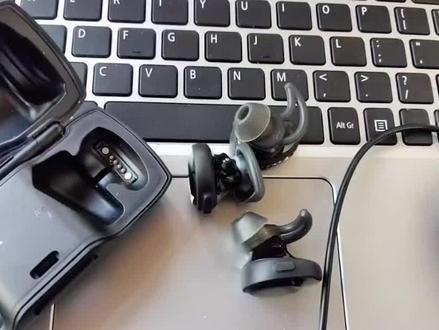 02:13查看AI文稿AI文稿
我是小谢,欢迎关注非凡儿优秀专业修理耳机,今天给大家讲一个博士的这是一个真无线耳机,听一下博士什么飞的什么 boar 的好这个耳机,这个耳机因为修的时候我们现在已经发现他这个主板已经烧掉了,现在只能给他配一个诱饵, 配一个婴儿。现在大家买这个耳机的时候注意一定要同一个颜色啊,不同颜色是配不上的,我们首先要看好数据线,找一个数据线不是普通的充电,充电线啊,这样耳机盒打开着,插着插着电脑插着电脑,我这边使用笔记本哈,我们登录这个网站 看啊,这个蛋盘清楚一点啊, btubus com 这个网站,他这个有一个更改语言,我们更改到 中文也就好了,现在我们点这个下载, 要下载这个软件哈, 现在是这个地面,我们他这个地方有一个语文,我们要要切换到签那点下载,就是看啊,我同意把这个勾选这几个勾勾选啊, 现在主要下载博士这个升级软件,已经下载好了, 再给大家说一下,第一个一定要登录这个王者 btu 点 buscum 以后再下载 busupt 这个这个升级工具,这个升级工具有一个语言选择,在这个地方,大家刚才刚才看到 要选择成中文才能下载,下载好以后他在这个这个浏览器的地方安装,我们安装了以后在这个角落的下面这个角落看这个地方有有合适工具,这个打开,打开以后把这个耳塞盒 这样打开着,这样打开着要一要用一根数据线注咬,一定是数据线,不是充电线,这样看哦,这个进度条慢慢在滚动,现在这个耳机就可以在左右配对了啊,大家一定要买同样一个颜色的啊,谢谢。求大家点赞关注一下,谢谢。
515非凡耳机维修 00:59查看AI文稿AI文稿
哈喽,小伙伴,最近有好多小伙伴问我这个 boss 怎么死, boss 的福瑞这款耳机,他说怎么连连手机啊?有好多,一些是自己买的,还有一些是朋友送的。嗯,这个呢,第一, 第一呢是我们先把耳机从耳机壳里拿出来,这个灯是要亮的,只有 这个灯是亮的,这个右耳这是左耳,每每个耳机上都有一个灯,灯必须是亮的,亮了之后闪蓝灯,之后再连接手机就可以连接。然后有有小伙伴说那个灯不亮,像这种灯不亮啊,这个是我上盖去掉了,这有个灯,灯不亮的话是耳机是坏的, 这种情况就需要维修了。然后这个耳机呢,一般耳耳机电池坏的比较多,耳机壳电池坏的还是很少的,所以呢,第一时间我们要确定是否能正常开机,耳机能不能是否正常开机,然后。
140兔子耳机音箱维修 00:15查看AI文稿AI文稿
当这个耳机左边和右边放在里面的时候,他就处于一个充电的状态啊。 当你拿起来的时候,如果说你自动配对了你的手机,他就会自动连接你的手机。
151泓杰收万物


