
粉丝962获赞1.5万
相关视频
 05:41
05:41 01:23查看AI文稿AI文稿
今天要讲的是如何将斯蒂姆账号与正式的 vrc 号绑定,用斯蒂姆直接登录的账号名字都是斯蒂姆号,名字后面还有四个随机数字或字母。在官网注册的 vrc 账号后面是没有字符的, 这个时候我们就需要去官网注册一个账号,将我们号的数据和四点五登录的号合并。 我们点餐设置菜单塞屏,下面会有一个奥波的高空置的按钮,然后点击粘的这生成代码,再点 copy 不知代码,最后到下一页点浪池打开官网, 打开官网后用听第二邮箱注册官网账号,注册后登录账号,他提示你是否需要绑定账号, 在下方输入复制好的代码,再点合并,如果代码失效了,重新去游戏里面再复制,合并成功后会出现上面一串字符,然后我们重启游戏 a few minutes later, 再次打开角色界面,后面四个字母就没了, 我们的好友和自己存储的模型都没有变化。
506卡米丶 02:00
02:00 04:21查看AI文稿AI文稿
welcome to pico interactive! our headsets are built with your business in mind as an all in one six degrees of freedom vr headset pico, neo three pro and neo three pro i can run apps from pico store and is able to stream your sixdofvr apps uploaded to streamvr by using the display port cable and the vr capable windows ten pc this allows you to have your pc content on our untethered high resolution headset this is a flat screen our display port dp cable is specifically designed for use with the pico, neo three pro and neo three pro i models the cable is available as a separate and optional accessory first let's see what's included in the box use a manual dp cable covers for the ports cable clip and screwdriver the screwdriver ensures that the usbc connection to the headset stays in place to keep the cable out of the way while using the headset you can attach the dp cable to the headset strap with the cable clip in order to get started you'll first need to prepare the following items neo three pro or neo three pro i dp cable and a pc with internet collection please remember to charge the headset prior to setting up pc streaming your vr pc hardware and system configuration must meet the following requirements pc standard dp one point two and above usb two point o and above laptop mini dp one point two and above usb two point o and above cpu intel core ivive four five nine zero and amd risen fifteen hundred and above gpu navidia g force gtx ten sixty and amd radian rx fouratre and above ram agb and above operation system windows ten the power port allows you to continuously supply your headset with power to remove the need to charge the headset during streaming the standard dp one point, two and standard usb ends plug into the pc and this usb c end plugs into the headset the display pork connection can be found here under the pork cover labelled with the letter d when mounting the dp cable be sure to line everything up correctly before using the screwdriver to tighten the connection, the screw ensures of the cable will not be pulled out during use this provides a stable connection as well as aimed to avoid possible harm to yourself objects around you to the headset and your pc screw the cable into the headset slightly wiggle the cable to make sure it is firmly in place attach the cable clip to the cable before clipping it onto the strap be sure to listen for the snap as this signifies at the cable clip is securely fastened before you can begin streaming from your pc be sure to check that seamvr is downloaded and installed after confirming the connection as desired click next this interface will recheck the installation of swim vr if both already installed press finish use the room setup selection to define the boundaries of your workspace select either the standing only or room size mode if you select standing only, there will be no safe zone reminder in this mode, please do not leave the area to avoid the danger of running into objects now open your chosen application and start streaming thank you for choosing pico interactive our headsets are built with business in mind。
 10:27查看AI文稿AI文稿
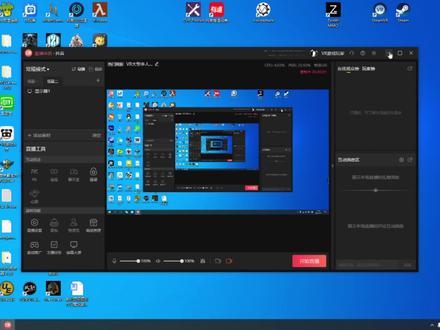
大家好,今天给大家介绍一个在 stt 磨牙中,我们怎样能进行语音实时翻译英文游戏的一个教程。 首先呢我们先准备三个软件,这三个软件是一个是欧威啊,一个是有道词典,一个是 av 识别语音控制软件。 然后呢我们准备好这三个软件到四点,这个软件呢 是我们大家应该很熟悉,他就是一个翻译软件,然后呢这个欧牙呢?然后我们通过这个有道词典呢进行截屏。欧牙呢?欧牙这个软件其实他是一个 steam 中一个 付费软件,它的主要功能是在于我们可以实时的在游微串流游戏中,可以实时的查看 我们电脑中的任何任意程序,包括你如果说和别人在微信聊微信也是可以的,可以在斯蒂姆维亚中可以打开 这个软件还是比较方便的,这个软件是基于斯蒂姆维亚的,不启动斯蒂姆维亚的话,这个软件是不能使用的。好,废话不多说,我们现在开始 讲一下这几个软件是怎么用的。好,我们先打开这个有道词典,把它最小化,然后打开这个 语音控制软件,然后我们先讲一下这个语音控制软件,我们先打开这个项目新建项目这一块打开,这里面我已经添加了两条指令,一条是翻译指令,一条是关闭指令。 这个翻译指令呢里边有几部操作,就是模拟我们鼠标进行模拟键盘进行康治奥特加 d, 然后鼠标从左上角拉到右下角,松开鼠标的整个一个流程,这样的话就是可以用通过语音控制我们进行有道字典的截屏翻译了, 大家可以看一下, ok, 然后这个关闭呢,在我们进行翻译的以后,看完翻译以后,我们需要关闭 这个截屏,所以说我们要执行一个关闭指令,关闭指令的操作就是模拟键盘的左上角的椰子 c 按键按下的指令就行了,其实这个是比较简单的,大家都可以试一下啊。关闭 好,下一步呢?我们显示一下怎么在此题目中 怎么使用这个语音,看一下效果怎么样,语音指定翻译效果怎么样? 我们先打个 stm, 找到这个游戏基本上都是英文界面,然后我们随便找一个这个新闻,大家可以看到是纯英文的,我们首先先看一下我们这两个软件,好,都 这个打开了,有到此点也已经开汽车的。好,我们执行语音指令翻译好,大家可以看到翻译的还是可以的,对吧?然后我们执行关闭指令,关闭,已经关闭了, 其实演示的效果大概就是这样子,下一步我们进行串流,在游戏中我们是怎么用的? 首先我们先打开斯蒂姆维亚,启动一下斯蒂姆维亚, 我们在桌面上可以看到斯蒂姆亚正在启动,已经启动了。好,进入斯蒂姆亚以后,我们再返回桌面,打开欧维亚 软件,记住这个 ov r 软件一定在 sto r 启动以后再启动。 好,我们返回正面看一下。好,这个软件已经启动成功了,大家可以听到噔噔两声,我们旋转左手臂,可以看到 o 牙的软件已经启动了,在我们的左手柄左手腕处。 好,现在我们进入游戏,进入游戏后选分区, 这个还比较空闲。好,进入游戏之后,我们可以看到这个任务列表全英文的, 然后我们旋转我们的手臂,啊,这是我以前的关闭点,那个齿轮关闭点,这个齿轮关闭,当我点击齿轮的时候, 我们反转手臂会出现这个窗口,我们新建窗口,新建一个窗口,这是刚才我翻译的界面,关闭 好,现在已经关闭了,然后我们可以试一下 这个窗口,这个窗口的大小,我们可以通过左右手的握尺,手握尺键可以任意放大和缩小吗?大家可以看一下,放到适当自己感觉舒服的位置大小就行了。然后这边有一个西服的按钮, 看到没有,手上面有一个手臂的吸附按钮,我们把它给拉过去放在上面, 好,他已经吸附在我的左臂上,然后调整到自己的使用的位置好,可以把这个 窗户关闭,大家可以看一下,然后我们试一下翻译,翻译好已经可以正常翻译了,关闭 啊,已经关闭了,好,我们回到桌面讲一下这个,首先我们打开这个语音控制指令,然后选择我们所用的麦克风,现在我要切换到我的电脑上的麦克风,然后给 然后打开这个新建新建项目吧项目,然后里边有两个指令,这是我以前所创建的指令,我们删掉 这个也删掉创建新的。然后这里呢是就是我们所用的语音指令, 可以填写,我用的是翻译两个字,你们可以用其他的都行,然后这勾打上就行了。下一步呢,我们需要创建这个语音指令开启以后的所有操作。 首先我们有道词典的截屏,指定的是 ctrl 加奥特加 d, 我们先模拟一下键盘, ctrl 加奥特加 d, 然后选择键盘模拟,选择 ctrl alt, 然后按一下键盘 d, 这就 ok 了点, ok, 然后下一步我们要模拟鼠标的事件,鼠标移动事件,然后我们先选 要从左上角,是要把鼠标先移动到左上角,我们选择这个暂停,暂停我们的鼠标,然后在这按 f 八 好 f 发获取到了我们这个鼠标位置, ok, 然后下一步呢,我们要添加鼠标,按一下的时间, 请接鼠标 cling go, 选择鼠标左键按下, ok, 然后我们需要把鼠标从左上角移到右下角,再添加一个移动的时间,监听到右下角 if 好获取到左标了, ok, ok, 然后我们再添加一个鼠标,松开鼠标左键的一个事件, ok, 这样的话我们的截屏整个一套操作下来了,大家可以看一下是不是 好关闭,我们大家手动关闭一下,我们需要再添加一个关闭,直接 我用的是关闭这两个字, 当然大家可以用关掉,然后选择椰子 c 键,模拟键,键盘椰 c 键点, ok, ok, 现在我们有两个指令了,点的应用点的关闭,大家可以看一下这两个指定已经有了语音指令关闭, 根据啊不同电脑他那个 cpu, 然后他这个反应的时间是不同的,所以说我们要进行修改一下, 然后我们在这个每次他们的事件操作以后,我们要增加一个延迟, 因为有的快,有的慢, cpu 电脑我们添加延时,延时多长时间呢?延时零点一秒, 打错了,零点一秒,每次操作都添加一个, 这里再添加一个, 这里再添加一个。 好, ok 了,大家可以试一下,我们可以试一下这个操作,翻译 关闭,翻译关闭,大家记得点赞关注哦,有什么问题可以问。
425VR游戏玩家


