labview中的簇怎么使用
朋友们大家好,欢迎您收看 love you 数据采集视频教程,本期视频我们分享的是教材的三点二点二节 醋第二部分,接下来我们再看一下第三个知识点,醋函数。在程序框图当中,我们也可以利用相应的醋的相关函数进行醋的一些编程的 操作,这些操作呢我们依赖在函数选版当中找到编程子选版下面的醋类与变体,这个子选版 我们可以对之前呢所转换得到的这个醋的数组呢进行一个操作,我们可以直接将光标移动到醋数组的一个元素当中,我们这个元素的四边呢会显示这种高亮选中的这种小方块,我们单击鼠标左键, 然后直接将这个元素呢按住以后往外拖拉,我就可以把数组当中的这个元素呢直接提出, 这个时候我们可以对应的在程序框图当中看到工具栏当中的运行按钮,这个箭头呢已经出现了断线,这个数组的接线端呢已经变成了黑色,我们这个时候可以把这个数组呢删除。接下来我们就利用程序框图当中的醋类与变体这个紫旋板当中的按名称 解出捆绑函数呢,我们进行一个相应的操作,我们把这个函数呢放置到程序框图当中,并且为他开启显示标签, 我们将光标移动到这个函数上面的左侧的这个接线端呢是输入醋,他需要连接一个输入控件,而我们现在的这个醋呢,他是一个显示控件,我们可以在程序框图当中直接将这个醋 转化为输入空间。好,接下来我们将它进行连线,当我们连线完成之后呢,按名称解除捆绑这个函数当中呢,他会显示一个元素叫数值。更进一步,我们将光标移动到按名称解除捆绑这个图标的下边缘, 高标变成了双向箭头,我们按住鼠标左键呢,可以向下拉,这个时候我们可以看到我们往下拉的时候呢,按名称解除捆绑这个函数的他的这些标签的元素,这里面呢会显示数值 旋钮,列表框,那么列表框后面呢,会显示很多的列表框,这个时候我们只看前面四项,前面四项实际上对应的就是我们在这个前面板当中醋里面这些元素的排列顺序, 第一个呢是数值,第二个是布尔,第三个是旋钮,第四个是列表框,这都是一一对应的。第五个列表框以后所显示的呢,实际上还是第四个列表框,他的一个重复, 我们需要把它调整回只显示四个元素就可以了。这个操作就是我们对兔的一个输入控件进行了一个名称的解除捆绑操作。更进一步,我们可以将光标移动到按名称解除捆绑这个函数上面, 然后单击鼠标右键,选择创建所有的输入控件和显示控件,我们为他整理一下连线,这个时候呢,他会对应的根据我们的数值型的输入 控件,布尔型的输入空间,按钮旋钮以及列表框对应的创建四种数据类型的显示空间。 在前面版当中呢,这四种对应的数据类型的显示空间呢也同样的会生成,实际上呢就是将前面版当中这个醋里边的元素呢分解出来 更进一步呢,我们可以将分解的这些元素呢进行一些数据处理以后呢再进行一个捆绑的操作,再生成一个醋,那么就进行了一个醋的这个元素的替换,或者是一个后期的数据处理。 接下来我们再看一下醋的捆绑操作,我们可以在程序框图当中找到醋类与变题紫萱板里面的按名称捆绑这个函数,我们将它放置到程序框图当中,并且为他开启标签显示我们将光标移动到这个函数上面呢,他的左侧呢有一个 输入接线端叫元素,他的上方呢有一个叫输入醋,一个接线端,他的 输出接线端呢就叫输出醋。首先呢我们可以对这个输入醋呢进行一个操作,这个输入醋的意思呢就是说我们目标要把它捆绑成一个什么样子,我们可以为他创建一个连线,将连线呢直接连接到我们之前的这个醋当中,因为我们将这个输入醋这个接线端 和之前的这个输入处呢进行了一个连线,这也就意味着我们会把之前在前面板当中所创建的这个输入处的这种数据类型,他所包含的元素的个数 进行了一个定义,也就意味着我们这个按名称捆绑输出醋这个地方呢,如果我们给他创建显示空间的时候,这个输出醋的这个元素的个数以及 元素的数据类型呢,和我们之前的数据源呢是一致的。接下来我们可以做的就是将光标移动到按名称捆绑这个函数图标的下边沿光标变成双向箭头之后呢,按下鼠标的左键往下拉, 同样的和我们之前按名称解出捆绑的这个操作是类似的,可以拉出非常多的接线端,那么其中前面四个呢对应的实际上就是我们这个数据源所定义的这个输入处的这个规格, 我们可以保持只显示四个这个输入端就可以了,可以给他做一个相应的数据的处理,比如我们想对这个 解绑后的这个数值呢进行一个函数的处理,我们进行一个乘法,我们为他输出的这个数值呢进行一个两倍的处理,然后呢将处理过的数据呢又送到这个 数值的输入接线端,并且呢我们在进一步对这个布尔按钮呢进行一个取反的处理,我们可以在这个布尔函数紫旋板里面呢找到飞,我们为他连线,然后呢 将这个布尔的显示控件他输出的这个结果呢一个取法,然后再送到我们这个布尔的输入空间当中,同样的我们还可以对这个旋钮的这个显示空间呢也进行一个运算, 我们可以进行一个除法,我们将这个旋钮的运算的结果再除以十。把这个除法的结果呢再送到这个旋钮的输入端, 然后我们再将这个列表框呢直接和我们的列表框呢进行一个连线。好,我们这样简单的进行了一个数据的一个提取之后呢再给他捆绑得到一个新的这个醋,我们运行一下这个程序,先看 大概会有什么现象,程序运行之后呢,我们很直观的可以看到了两者的区别就在于这个部位 我们原始的这个输入的空间这里呢布尔这个元素他是非,那么我们经过数据处理之后呢,对布尔进行了一个取反操作呢,那么这个生成的输出促这个结果当中,布尔这个数据类型的直接进行了取反,那么他就显示了真 其他这几个元素呢,好像没有发生变化,那是因为我们在前面版当中呢,对他的这个输入的这个醋没有进行复制,那么我们这里呢可以给他简单的进行一个复制,比如我们先将这个数值输入空间呢,我们输入一个十, 我们将这个旋钮呢调整一下这个数据,我们现在看到的是四点九二零四八列表框当中呢,我们可以输入一个文本 abcde, 好,我们对这些数据呢进行了一个负值操作之后呢,我们再次运行这个程序。好,这个时候我们可以看到这个布尔登仍然是保持在点亮的状态,并且呢这个数值以及这个旋钮的值呢都已经发生了变化, 他所发生变化的这个运算的依据呢,就来源于我们解除捆绑之后进行的一些乘除取反的这些操作。 根据我们前面所学习的内容,他们在某些场合下呢,两者可以进行相互的转换。接下来呢我们可以尝试的使用函数选版当中的醋类与遍体选版当中的 复制数组转换这个函数。我们可以尝试对我们刚才所创建的这个例子当中的输出结果呢进行一个转换操作, 当我们给他进行连线的时候,我们会发现他产生了断线,我们将光标移动到这个断线的地方呢,然后他给出的标签提示是多肽接线端不支持该数据类型。好,我们先将这个断线的删除一下, 接下来呢我们再在前面版当中呢,我们再创建一个醋,我们来看一下,在数据类型紫旋板当中放置一个醋,并且呢我们放置数值的输入空间,我们再放置一个数值输入空间, 那么对应的在程序框图当中这个触二呢输入空间这里呢是褐色的显示,我们再将这个触至数足转换这个函数呢 给他进行一个连线,这个时候呢这条线就可以连上,并且我们为这个函数呢打开显示标签,再为他的输出接线端数组呢创建一个显示空间, 这个时候呢我们再运行一下这个程序,在前面版当中我们先找到这个输出的结果, 我们运行这个程序,这个时候我们会发现程序运行以后转换的数组呢,他会显示两个元素分别是零零对应的,在前面版当中将这个错二这个输入空间,我们给他复个值,我们再看一下运行一下, 这个时候我们可以看到实际上这个醋二这个是一个醋,但是我们经过醋制数组转换这个函数的操作以后呢,他把它转换成了一个包含十和二这两个元素的一个数组,包含有相同数据类型的这个醋呢 使用醋制数组转换这个函数进行转换,转换之后呢,醋就会转换成一个数组,他的元素的个数呢不会发生变, 但是醋里边的数据的类型如果是不同的,他是无法实现醋制数组的转换的。教材当中涂三杠二杠二五是一个替换醋当中元素的一个操作, 这个操作呢非常的典型,大家可以通过教材当中的这个范例呢进行一个实际的训练。好,本节视频我们就分享到这里,喜欢我们的视频请关注我们,欢迎大家在视频下方留言,我们下次再见。

粉丝483获赞1307
相关视频
 14:18
14:18 08:57查看AI文稿AI文稿
大家好,我是芒果数数字技术的 level 工程师,下面会给大家带来 level 的基础教程,同时你可以通过屏幕下方的微信公众号, qq 群,微信微博以及我们的网站获得我们产品的最新信息。 第五章给大家介绍一下醋。首先下面三个主题介绍醋,醋函数以及错误醋。 醋是什么呢?醋是一种数据类型,将不同的数据结构捆绑在一起,醋里包含不同的数据类型,类似于 c 语言中的结构体 元素必须全部是统一的,是输入空间或者是显示空间。类似于下图,通过线把各种颜色捆绑在一起,符点 ver 和字符串捆绑在一起,形成一个新的数据类型处的输入空间和显示空间。从数组 和醋的选版中选取一个醋的框,然后把对象放到这个框里边,就成为了一个新的数据类型,这里边有竖直布尔以及字不转,我们也可以给大家演示看一下有他的前面版。我们右击 醋,然后我们可以放置我们的数值,再放置我们的布尔以及我们的以及我们的字符串等一下,以及我们字符串,这样就形成了我们新的一个数据类型,就是我们的这个醋, 撞见醋的常亮,我们选择一个醋的常量框,从程序框组中的醋的选版,然后把我们对象放到这个框中,就成了一个新的数据类型,我们可以看一下,创建一个醋的常量,右击选择醋 类和变体,我们选择醋的常量,我们选择放一个 bor, 再放一个数值,再放一个 twitter, ok, 这就是我们新的一个数据类型,也是醋,醋的常量, 醋中的顺序,醋中的元素是有逻辑顺序的,就是你哪个元素是先放进来的,哪个元素是后放进来的,你可以通过右击醋的编辑选择重新排列顺序,就可以改变醋中的顺序, 这是我们刚刚放的一个醋,我们通过 u g 我们选择重新排列单这个可以看出零一二就是我们放进来顺序,我们现在可以把 变成一个,把它这样又变成了零二一,我们也可以把它变成把它变成零二一,这样就是改变我们的一个顺序。 好,我们点击设置,现在我们再看一下就可以看出二一零,就是先放在这个支付转,再放到这个 boy, 再放到这个数值,就通过刚才那个顺序进行更改的。 使用醋将数据传递给,怎么样?使用醋将几个数据传递给一个端口,就克服了一个年限版最多二十八个接口的问题,简化了年限。 我们可以看一下我们的连线板,这我们乘住程序框出的连线板 模式模式,这里最多他就是有二十八个接线口,如果我们的数据要传给我们的子维安,大于二十八个将就不能充电,这时候我我们使用我们的一个醋,醋里面可以放很多数据类型,通过这个醋就可以直接传给我们的这个数字,那他就相当于一个就代替了三个段子口 醋的函数,捆绑函数,醋分为捆绑和按名称捆绑,嗯,这捆绑有可以两种用法,一种是直接创建一个新的醋,一个是替换 you 的醋。好,我们这边的这个, 我们这边这个按名称捆绑就必须只能是替换 u 的醋,我们可以来看一下, 这是我们刚才的一个醋。 我们首先使用我们初中的一个函数 捆绑, 选择 bor, 错误叉以及我们的数数据传给我们的这个 bor 就直接生产了一个错误, 是没有问题的,但是通过按名称捆绑的话,那就是不行的,按名称捆绑只能通过我们的这个只能是替换。里边的图我们可以看一下,如果我们把它连接起来,连接给他,连接也给他,连接给 他,这样是不行的,如果我们把我们的这个图连接,就都是字不粘,字不粘,我们可以看一下 cf 叉是有的,我们可以选择有机布瓦,比如说走走叉这个,我们选择数值,这样就可以替换我们的这个布瓦中的这个数据类型。 按名称醋的函数,按名称解除捆绑,就是把我们的这个醋中的元素可可给解除捆绑出来,这一个是按他的数据类型来解除的,一个是按他的名称来解除的。 错误处,在每个 vi 中使用错误输入和错误输出来构建错误处理的妻子。错误处位于空间选版的数组和处的选版。 醋里边分为他的三种状态,一个是布尔,一个是树枝以及字不串,分别有三种不同的意思,我们可以看一下,这个布尔是一个布尔值,当他出现错误时,这个布尔值就会变真。 另外一个是一个有符号的三十二位整数,显示的是错误代码,当扣的非零时,同时不是一个假的状态时,表示的是一个警告。最后字不串就是表示这个错误发生在哪,我们可以来,我们可以来看一下, 全部删除, 这是我们首先把我们的这个错误输入给放进来,我们可以通过按名称指出宫保, 我们把这个点击出错,这个就自动会变亮,就是这样,如果我们代码,比方说是幺幺幺,我们代码也会自动变成幺幺幺,就是 简易的错误处处理,使用简单的错误处处理来处理数据流末端的一个错误处,简单的错误处处理为函数选版键对话框与用户界面选版中的简单错误处理,我们可以告诉大家在哪 右击对话框有一个简易错误处,我们可以直接把这个错误处连到这, 如果我们这边会报错的话,他就会自动提示出现错误了。 well, 循环中使用错误处理,当错误处直接连接到 well 循环,在条件检验单时,当发生错误时,循环就会调停止。这个我们也可以演示给大家看一下。 首首先我们先直接放我们的一个操作,从输入放到这个空间,然后我们在它的外边放置一个握摇循环, 帮我们操作,直接连接到这里,我们可以看这个参数, 现在我们就是不停在跳,当我们把这个包 shots, 它就自动停止了, 也就是说当程序出现错误的时候,如果我们的这个错误端连接到我们的停止条件,那我们的停止条件就会自动停止。 总结一下,醋中可以包含不同的数据类型,但指的都是输入空间,或者都是切实空间。错误检查会告诉你什么时候发生的错误,同时错误发生在哪里。最后醋中包括了三种布尔 数值以及这不算,分别告诉你他们是否发生了错误,错误的代码以及错误具体发生在哪里了。
 21:18查看AI文稿AI文稿
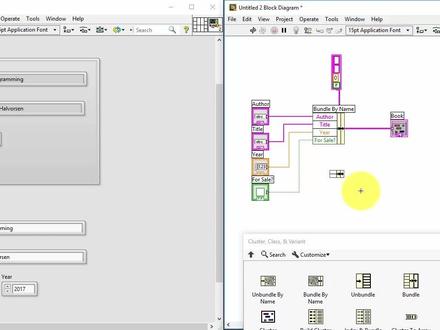
ah in this video we will give an a way of clusters how we can create clusters in label on how we can use them so what is our cluster and cluster is a group of information it could contain different data types and different controls and it's very similar to what the cost struct or record in other programming languages or also it's also it contains some of the features that the class typical class have in other programming languages and on the front panel you can find the cluster control in the array matics and cluster palette and then select this cluster control and then just place it on the front panel and then you can put all the controls into that cluster it could be numeric strings and bullying whatever and then you start using clusters it's also a set of functions you want to use to get the with clusters in order to add the bundle information and then you have this bundle by name or bundle and also if you want a specific part of a cluster you can either use un bundle or unbundle by name here you see the unbunned function so here you have a cluster with different controls, a string and numeric and bullying and understring and if we say if you want to only are interested in a company name then you can use this unbundle or unbunbern name in order to get the company name or the other controls that the case and that the cluster contains off and unbound by name then you can see the name of the controls within the cluster so this is more user friendly but sometimes you also want to use the unbundled or the opposite way if you have different controls or values that you want to put into one cluster or bundle it then you can use either the bundle function or the bundle by name where you see and the name of the different controls within the cluster so let's go through these functions on how to create the clusters in w with a small demo so let's open love you so now i have opened the labu and started a blank vi so on the left side i have the front panel and on the right side i have the block diagram use the front panel to create your use interface and then you use the block diagram to create your code so let's start by creating a cluster in our front panel just try click select the palette very fine a cluster here, so it's in the beginning it's just empty so you need to put different kind of controls within your cluster so let's start to find a string so let's say we want to have a cluster with information about the book so we can just name it book and then this string could be the title of the book perhaps we need another string which say something about the auto of the book like this and then then lost a book published and we could use a numeric and call it here then let's say we want them bullying as well, so is the book for sale or something we could call it for sale crash mark, which is just a three falls and then you could try to fill out some information title call it let me programming water is me the a lotion here 2016 and it's it's not for sale you can get it for free so now i've created a cluster with the information about the title alter here and if it's for sale or not then on the block diagram you see and the classic container here and then you can use these and bundle or unbunned functions the cluster functions you find just right click here and find and the cluster palettes and then you can start by using this and bundle by name so just select this one and wire the close to container to this one and then you see if we drag here we can see all the controls that close the contents of like this and then you can easily get just the title the auto year or for this this for sale and control then you can either create controls here or we can just right click here great indicator like this now if i run this program you see i have unbundled this information and got it into this string control i can do the same for others water great indicator here where i can also create them here on the front panel i can use a lead which is a bullying and i can use a numeric indicator this is here this is for sale and i also buy this like this and run it and you see i get get out all the information from the cluster within these controls or indicators in this case i'll go also try to change it i'll be programming to and then you see it's updated change the air or this book is for sale and then it's updated like this so this is unbunned by name let's try to use this unbunned instead so just remove this this one we control b to remove all the bad wires and then wire the cluster control to this one and then you see here you don't see the name you just see the data type so this is a string but if it woo the mouse then we can see the title or the name of the controls within the cluster so then the title should then go to this one autor should go to this one and then year from go to this and then this is a bullying three falls for sale goes to this let's run it see it has the same functionality the bundle by name or just unbunnel or unbunnel by name you can also set the order of the elements within the cluster we can right click on the border and select reorder controls in cluster and then you see the order this is the first or is zero, one, two, three and then you can change the assuming we want to how this order to be number zero and then this automatically will be number one, two and three and then you can just click okay and then you see here they have also changed the order here so the first one now is auto but it's how linked it to title and the second one is title and then how linked it to order so this is the problem using this unbundle compared to unbunned with name so then i have just need to change them like this in order to make it correct so the first one now is auto and the second one is tied to it like this so let's try to do it the opposite way now we have used the unbumble and unbumbled by name let's use the bungle by name and the bundle functionality so start with this bundle by name and then i just remove this part and now as you mean i have a cluster with nothing inside the different controls like this and then i just want to put in information into the cluster based on the information here then i can use this panel and by name then i just repeat it all the way and make those controls and then i can wire this to them just like this and also i can create a constant in order to define the contents of this cluster so they're burdened by name function nose and the, but the space speed cluster contains of like this so this cluster contains of and these and four controls which is the auto acampute here and then i just drag it you see the other title goes here and here goes here and for sale goes here and then i just wire the output to the cluster and you can see no they see some control control so i just need to right click and make it an indicator like this so then when i run the program all these information i have in these controls will be filled into the custard like this so that's how we use clusters in labu it's an ecv to burn the information like in this example it's a book and a book typically consists of a tittle auto year it was published on etc and then you complete it easily into a cluster and then you can easily fill the cluster using this bunny by name or just the bunny this one or the opposite way and if you want to get the spasic part of information within the cluster you can use this unbunned or unbunned by name you can also put clusters into array so let's start to create an array so this is just on empty array and then we can just drag the cluster within this array and then we will have on array of clusters and then you can type book one and order one etc and then we can just have multiple books here so this is book number two etc then we can have manly books within bomb cluster area cluster like this and then you can easily and get this information and just sense it to a control first and using our for loop so if i in a for loop and then you can just wire the cluster of irise into the for loop and then we can use these same functions in this case we could use this and donald by name like this in the for loop and then you can just fire them like this in order to get specific controls within the cluster like this and then i can also just add the timer so it's easier to see what's happening so i just create a timer with in this case two seconds or two thousand milliseconds and then if i run the program, oh you see it's first call three book one and then book through and if there was more books in this array it would browse through all the books within the cluster array like this so this is a handy way you use arise of cluster combined with four loops like this and use this unbunned function one lasting i want to mention about clusters in lobby is this i ray cluster so here you're fine arrow in an arrow out so these are actually clusters that contains of three controls and and bullying and numeric and a string and these air clusters are used in many built in functions and you should also use those and when you create your own functions or severe ice and so you can use the same unbunnel functions or bundle functions in order to get space speaking information so let's say only want the status that you can use this unbunnel in order to get just a state just like this but typically the aero clusters are very handy to use and you create more advanced applications in the labiu princess if you want to open and read from a file youtubely can use this open function, read function and finally when you have read the information in the file you want to close it first you need to use this open then you use this read function and then finally you can close the file and you see here and these built in functions has lots of inputs and outputs, but all these functions has this error incluster and error outcluster which you should wire like this so you should have that error out should go into arrow in an arrow out should go into arrow in then in the beginning you should have this error in that comes typically comes from another servi and this error out that you could send to another avi or service i type this and then anyway i love you use these arrow clusters if for instance if you get some arrow open the file you could not specify the wrong file part or something then this error information would be sent to the next file and then based on this error information this function we'll know if there was some error opening the file or not so these arrow clashes clusters are very handy to use in your lobby applications and you can also wire these clusters to a case structure like this so if i wire this one do the question mark on this case structure you see i get a case structure with two cases with no error and error so no arrow it's green and arrow is red and then if closing the file you get some arrow here you could pop up and information to the user or something pop up window with some information error in close file or something so then user can easily see if there are error in some specific part of your application so that's all you need to know about clusters and love you how to create them or how to use them if you want to learn more about w i recommend that you take a look at these resources so just open this link and then you go to this web page we will find lots of sources about love you videos exercises you can download softer hair and also a lot of additional tutorials about different concepts or features about love you so that's all it's a good luck with using and creating clusters in w。
 52:04
52:04 11:25
11:25 03:24查看AI文稿AI文稿
很多人刚开始学莱伯威的时候不知道该怎么入手,今天我结合自己的经验讲一下怎么快速入门莱伯威欧。 相比于通过看书系统的学习一门软件,我更推荐先学会软件的基本用法,然后开始实践,在实践中边学边用,用到什么功能就学习什么功能,这样可以节省我们宝贵的时间去学习真正有用的知识。希望大家能够在看完这个视频后就可以直接进入实践了。 接下来进入正题。首先打开 live vivo 软件,你会看到这样一个界面,这里需要说明一下,很 很多编程语言编程时都是先建一个项目,也就是这里后缀为点儿而为 pioj 的文件。但是莱伯威尔的程序文件,也就是后缀为点 vi 的文件是可以单独运行调试的,对于初学者只使用 vi 就够了,等后面熟悉了再用项目。我们可以在菜单栏点击文件,然后点击新建 vi, 即可创建一个 vi。 一个 vi 包含两个窗口,一个是前面版,一个是程序框图。 前面版相当于是 gy, 是用来制作软件界面的。程序框图相当于是文本编辑器,用来编辑整个程序的算法。 我们先看前面吧,在前面版点击鼠标,右键会弹出一个空键的窗口,这里有很多 love 封装好的模块供我们使用,例如数值空间、波尔空间、自负串与路径空间等等。 把鼠标放在数值空间上,会弹出数值空间窗口,这里需要说明来标 vivo 的空间分为输入空间和输出空间两类,输出空间又叫显示空间,数值空间窗口中包含了多种数值 输入和显示样式,我们点击数值输入空间,然后在前面版适当的位置点击一下鼠标,数值输入空间就被放在了前面版中。使用同样的方法,可以在前面版放置一个数值显示空间,当然如果有需要,可以放置不同样式的输入和显示空间。 接下来我们再看一下布尔空间,布尔空间中有不同样式的开关和指示灯,我们也在前面板上放置几个布尔空间。 接下来我们再放几个自伏串与路径相关空间, 我们再放几个有代表性的空间,例如数组空间,错 表格空间,还有图表相关空间等,我们还可以放几个装饰用的空间。 数组空间和醋空间里面是需要放置内容的,具体的使用可以学习相关内容。 这些空间还有不同的样式,例如银色的系统的,经典的 logo, 提供了非常丰富的空间供我们使用。 love you 提供的空间不仅多,我们在每个空间上右键还可以对一个空间进行非常多的操作,这里就不详细介绍了,大家可以在用到的时候摸索。有这么多的空间和方法,大家肯定可以做出理想的界面。
5222房工 05:46
05:46 04:56查看AI文稿AI文稿
好,继续讲解,刚才上节课留下了一个小问题,就是说咱串口的读写读读的时候呢,肯定记性先写入,写入的时候,这个地方哈,以前 刚才上节课议论了一小点,就是也会加一个延时的,其实这个延时哈,在我就是说高亮监控的时候哈,确实有点没有必要,但是还是加一个比较好哈,加一个小小的延时了给他,比如说 根据你的,当然你的工程需要哈,我这加个零点二毫秒就可以了,因为在实际使用中哈,很多就是说延时有有些要求是比较严格的,有可能你通运来不及响应哈,太太长也不好, 这个就根据项目中来吧。这个就,然后刚才讲到了,这你赌赌的时候不可能一下,有可能哈一下赌 读不到,读不到怎么弄?咱循环读就是轮寻读,让他轮寻读的话就是让他就是读到穿过这些总数不为零为止,然后自动停止,这个时候怎么处理呢? 加一个小的画画循环就可以啊这个地方,但你也不能无休止的。就是也是加一个小延时吧,加个两百毫秒的一个一个小延时直接拖过来就可以哈, 然后你判断一下你的这个地方加个条件结构。 嗯, 在调完结后之后判断一下这个参考自己的总数是否是比较里面哈,有一个大于零用,大于零为 n 的时候, 大于零为针的时候,咱这个地方再加一个,或者是咱这边啊再加,直接让停止吧, 让他停止了,然后不为零的时候呢?为零的时候读取数据,读取就是说咱刚才要做的那个命令这个数据, 然后把你的数据给读出来就可以了, 然后不为零该怎么办呢?不为零会让他一直给来读的,不为零这个地方会一直读哈,这个地方直接没了就可以,他不会停止的。 回家的时候切这家伙给进行读哈,这个地方直接复制过去就可以了, 就是说不管你真假,我都会执行这个独的操作,不可能不执行。 然后这个地方啊,一旦进入这个,不管是袜子循环还是否循环,一定要使用这个 uu 计算器哈,这样对内存是有好处的,接上内存可以说,当然出现错误的时候哈,这个地方还有个编程中一个技巧,技巧就是出现错误的时候,你也可以把它给 出现错误的时候让他给停止下来,要不然是无休止的不停止那也不行哈,肯定 一个或操作或者有错误的时候,一个是咱读的大于零的时候,或者有错误的时候把它停止下来,当然你的错误哈一定要输出一下。 这个地方 咱这个是现场编辑哈,现场就是给你编成,大家可以看到哈一些数量都到了,到了到了一定程度之后哈,你们也可以现场把它给编出来。 好了,这次咱这个穿股这方面基本上就讲完了,可以说这个部分的重点啊,你写出名字的时候一定要加一个回车,或者他或者是换行,这样的话你会掉 要用的,然后读的时候一定要是读不出来啊,他就继续读,因为很多命令他不一定他俩对哈。好的,就大家有继续。嗯,探讨的可以继续留言或者什么都行的。
 11:32
11:32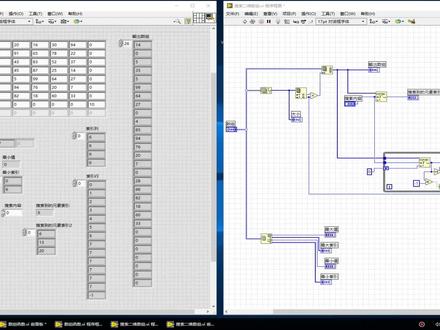 07:59查看AI文稿AI文稿
书主在自动化测试当中应用非常广泛,而且那不就自带了蛮多的一个书主的一些工具函数, 我们看一下,他可以求数组的尾数大小了,所以呢还有可以替换数组,插入三处元素,三处数组等等,而且也可以,嗯,求数组当中的一些最大值,最小值, 嗯,还有一个很关很重要的,就是一个他可以搜索一位数组, 他可以把数据里面的任何一个元素,那搜索到他的这个位置在哪里,但是找了这么久我们就发现他只是搜索一位数组,但是我就没有找到这个搜索二位数组,因为 曾经有朋友问过如何搜索一个二位数组,在今天我就发现一个技巧,我们可以把这个二位数组转换成一位数组,然后 进行搜索,用一位搜索一位数的方式把它搜索到这个他的这个缩影,然后把这个缩影再转分成二位的缩影,这样我们就完成了这一个搜索。那具体的操作手法呢?我们来给大家详细介绍一下。 在这里我已经在这里创建了一个二位数组,那么嗯,具体的这个程序框图是这样的,这个数组首先我用这个 这个球他最大值,最最小值,这个我只是为了演示一下用的,和搜索二位数组关系不大,随便连到这里,这前上面,这里,这里有一个重排数组为数, 这个函数呢是他这里有个尾数大小,这个尾数大小就是指你把这个嗯排出来的,而一位数组到底是多大的一个数组,那么我们就可以 把这个二位数组我们先运行一下,可以看到这个二位数组,他是一个八行其列的一个数组,那这样他总共八七五十六个元素,那五十六个元素我们就可以通 过这个嗯,数组大小,然后把它缩影出行和列,然后一乘起来就得到五十六个,那就填到这里,这样他就会说出一个五十六个的这个二位数组。 那我们可以试一下,比如说我现在看看这五十六,那他五十六个的话,所以是五十五,最后一个, 你看这五十五他刚好是这个就是死。那我们这个输出的一位数字之后,我们用搜索一位数字的方法,我把它搜索出来这里搜索的内容,然后搜索引到的数字, 然后在同一个嗯,二位数字里面的有可能不止,我们要搜索的内容不止一个数,可能有好几个, 那么我们可以用这个循环的方式把它嗯收缩出来。这个方法呢?嗯,具体细节我就不建设那么多,给大家介绍一个。呃,思路就是这样的,它还是收缩移位速度, 因为这个一位数组搜索到之后呢,他就会把所有的纸输出来,如果说搜索到不到没有了,他就会输出负一,那当他等于负一的时候呢,我们就停止这个退出这个循环。 所以说我们如果搜索到了之后呢,我就把他的所引的这个位置的再加个一来继续搜索,就用这种思路完成 好了。总共思路呢就是这样,方法也是这样,也不会太难,我们来运行一下,具体建设一下, 你看我们一运行这里才显示到八七,这里球最大只最小只是他自带的就这里最大是九十九,你看在这这个位置,他的缩影呢?是最大缩影。在四行三就是第第五行、第四列的位置,这 一二三第四列,一二三四五,第五行、第四列是没错了。然后呢最小只是零,他是在第 第零行第六点的位置,哦,第七点的位置是吧?一二三四五六七就是这个,所以这个就是没错的了。那么我们来搜索一个,搜索个零,刚才搜索内容是零,我发现 他这里呢,他这里是所有行,他就有好多个,你看这里一二三四五六七八九十十一十二十三,总共有十三个,那我们这里有十三个零,所以太多了。我们搜索另外一个吧,比如搜索个五 来运行一下,当搜索个五,我们看到所引到的元素,第一个就是我们单单个搜索的时候,他是在二十八的所引位,二十八,我们把这里 看看,调到二十八,是不是这个就是个五,那么我们发现第二十九、第三十这个位置也有一个五,所以说让我们看看这个是多少。 他二十八的时候,我们通过这个已转换,我求求这个余数和商,我他爸的已转换就成。所以行,所以列这里能看到 第一个五,他是在第零列和第五行的位置。一二三四,第五行、第零列这个位置, 这第二个五了,他是在第二点还是在第五行,是吧?第五行一二这个,所以为二点这个位置,所以说这个就, 嗯,所以说这个位置就定位很准确了。然后这后面呢,虽然有个六,但是这下面是个负一,就证明他没有了,所以总共就两个,那我们再随便再选一个吧,比如说选 能够二十二十,我们再运行一下 那二十,他这搜索的会在第二个位置,就是这个一位数组的时候在第二个位置, 你看他这二十这是零一二啊,那么在这个二位数字当中呢,他就会在 第二列和第第零行啊,就是这个位置,第二个呢是在第四列, 第五,第五零一二三四五一零一二三四在这个位置,所以说这个位置还是准确的。那么用了这种方法,我们就可以精准的搜索到他在二位数组当中的一个 缩影纸,为了方便期间呢,嗯,你可以把它建成一个纸程序, 嗯,以后在使用的时候直接吊用就可以了。那在我的前面的几个视频当中有介绍如何创建纸程序的方法,大家需要的时候可以去看一看。 好了,今天的分享就到这里,谢谢大家收看。
 03:30查看AI文稿AI文稿
上个视频讲了前面版,这个视频我们讲一下程序框图,按快捷键 ctrl 加 e 切换到程序框图,可以看到在前面版放置的空间,在程序框图上有了对应的图标,我们可以在程序框图实现对前面版空间的操作。 程序框图是用来实现算法的,程序框图的主要操作就是连线和放置函数,连线是为了确定数据的流向函数,主要是对数据进行特定的操作。我们先连一下线, 在程序框图,按住 c 所键并点击鼠标,右键会弹出工具选板,点击工具选板的进行连线图标, 这时鼠标发生了变化,点击一下数值图标会出来一条虚线,再点击一下数值二图标, 就把两个图标连在了一起,再按住 c 和键,点击鼠标右键,在弹出的工具悬板上点击鼠标图标,这样鼠标就回到了原先的状态。当然也可以通过点击菜单栏的查看,点击工具悬板,让工具悬板一直显示在窗口前面, 按住 ctrl 加 e 回到前面版。在程序没有运行时,要改变输入空间的值或者是状态,需要使用工具悬板中的编辑文本按键或操作值按键。鼠标点击一下编辑文本按键,我们修改下数值空间的值, 所有的文本编辑都是使用这个按键。工具悬板上的操作值按键一般是用来操作按键的, 修改完值之后点击运行图标,这时数值空间中的值就传递给了数值二空间, 接下来连接一下布尔输入和布尔显示制服串输入和制服串显示所有的输入和显示都是可以相互转换的,例如当前滑动感是输入空间,我们在程序框图中右键图标选择转换为显示空间,这它变成了显示空间。 我们也可以双击两表图标,这时会定位到前面版的该控键,在该控键上点击鼠标右键 选择转换为输入空间,他就变成了一个输入空间。我们再双击两表空间,回到程序框图,把这两个空间连接起来, 按 ctrl 加 t, 同时显示前面百合程序框图,点击菜单栏中的连续运行图标, 这样程序就循环运行起来了。输入空间的值可以不停的传给显示空间。如果我们想看程序中间变量的值,可以通过点击程序框图中的高量显示执行过程图标, 或者是点击工具选板中的太真数据图标来观测程序中数据的变化, 改变不同的值,数据可以正确传输。 点击中指执行图标,程序停止运行。
1083房工


