edrawings如何隐藏所选零件

粉丝3189获赞5523
相关视频
 03:01查看AI文稿AI文稿
哈喽,大家好,我是魔方,在之前的视频第二十六课中,我们已经讲过三 dbd f 文件的使用,现在我们来看一下一周二文件的使用,一周二也是一个软件,是收到 wx 自带的工具,在我们安装收到 wx 的时候会自动安装好了。 我们都知道收到 wux 是非常大的一个软件,现在的新版本有十四 g 左右,除了设计部门外,如售后、采购、加工这些部门我们就无需安装。收到 wux 在设计电脑里面我们直接安装一串软件就可以了,这个软件它可以打开我们搜的 word, 使文件不用转换格式就可以直接打开。 除了 sodowx 文件以外,它还可以打开 stp、 igs 等文件。现在我们来看一下没有装 sodowox 的电脑如何安装这个 aj 软件。我们要安装这个软件,我们必须有一个搜的 box 的安装包,收到 box 的安装包里面有一个 egr 的文件夹,我们把这个文件夹直接复制到我们没有安装搜的 wox 软件的电脑, 然后在这个文件夹里面我们运行这个程序就可以安装了。我们也可以到搜的 wx 官网去下载,因为这个软件是免费的,也有手机版,也可以安装到手机里面,在手机里面进行查看三维模型。我这台电脑是已经安装搜的 wx, 我们可以在开始下单,这里 找到 sodowiss, 我这里安装了三个版本的 sodowox, 现在我用这个 sodowox 二零幺八,我选择这个,然后里面就有一个 aj 二零幺八,这里我已经打开过,我们来看一下这个软件的使用,现在呢我们来打开几个文件来看一下, 先打开一个模型,这个模型就是收到 wox 零件,不用转换格式,直接就可以打开了,也可以 可以做一些铺面,非常的方便,也可以只用测量工具测量这个零件的尺寸,这里还有一些功能我就不一一介绍了。我们再来打开一个工程图,打开一个装备体,再看一下 装备体,打开的速度也很快,现在我们用搜的 worx 保存成 aj 文件,我们主要是看他的一些选项,保存成 aj 文件,跟其他文件的保存是完成一样的,选择文件,另存为文件类型,我们选择 aj, 选择保存。在弹出的对话框中,我们选择这个复建,选择复建以后,你保存成这个 aj 文件的时候,他就会附带一个 stv 文件,这个文件可以提供给加工部门,这里还可以设置他 的密码确定保存。 我们用 aj 软件打开,打开这个 aj 文件,这个就是 aj 文件,这里就是我们刚才附加了一个 stv 文件,我们可以选择这个文件,然后提取附加键选择提取放到桌面。 我们来看一下这个就是我们刚才提取的那些 tp 软件。关于 aj 软件的使用,先介绍到这里,谢谢大家的观看。
403摩方机械前线 09:13查看AI文稿AI文稿
this is a shoker box in minecraft and this is a real live shoker box built from lego parts it's packed with features including one that had to test by dropping it from a second story window more on that later that's why i need to drop it from the window to make sure this feature is working, but i'm getting ahead of myself the coolest part of a sulker box is how it opens the lid spins while opening and just floats there with no supports how am i gonna replicate that first, i built the lid it is one of the most recognizable features of a shulker box so it needed to look just right once the corners were in place i built some curved pieces into each edge to help with aligning the lid to the lower portion of the sulker box see in minecraft the lid can pass right through these sections of the box, but in real life those sections are going to have to be pulled into the box so the lid can spin while it opens so i kept that challenge in mind, but building the rest of the lid went on without a problem along the sides on top of the lid i used some one by one technic bricks to provide connections across colors since this type of pattern would typically make this kind of build variant stable, i finished up the lathe by creating a roof selecting it to the rest of the lid and tiling it off to hide the gray plates and bring out the vibrant lego colors of blue, dark azure and medium azure with the lid completed i moved on to the mechanism that would lift and spin it one motor could have handle both functions, but there's a reason for keeping them separate that i'll show you later the lid is pretty heavy so i built a roller bearing with these one by one round tiles that will allow it to spin easily i originally considered using this larger design, but that took up too much room so i threw that design away or should i say rolled i only have these gear arcs in the dark tan color, but they added some cool blue pieces to hide most of it so the bearing for rotating the lid is all done, but i needed this to lift it it has transparent lift arms at the bottom so that the lid appears to float just like in minecraft it also has a worm gear to provide a lot of torque for lifting the heavy lid gear axe like these allow a rotating gear to move an object linearly, which is perfect for what i needed there you have it spinning motion and lefting motion i started to design a way for these sections to be pulled into the shulker box and kept each one separate so they could have different animations while the lid opens which is cool because that functionality isn't required in minecraft so you will have never seen it before it takes four of these sub assemblies one for each sliding section they'll work by rotating something like this, but it's just an early prototype with that part complete i needed to get the controllers connected which i use these awesome new pins with anti stead pieces for i put one controller here and one there no communicate using bluetooth last, but not least i added a few ways for users to access the shroker box these color matrix will be used for password entry it can show individual colors in each square, so i looked up the hsv values for lego colors, blue and dark azure so it will blend in with the box walls until it is needed for password entry then i use the small motors and coder so that the user can enter the password by rotating a key left and right plus this old yet very useful spring loaded part will always bring the motor back to center those barely fit but i'm just glad that they did on the other side i add an emotion sensor that has an rgb led in it the only problem is it lights up green when measuring distance which would be confusing to the user so i added the second sensor just for the led finally, i added an rfid sensor too which can detect users id cards through the walls of the poker box just like you've probably seen in my chanting table, crafting table and furnace videos and if you haven't seen them you should totally go watch them after this one with the wires looking like a mess i got those cleaned up using a bunch of cable connectors it looked much better afterwards plus then the cables wouldn't interfere with any moving parts well, that's all the required functionality so all that's left on the build is finishing the walls and covering up the mechanisms i put together the walls for the base and only had to modify them slightly when connecting them to the main assembly to adjust for the lights and password entry items oh yeah i almost forgot the tool for password entry it looks like a key but really any axle will do because it's more about entering the proper password sequence than having a key supports for the sliding sections came next, which conveniently also help to hide some of the mechanisms the sliding walls were built then which didn't take long since i had already completed the motor and gear train portions final assemblies were built to hide the rest of the mechanisms i wanted them to be easily attached and removed so the inner workings could be shown to anyone who was interested i initially attempted magnets for that, but found an easier solution instead finally it was time to connect the lid it turned out to be trickier than i thought, but these technic frames eventually made it work oh, and you'll notice i had to change out these slopes because they didn't work well for helping align the lid thankfully i had some other sloping curved parts and tried a bunch of them instead finally landing on the design once the lid went on the build was completed and wow, i felt like it looked even better than i hoped it would let's see the normal functions of a shulker box before i drop it from a second story window i'll start with the password entry normally these lights stay blue and don't show the correct or incorrect rotations because that kind of defeats the point of a password, but i'll show it just for you first, i'll show an ink correct sequence and now the correct one here's the original minecraft opening animation which looks super cool but i programmed several other animations too now let's see what we have inside ah yes, golden copper, ingots, diamond and nether right scrap and of course my life savings did i hear you chuckle it's more than just a dollar there's a penny hiding under there too now let's close it up by swiping an id card whichever way the owner triggers the box to close becomes the next methods brand tree so the password entry won't work anymore only id cards will sorry steve you don't have access here's one of my custom opening animations now we'll close it using the most motion detector so that that becomes the next method for opening, which is cool because then anyone can open it no password or id card needed, which is just like it is in minecraft ready for another custom animation tell me in the comments which animation you like best you can rewind the video if you need to see them again before i drop this from the window to test if the box could actually keep items insidemen broken check out the machine with the mechanisms uncovered it looks pretty sick now to drop it from the window onto the cold rough concrete below yeah here goes uh, oh three two one ooh let's check out the damage wow, yeah that got obliterated oof that final feature is going to need some work to keep making content like this i really need your help so please share this video on your social media check out my working enchanting table too you'll love it hit subscribe and leave me a comment and i'll get back to you as soon as possible thanks for watching。
208玩乐高地 03:12查看AI文稿AI文稿
各位小伙伴们又又又见面了,我是二锅头,玩了这么多天的布鲁可也该换换口味了,那今天就来玩点不一样的, 今天要介绍的是奇妙积木奥特曼无限版第三代与森宝积木的战西游天光级盲盒。先来看奥特曼无限三台奇妙积木无限版系列的官方定价为二十九点九元,我这盒的入手价为五点三六元。角色只要不是腮高骨,其他都能接受。 格里加说明书一份一包零件, 头部和胸部的红黄色零件非常漂亮, 黄色的特效键也十分精致,幻象特效键后的格里加更加出色,整体的造型也是非常酷炫,整体的可动性也是非常不错,我非常喜欢。 先放到一边,咱们再来看这盒森宝积木的占稀有盲盒。森宝积木占稀有盲盒的官方定价为十九点九元,我这盒的入手价为五点九九元。角色给我来哪个都可以,里面的角色我都很喜欢。 三包零件这边也是以为说明书和身份卡在零件袋里,就把零件袋先拆开了,第一台一个 也是找了半天,最后才发现在盒子里孙悟空说明书一份, 骨架做的也是相当不错, 头雕造型让我非常喜欢。 如意金箍棒也是不错, 孙悟空也是完成了最后的效果是相当可以,满满的未来机甲风,红黄白的主题配色也是看着相当舒服,同时地台支架也能替换成孙悟空的筋斗云,筋斗云做成了喷气滑板的造型,创意十分不错,加上筋斗云的孙悟空也是又帅气了不小, 六块钱买的就能有这素质,我感觉也是相当可以了。那么今天的视频就到这了,各位小伙伴们下期再见。
39该不该买二锅头 02:01查看AI文稿AI文稿
给甲方演示设备产品,对方需要模型文件给领导汇报怎么办?你不会是直接原文件打包吧?本期视频总结三种模型文件传递方案,每一种的安全性、功能和使用便捷度都不一样。 首先是第一种方案,给对方发送产品原模型或 stp 这类通用中间格式文件,操作上通常使用 pick and go 功能,中间格式则通过另存为导出。该方案安全性极低,核心设计易被窃取, 除非长期深度合作并签署严格保密协议,否则不推荐。接下来是第二种方案,把产品模型转化成 ajax 格式文件或投供 ajax, 导出 exe 可执行文件, 一方面能传递较多产品信息,如质量、属性、运动算力等非设计核心内容用于展示。另一方面安全性有保障,可按需限制测量功能,给文件加密并解释,轻量化消仓文件 不含特征信息,从根源保护设计成果不泄露。发送 ejoyce 格式文件,对方电脑需安装该软件,下载很便捷,直接去 sullyworks 官网进入,支持免费下载板块就能找到并下载安装完全免费。 当然你也可以下载好后和文件一并打包发给客户,手机端则通过应用商店下载。如果导出 exe 可执行文件,对方电脑无需安装任何软件,双击就能打开查看。不过要注意,导出 exe 操作需在 exe 里完成。 or face solidworks 中。 最后是第三种方案,导出成 html 网页格式文件。这个方案的最大优势就是极致便捷, 不用安装任何专用软件,不管用什么浏览器,直接打开文件就能查看产品结构,而且测量功能也能根据咱们的需求决定是否开放,满足基础的产品尺寸结构展示需求。 不过它保留的信息有限,属性信息和动态信息缺失,所以更适合只需要快速了解产品基础结构的场景。
725工软通邱工 06:10查看AI文稿AI文稿
大家好,今天我来讲四个问题,主要讲四个问题,显示或者隐藏切割顺序。哪呢?眼睛正上方,在这个地方也是啊,显示或隐藏切割顺序,这是显示或者隐藏零件名称,这个呢是显示隐藏 图框的序号。一二三啊,在下方也有啊,下方正下方这个位置工具条上也有啊,我因为录屏了,所以他这个提示不出来啊,一二三就是一二三啊。显示隐藏切割顺序显示隐藏 零件名称显示获得隐藏图框编号啊,图框编号或者说图框序号啊,图框编号看到吗?一三五二四六啊,图框的编号。我得给大家显示一下 这个啊,显示获得隐藏绿色的啊,绿色的我把另外一个关掉,黄色的这个线关掉啊, 显示获得隐藏,看到吗?切割顺序显示获得隐藏零件名称显示获得隐藏零件名称或者是显示获得隐藏零件序号。显示获得隐藏图框序号啊,或者说领。呃,显示隐藏 编号,这个程序员写错了,上方这个一二三看清楚,在鼠标上都显示或者在下方也都有啊,我们分别放在上面或者下面显示获得隐藏切割顺序。 点一下,那么显示获得隐藏就是开好关,显示获得隐藏零件名称,看到吗?显示获得隐藏零件的 编号。显示或者隐藏图框编号,现在你看着用啊,我一般情况下呢,用这个显示或者隐藏 啊图框序号我用用这个左上角这里添加了这个叫如果你添加了这个打标文字,如果添加了打标文字以后我就在这里可以显示或者隐藏了,看到没有?那放大一点啊, 显示或者隐藏显示或者隐藏喷墨文字显示或者隐藏打标文字喷墨就打标啊,今天主要说这四个问题啊,你随时可以隐藏啊。 显示或者隐藏左上角这一个,听说吧,这是添加打标,这个是显示或者隐藏打标的文字啊,这是清除打标,一下子就清掉了啊。 移动打标,这个是旋转打标,这个修改打标,添加打标,修改打标,旋转打标,移动打标,删除打标,清除打标。我们所谓的清除就一下子清掉啊,删除的话只是说一个个删啊,给大家演示一下啊, 正常的你打十五,二十二十五就行了,我现在找一个二十的啊。好,这叫删除。选一下。一下右键。鼠标的右键啊, 移动吗?移动啊,删除是这个啊,我点错了一下鼠标的右键,那么那再来一趟啊,删除删除,这个叉着啊, 啊,注意啊,下面有将当前的打标文字的操作应用到所有相同零件自身默认式自身,你按一下回车或者按一下鼠标的右键就没了,就删掉了啊, 清楚就不一样了,清楚一下子就没了清楚一下子就没了啊,那再给大家搞一个大的啊,说一下这个打标,我们有的时候在这里可以把这个字搞大,搞成两百。能咋的, 这个字,这个大字不就大了吗?这个小字还是根据我的图形呈 n 比例去缩放的啊,然后输出指令的时候我们还可以控制, 你可以先弄一个二十毫毫米的输出一个切割指令啊,然后嘛再弄一个两百的打在这个 pdf 上,大家看了吗?这里你可以控制的啊,这里选一下这钢板选的货全部都出去了啊,这么简单啊,这个顺序对不对?就不对的话等一下切割顺序啊,在这里 自动切取。一改就行了啊,一改就行了,别忘了加引线啊,别忘了加引线,然后我把它关掉,然后呢?我再来生成一下啊, 再来生成一下,对选一下,否则一下都都指定都换了啊,好吧,然后我们来模拟一下这个叫什么名字?二零二三啊,零二三,零二三在哪是吧? 这个十四号十四点三十五分播放一下,搞的速度快点,先喷粉,那个喷粉也是达标啊,在在激光上先喷粉再达标再切割啊, 过了这一个呢,再再给大家讲一下为什么可以这样做,我们这个不要他就不输出个指令呢啊?标或者说喷墨的切个指令不输出了不就好了吗?你想怎么弄?不是有很多办法,哎,点错了, 再来一遍,再来模拟一下这个零二三,零二三,零二三啊,零二三 就没有了吗?你那个切割指定这不是好随意控制吗?是吧?有的字是打在图纸上给工人看的,有的是打在钢板上 工下料切割直接打在钢板上,打在零件上装配着工人看的好,这里就可以这样操作啊。今天主要讲这些问题,检测或者隐藏切割顺序,零件名称,图框序号或者说图框编号。 那显示或者隐藏。打标文字打标就喷墨,喷墨就打标啊,喷墨。呃,怎么添加,怎么修改,怎么旋转?旋转你自己试吧啊,这个怎么移动,怎么删除,怎么清除,方便了啊。好,谢谢大家,今天就讲这些,有问题再联系我啊。
 00:35查看AI文稿AI文稿
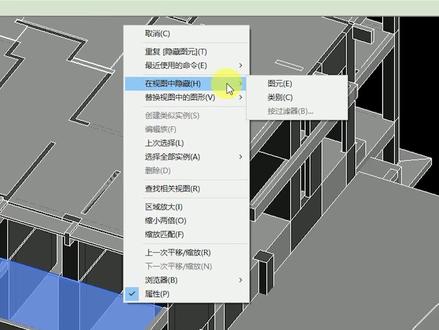
raving 之中链接的模型想要隐藏部分,构建时发现临时隐藏不能用,该怎么办? 对于 rive 中链接的模型,想要隐藏某个构建时,是无法通过临时隐藏对构建进行隐藏的。当需要隐藏那个构件时, 先用 tf 键选择需要隐藏的构建,然后单机右键选择在视图中隐藏,选择图源即可完成对选择的构建进行隐藏。当需要对选择构建这一类别进行隐藏时,可以选择类别进行隐藏。
239BIM日技


![[roblox 战争大亨]2025年新版地图铠甲S1防空车零件所在位置!#roblox#战争大亨#s1防空车零件#教程](https://p3-pc-sign.douyinpic.com/image-cut-tos-priv/6d15461ab0f61e6ff7fcc05da6bc5550~tplv-dy-resize-origshort-autoq-75:330.jpeg?lk3s=138a59ce&x-expires=2094627600&x-signature=AHsMuCjRL87bVHHgI2B0suWdbU8%3D&from=327834062&s=PackSourceEnum_AWEME_DETAIL&se=false&sc=cover&biz_tag=pcweb_cover&l=202605201740278783E2D9595BDD4799EC)


