omnipod 使用教程

粉丝508获赞5012
相关视频
 06:12查看AI文稿AI文稿
omelepart 打出管路 boss 使用测评致开箱与直入哈喽,大家好,我是糖糖,今天给大家开箱一个欧米 pot 的二代。这次我拿到的这个欧米 po 的二代啊,也叫大师,是一个小盒装的。那我之前拿到的都是呃,这种大盒装的啊,大盒装的是十个, 小和尚的是两个的五个啊。那二代跟一代的区别是什么呢?二代的话啊,他首先包装上二代是 这样一种浅色调的,一代是这种蓝色调的啊,每一盒里面装的都是十个,或者说有五盒装的那种小盒。 从硬件上去讲的话,一代他与我们软件的连接必须要通过这个小成盒啊。 ridingc riding 的小成盒这是这是二代的这样一个 riding 的,它是橙色的,相当于一个苹果耳机那么大的这样一个小设备啊,装七号电池。所以说就是一代我 我们再去使用的过程当中,必须还要除了带手机,还要额外带一个这样一个小成盒,才可以接入我们的 loop 闭关 app。 那呃,二代这次升级呢?我们直接二代就是直接就是蓝牙,直接可以连接手机,也就是直接抛弃了这个小成盒。那么也就是最近呢,这个手机的 app 他也直接适配了。二代。那话不多说,我们就直接开箱演示安装啊。这个二代在苹果手机上面的这样一个地环的这样一个安装激活的这样一个步骤哈。 首先这是一个二代的一个泵啊,他跟一代的区别就是这个盖帽啊,变成从透明的变成了蓝色的啊。所以我们现在亲切的称之为他为小蓝,只要一提小蓝,那就是二代。那先拆胰岛素,然后呢,撕开二代 这样一个五管路泵啊,一个泵的主体,还有一个注射器。把注射器这个卢尔街头给他拧上,拧紧。拧紧之后这个针头他就在里面了。然后向注射器里面抽取一定单位的胰岛素。 好,我习惯是用这种反推的方式来进行啊,而且是垂直的方向,有利于让气泡在最上面 啊。根据个人单位计量吧,如果不确定的话,就抽满两百个单位,如果用不掉,最后他是可以再抽出来装到第二个泵里面的。 ok, 两百个单位满了,简单的排一下气,这个剩下的胰岛素放到冰, 下次继续用。然后呢,这个抽取结束之后呢,我们先在手机上啊,点击一下连接泵, 点击设置,点击添加泵啊,选择我们新增的一个选项,就是欧米利炮的大使啊,点击大使。然后这个时候需要我们去设置我们的一些安全剂量,比如说最大基础率,最大剂量的一个限制啊,根据个人的一个情况去设置一下。 设置结束之后,再设置我们我们每日的这样的基础。一道一道速记啊,这个一般是医生给你的一个建议。 好,点击继续。然后他软件这边全中文的一个提示就是啊,请填充一个新的 omilepot 大使啊,蓝色标签这边写的蓝色标签。填充过程中,大使会发出两声 b 的声音,那我们这个时候就开始填充, 直接插入他这个箭头所指的这个方向啊,直接开始填充, 填充速度不要太快,防止里面的马达啊,活塞反应不过来,哎,滴了两声啊,全都打进去啊。不用担心打进去,因为他这个给你配的这个不会超过他蹦的本身的最大的一个容量啊。这个时候 这个注射器就工程圆满啊。结束了。逼了两天之后呢,我们点击一下配对啊。这个时候他就自动的去配对我们这个欧美的 pos 大使啊,也就是说 polo 二代了。在这个过程当中呢,我们可以找一个酒精连片,对我们即将植入的这个部位啊做一个消毒。 哎,他提示没有找到 pose, 请确保你的 pose 填满,并且在附近再点一下配对。 哎,配对成功,正在充盈。有时候在配对过程当中啊,有一些小小的意外,经过这么长时间的这样一个使用啊,往往我们多试几次啊,不要放弃这个 po 的,还是可以抢救回来的。 在配对成功之后,他正在充盈的意思是啊,这个时候正在排气啊,将管路内部的空气给他排空。这个时候我们不要去对这样一个 pot 的座椅任何一个操作,让他自己去排空就可以了。让他保持这样一个状态,自己排空。不要去取下他的盖帽,不要去撕他的这个游离纸啊, 你唯一可以做的就是消个毒。 好了,充盈结束啊。这个时候我们点一下继续。他会提示我们清洁植物部位移除后的真貌啊,并且撕下胶布,然后将后的贴在身上。 这个时候我们已经已经清洁过了。我们直接做下一个步骤,先移除真帽,直接掰下来就可以了。然后撕下这个油离纸啊,也就是说所谓的胶布吧, 打在我的肚子上,因为我的肚子上吸收会比较好,我在大腿上吸收会慢一点,所以我自己我一般扣的会打在肚子上。直接贴在肚子上啊, 就可以了。胰岛素输住的这个位置都可以啊,贴在这个肚子,他的软针是在这个位置的啊,软针是在这个位置。所以说你胰岛素输出的位置尽量去选择跟这个位置相接近的,就是以这个位置为准。 好贴上去之后呢,我们直接点啊,他这边还汉化,还没有完全是 insert 啊。也就是说植入的这样一个意思。我们点击植入,他仍然会有这样一个排气大大大大的一个过程,然后软着 a, 就这个时候突然就给你打进来了,那证明这个时候我们这个 po 的植入就结束。 这边也是一个勾就点继续啊,表示设置已经完成后的可以正常使用了。并且提醒我们后的一个到期日期就是三天后的晚上的八点四十八分,他会给你发一个提醒啊。 好,这个 po 的激活设置啊。植入结束了,我们看一下血糖仪 cgm 啊,他是如何去把这个血糖先给他显示进去。
584糖探 02:55查看AI文稿AI文稿
这个呢是 only pod 的第一代,这个呢是 only pod 的第二代,我们叫它 dash, 那它们两个呢?从外观上面来看的话呢,差别不是很大,但是这个,呃,塑料小片的颜色是不一样的,一代的话是透明的,二代的话呢是做的这种蓝色的, 那他们的体积啊,大小容量都是一样的,那具体的区别在什么地方呢?我们在使用一代的时候是一定要去配合这样一个小局和的,只有这个小局和才能通过蓝牙我们的泵和我们的手机 app 去连接起来,通过手机就能够去打胰岛素的功能。 但如果我们去用这个二代的话呢,那么这个小菊盒就完全不需要了,因为这个二代呢,他已经实现了自身就带蓝牙这样的一个功能,那么从讯号的稳定性上面来讲呢,会更好一点, 因为那个小橘盒呢,我自己用下来的感受,第一个费电,第二个容易断,第三个如果忘了带的话,那这个泵基本上也 也是没什么用了。那我现在呢就来一个,我用的软件呢是 free aps, 那么在这个地方呢,我们添加 book, 呃,里面有好几个选项,那我们用第一代的时候呢,选的就是这个 only pod。 那我们用第二代的话呢,选这个 only pod dash。 我们现在就来连一下, 我们要先输入一个基础率,那我一会再调整,我们先点继续还是一样,我们直接用笔来把这个药素打进去,打到最大六十个单位就可以了,然后这里有个小孔直接给他怼进去, 我们再输五十个单位就够了。这个泵呢,很多人问可以打多少个单位,他一次性的话呢是可以打两百个单位,但一般来讲没有人三天能吃这么多, 所以大家最好还是根据自己呃生活的一个习惯啊,打一个差不多的剂量就够了。那如果你要用泵去走基础的话呢,你得把基础也算, 但是我的话呢是用长效打基础的,所以我就只需要大概估算一下我吃饭需要的剂量就可以了。然后接下来呢,我们就点击这个配对,那么他们两个呢,就通过蓝牙先去进行一个连接 好,那么现在他已经自动去排好气了,我们就点击继续小贴片和这两片贴纸都给他撕掉就可以了。 那这个呢就可以直接敷贴在我们要注入胰岛素的部位,那我现在就来贴一下。贴好以后呢,我们就继续点这个蓝色的按钮植入到我们的肚皮里面, 大家听到啪的一声,就是它里面的一个软针已经植入到我们的这个皮下脂肪了。好,那我现在呢已经完成了佩戴,我们点击继续。那我用的这个软件呢,在使用泡第一代和第二代产品的时候呢,在基础的这个地方啊,用代史的话呢,我们最低每个小时的 基础可以设置为零,也就是说你一点基础都可以不走,那我们在用第一代的时候呢,最小的话呢,是必须要走零点零五个单位。所以如果像我一样需要用笔去打长效的朋友呢,那就要注意你的更走的基础和笔打的长效,自己要很好的去找到一个 平衡点,来维持你血糖的一个稳定。如果大家对于这个无管路贴膜有什么问题呢?也可以在评论区留言,退糖是件很酷的事。
 01:28查看AI文稿AI文稿
这个完成了是吗?嗯,继续。然后呢?先不点植物泡了是吧?对,先把这掰了是吗?啊, 以前我败的时候总是小心翼翼,不知道为什么现在已经很熟练。哈哈哈,进圈进圈。 你也觉得 第五圈 ok 啊。
21甜星在线 03:44查看AI文稿AI文稿
the pdm controls all the pods functions and has a touchscreen similar to a smartphone the home screen has three main views, dashboard basil and pod info there are two main actions you'll perform when navigating the omnipod, dash, pdm tapping and swiping fields that you can edit are either underlined or framed by a box to edit them tap the field this opens, a keyboard, number, pad, slider or scroll wheel while using the pdm you'll also encounter toggles check boxes, radio buttons and drop down lists, options icons appear on the right side of certain lists tapping the options icon brings up a list of options relevant to the item in that row both the on screen back buttons as well as the triangle button beneath the pdm screen can be used to navigate to the previous screen the circle and square button beneath the screen have no function accessible from any home screen is the bolus button at the bottom of the screen to access more settings tap the menu icon on the upper left side of the screen the status bar at the top of the screen will display information about the volume of insulin in your pod as well as your pdm's battery charge during use the pdm will also display confirmation messages with a green banner at the bottom of the screen it will disappear after five seconds you can swipe the banner to the right to dismiss it earlier the pdm uses bluetooth technology to communicate with the dash pod as well as to the contour next one bg meter to set up the pdm first insert the battery that is included in the starter kit turn the pdm over and use the attached pull tab to remove the pdm back cover insert the new battery remove the pull tab and snap the back cover into place to turn on the pdm press and hold the lower smaller of the two buttons on the side of the pdm the larger of the two buttons control the volume you may increase the volume or decrease it down to vibrate on the top of the pdm, you will find the micro usb port for charging or data exchange all of personalized pdm settings must be entered into the pdm before use the pdm will keep a 90 day history of all blood glucose entries insulin delivery and any other sections that may occur the pdm does not automatically adjust time date or time zone be sure to adjust your pdm's time for daylight savings if you are traveling to a different time zone be sure to adjust the time zone setting after activation the pdm must be within five feet of the pod for communication。
5糖泵 03:25查看AI文稿AI文稿
哈喽,大家好,我是唐太。今天给大家开箱的是一个较厚的的五罐芦荟,他一盒是十个。然后这个就是他拆下来的样子。我刚才太可惜了,一不小心操作也不知道什么原因报废了一个。我现在给他撕下来。 那这个就是武汉刚刚报废下来的那个主体,一百八的大洋。就这样就这样就没了。就这样就没了。这玩意真的是太快了。那我先把他刚才的这个胰岛素给他抽下来,抽出来。 顺便看一下这个 po 的里面长什么样嘛。这边这边可以看得清楚。更清楚一点,这边有个电路板,电路板这边是马达啊。这个 pos 他是全抛的啊,全抛,也就是说你用一个这个玩意最多是八十个小时, 必须把他给他扔掉了。必须把他扔掉。我继续抽一下,看看能不能再抽一点医疗送出来。因为我刚才打了一百多个单位的时候, 那就没有办法再往里面打了。就是,而且一直提示第一,不知道什么原因。这是这是第一个 pose, 我会把它留住,作为我的一个报废纪念吧。 做一个报废纪念这个泡的。简单的去介绍一下他会用到的东西。什么?首先我们要准备自备胰岛素,然后这个是 orange 啊,小成盒。 orange 小成盒是什么意思呢?它是一个蓝牙中记的一个东西啊,用的是七号电池。我们把七号电池给它放进去,然后关上之后它会震动闪一下啊,这个小成盒就结束了。 然后这个是 pop 的主题,主题就是这个被我报废掉的一个主题。然后用手机去执行他的一个注射控 和闭环的一个控制,这是手机手表也可以执行啊,必须是苹果手表。那这个时候我们点击手机上面的设置,我们先把之前的 pod 拿删掉啊。点击手机上面的设置,点击添加泵,选择 om only pod 啊, 然后选择 orange pro, 然后点击继续,他这边会连接,连接成功啊,连接成功之后会震动一下。然后我们进行这样一个输出的限制,比如说最大基础率,还有最大剂量的一个限制,最大基础率,两油,最大剂量啊,十个单位每次。然后基础率的一个设置,把我们全天的基础率全都设定到这个里面去啊,全天基础率。 这设定结束之后,点击继续啊,他就开始啦。为星 pod 注入胰岛素。注入过程当中会听到滴滴配对过程中,请将 pod 与这个 rylink 啊 靠近,也就这两个要靠近,因为他们是蓝牙通讯的。那我们呃。然后他底下有个小字,灰色的字就是此刻请勿移除真帽啊。真帽是这个塑料片。那我们先把这个 pose 给他拆开, 他有这样一个主体,然后有这样一个取药器。取药器。那取药器我们说了,刚才报废了一个,我们继续用这个报废的这个取药器呃,来做这样一个取药的一个工作。先把上关的空气排掉好,然后继续取药。 这取药呢,就是这样子的。我们给他往下抽,抽抽抽抽抽抽抽抽抽。 冲的时候尽量慢一点吧,尽量不要让它里面存在一部分空气。好了。然后再回到这个 pos 的界面啊。
233糖探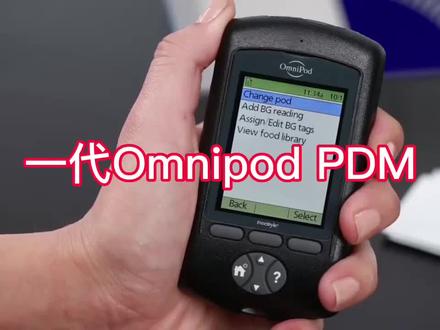 01:46查看AI文稿AI文稿
when on the home screen select more actions and then select change pod your pdm will now take you step by step on how to fill and activate a new pod the pdm will now display no active pod would you like to activate a pod now once you click yes the pdm will prompt you to fill a new pod with insulin to fill a new pod use an alcohol swab to clean the top of the insulin file assemble the fill syringe by twisting the needle onto the syringe and then remove the protective cap draw air into the fill syringe equal to the amount of insulin you intend to fill the pod with to press the air into the vial of insulin locate the marked back arrow on the underside of the pod this is the fill port insert the needles straight into the fill port it is easiest to keep the pod in its tray while filling make sure to completely empty the syringe into the pod if you hear two beeps then you still have insulin left in your syringe continue filling until all the insulin is transferred to the pod the pod will beep twice indicating the system is ready to proceed you have completed filling a new pod place the pod next to the pdm the pod in the pdm should be placed side by side and touching before you press next to begin the priming process press next to begin priming your pod the system will perform a series of safety checks and automatically prime the pod at this time once priming is complete the pdm will beep then prompt you on the next steps of pod application。
5糖泵 03:00查看AI文稿AI文稿
哎,昨天那个讲了一下油管路的泵,主要讲的是美得利,今天主要讲一下无管无管路的泵吧,这 五管路的朋友,国内的有微肽,但是我从来没有用过,我用的主要是这个。呃,国外的叫 amnipod, amipod 是纳斯达克的上市公司,然后他在国内的产品常见的有三种,一种叫 amipod, 或者叫 amipod 一,然后官方名叫 amipod aeros, 第二种呢叫 amipod dash, 也有人称之为炮的二,然后官方名称就是叫 amnipod dash, 简称 dash。 然后另外呢还有 amnipod 五, 这种上面会写的叫 omipo 的五,然后他们之间的区别呢?我们来看一下啊。这个 omipo 的,这是 omipo 的一,他是这种白帽子,然后他这里面写的就是 omipo 的,然后 omipo 的戴饰呢,他是蓝帽子,就这个 蓝色的扣,然后它上面写的呢就是叫 omnipod, 然后底下会写一个 dash, 然后 omipod 五呢,它这个也是透明的,跟 omipod 一好像是差不多的 哎,差不多,按一个应该也是透明的,但他这个背后呢,这写的就是奥姆力炮的五,然后这三种东西呢?官方来说啊,都必须要用控制器,什么叫控制器呢?那你看,这是奥姆力炮的一代的控制器,奥姆力就是 pdm, pdm 就是 personal diabetes manager, 个人糖尿病管理器,然后这样一个控制器,这样一个简介。这是这是一代的控制器,然后二代的控制器是这样的, 然后五代的控制器,我这个只有没有外壳,只有这么一个这个东西。然后官方都是控制器啊,然后一代呢?他是射频通信,就这玩意,他是射频通信, 不是蓝牙的。所以呢,如果你想用手机连接的话,手机上你编个路谱软件其实也可以连接,但是呢,他就需要有一个小菊盒,把这个 almond pod 的 来这个射频信号,然后通过小局和转换成蓝牙信号再发送到手机软件上,然后这样就可以实现手机上的控制。如果你,如果你没有小局和的话,你就只能买一个控制器,然后在上面设置好基础率,然后打大计量的时候设置大计量。 然后二代呢?这个 oppo 的代史也有控制器,但是呢,这个代史这个软件上支持比较好。就是国外这个程序员破解的吗?嗯,安卓手机用 a 装个 aps 就可以控制代史。然后苹果手机呃装一个路普或者福瑞 ips, 福瑞 ips, 是是是,那个路普的这个 呃分支是其中一个,是一个分支版的代码,然后所以苹果手机装个 loop 也就能也能控制 des 啊。 然后路普的话需要一点这个苹果个人开发者账号的这个分摊的费用吧,一年,像我们新球上这个家长编的就一年九十九块钱。 所以这个昂密炮的五的话,那就是只有控制器,然后昂密炮的五的好处是他用控制器可以当代使来用他如果这个跟德康他是形成官方闭环,就说白了,你身上打个, 但是打打高密化五,然后打个德康,用控制器设置好了之后就不用管他了,他就可以自动闭环了,大概就是这样的。关于价格我回来发评论评论区吧。
358一只渣鑫兔 02:42查看AI文稿AI文稿
omnipod five automated insulin delivery system overview the omnipod five system has three main parts the omnipod five app on either the provided controller or on a compatible smartphone the omnipod 5 pod and the dexcom g6 cgm system the omnipod 5 app is used to control and monitor the pods operations after entering your prescribed initial insulin settings you will use the app to view your data and notifications send insulin delivery commands and activate and deactivate your pods the omnipod 5 pods are equipped with smart adjust technology that can receive cgm values from the dexcom g6 system and use those values to automate insulin delivery the pod is wearable lightweight and holds up to 200 units of insulin can be worn up to 72 hours and is waterproof its tubeless design allows for convenient discrete wear on multiple sites on the body to use the system in automated mode and active dexcom g6 cgm is needed to learn how to use your dexcom g6 cgm system be sure to review training resources and options provided with your dexcom device please note that the omnipod 5 system is only compatible with the dexcom g6 mobile app to connect the two systems all you need to do is enter and save the dexcom g6 transmitter serial number into the omnipod 5 app before placing your dexcom g6 cgm sensor think about where you will be placing your pods pods can be worn up to 72 hours so you can expect a few pod changes before you will have to change your dex com g6 cgm the pod communication works best if you place the pod in direct line of site to your cgm try to avoid placing two devices on opposite sides of the body once you have the entire system set up each device communicates via bluetooth wireless technology pod and dexcomg6 app receive cgm values and trends from the dexcomg6 transmitter the army pot 5 app receives cgm values and trends from the pod therefore there may be a delay in cgm values and a slight difference between the value shown in the dexcom app and the omnipod 5 app please note that dexcom alerts and alarms will only come from the dexcom g6 app。
22糖泵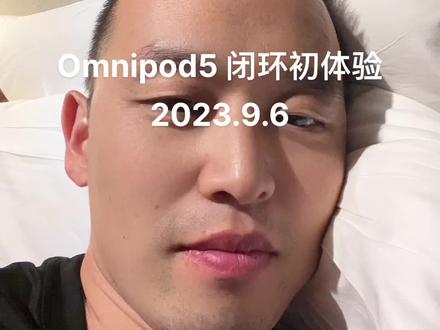 03:00查看AI文稿AI文稿
哎呀,我从遥远的漠河经过差不多二十个小时的火车的颠簸,终于又回到了人口稠密的大城市, 四天没洗澡了。哈哈,这个倒也不是说不能洗澡,我们住的那个民宿,他其实是可以洗澡的,但是放那个热水都不热。然后这第一天我咬着牙洗了,一下子,哆嗦了一梭子,哎呀,一分钟就跳出来了,太冷了。 第二天干脆就没有洗澡,只洗了个头。这个人还长期不洗澡还是不行的。哈哈。然后呢,今天终于暖暖的洗了一个热水澡,感觉舒服多了。而且好几天没有在这种正儿八经的床上好好睡个觉了。哎, 想说点啥呢,就是这趟漠河之星啊,有一个非常大的区别就是我最近这两天用了 pod 五,就是 omipod 五加上德康 g 六的闭环。就是也是官方的闭环啊。商业闭环是适用于两岁以上就可以。 然后我反正用德康也准。然后 omnipod 我也用过一代二代,这个 omnipop 五都都试了试,其实都差不多。 然后泡的舞,它的好处就是拿一个控制器,然后在这个控制器上设置好之后,然后就可以脱离控制器。然后你的泡的舞就跟德康只要打在身体的比较接近的位置,最好是同一侧,他们就可以通过蓝牙通信。自动的闭环。 然后但是他的这个呃,闭环的这个这个,嗯,不是那么激进,他主要是这个, 呃,这个这个这个更像是自动基础吧。然后呃,目标血糖是最低只能设置到六点一,所以很多人会因为觉得目标血糖太高了,然后而不满意。我反正先试试嘛,我觉得还好。 试了这几天的感觉呢,就是第一,半夜是真的可以很安心的睡觉了,就真的是不用管。 这个爱心不只在于不用担心低血糖。因为有时候会担心低血糖吗?你再也不用担心低血糖,低血糖他会自动停蹦,也不用太担心高血糖。因为前两天我记得有一天晚上吃特别油腻,吃东北铁锅炖 吃的特别油腻。然后本来我觉得按按往常的情况来说,半夜三点以后至少得飞十几吧。然后结果第二天早上醒来一看,哎,七点几还行。嗯,半夜曾经到过八九十的样子。然后后来 被他这个闭环吗,自动给打下来了,而且打的很平稳很平缓,这让我感觉很开心。然后坏处肯定是有啊。第一是可能窗口会嗯,比打针要大。 第二呢,是这个。呃,像我今天下午就莫名其妙的飞了一下子,然后补了好几次没下来,有可能是有气泡然后导致的。所以反正算是一次闭环的体验吧。我觉得还不错。众所周知,我还没有开始用路虎或者 aips, 过一阵子我会。
238一只渣鑫兔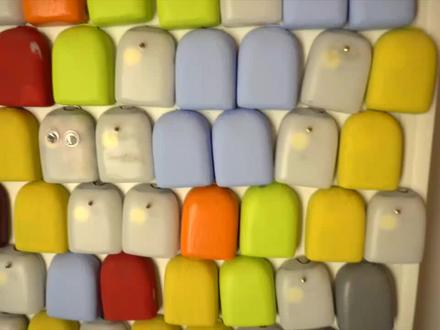 08:58查看AI文稿AI文稿
one two three four five omnipot five is here i am wearing the omnipot orange and this can only mean one thing we talk at omnipot omnipot five has just been approved by the american fda in this video i am bringing down everphant that you need to know about the omnipot five how it works and a lot more hey, it's camille notabetic if you're new here i make videos about diabetes tech so so so glad to have you make sure you're subscribed to stay up to date on all things diabetes tech so obviously omen pot five is the newest port from inchlet, but it's also the first omen pot under the new name in convention a couple a lot of months ago i interviewed omnipod ceo shacy petrovic and she explained this to me question about just the number five i'm curious does that mean this is the fifth generation of omnipod or where did the number five come from well, you're exactly right it is the fifth generation of amni pod and i think you know because we don't have that typical naming convention people sometimes are not aware of how much innovation has happened in the pipeline and the fact that there have been five generations of amy pod omnipot ii omnipot dash to omnipot five is the biggest update to omnipot ever omnipod five integrates with the dexcom g six cgm and it is a hybrid close loop system omnipod five connects to the dexcom g six censor directly which is huge put on your pod you put on your dexcom and you go into automated mode where you're in close loop control and then you can kind of go on to your day so you can go for a run or take a shower or take a nap whatever, it is you want to do and stay in close loop control and get the benefit of close loop control you really only need your handheld controller you know what you're controlling the system with to announce a meal omnipot five has a customizable glucose target between a hundred and ten and a hundred and fifty milligrams per deciliter so you can set the system to keep you at one ten in the night or one thirty during the day and adjust as you wish a key feature of omnipot five is exercise powered by the the hypo protect technology for times such as exercise in the hypo protect mode omnipot five targets a hundred and fifty milligrams per decilita omnipot five can project your blue glucose level sixty minutes in advance and every five minutes it adjusts your background to your base or insulin delivery according to your glucose level so it can give you additional insulin or less insulin or stop insulin delivery based on the current glucose nd sixty minute protection dexcom integration does not stop here because omnipot five is equipped with a first of its kind smart bolus calculator it takes into account not only glucose value, but also glucose trend so if your glucose is on the higher side and trend and high smart bolus calculator of an omnipot will intelligently suggest an appropriate inchlindos take it into account the glucose strength so you don't have to worry about it so in you to control omnipot five how'd you do it well this is very exciting omnipot five can be controlled with a pdm or a dedicated smartphone app at launch omnipot five is compatible with samsung galaxy s ten with android eleven with more android phones expected very shortly this is absolutely massive news as this is fda's first ever phone control approval this is huge and this is years ahead of tandem they are expecting approval of their phone bolus feature in the next couple of months, but this is four phone control so with the omelet port five app on samsung galaxy is ten you will not only be able to bowlers, but you will also be able to control all other parts of the omelet port five system including start a new pod position aport check in its status absolutely everything full phone control is here everyone eventually omnipot firefoo also be controlled with an iphone as intellect is working on an ios version as well timings of the iphone control capability are unknown as of now if you don't want to use your android phone at launch or you have an iphone you can also control omniput five of dedicated pdm if you lose your phone switch your phone switch from pdm to phone or phone to pdm all of your settings are not transferable as if recording this video i really hope that they will improve on this going forward for now insulate recommends regularly backing up your settings with their insulate provided gluco, it is also worth mentioning that each pod can be connected to one device so you can either control your pod with a pdm or your as of recording android smartphone so you cannot use both which makes perfect sense omnipot five is an incredibly intelligent and smart system and has artificial intelligence build in omnipot five automatically looks at your long temp trends and it updates your settings it is like heaven and an acronologist in your pocket so when can you get it well omnipot five is now approved and authorized by the fda and it is now available in a limited market launch in the us what about uk in europe well, when i interviewed chasey petrovic ceo and precedent of insulate home of omnipod she confirmed that insulate is committed to bring an omnipod five tenology to europe, but couldn't provide any timelines and to european up the approval and launch timelines are currently unknown as of this recording omnipot iidash was fda approved in june of twenty eighteen and c marked in september of twenty nineteen now this time round of omnipot five i am expecting a shorter window of approval gap between us and europe either way i can't wait so that's omnipod five it's the biggest upgrade to omnipod ever as a proud podder myself i am so so so incredibly excited about omnipod five if you want to learn more about omnipot, i had the honor and pleasure of interview in shaysey petrovick, they'll see you in president of insulate home of omnipot in october last year you can see that video up here it has a lot of information about i'm gonna put five so you can see that and a lot more in a band of video so i hope you enjoy that as well let me know if you have any questions about on and put five i will try my best to answer them or find out for you in the comments and let me know if you think where i'm gonna put five i will see you in the next one bye when i think about the next few years, i think there's a tremendous opportunity for a continued innovation for people with diabetes and we see the opportunity to just continue to drive more and more simplicity and we will do that through integration with consumer technology we will do that with artificial intelligence and being able to eliminate the amount of interaction that a user has to have with their technology to get more predictive and more intuitive our goal is for a user to be able to put on a pod put on their sensor of choice you know and be off to the races successfully managing their diabetes maybe with just one parameter entered you know maybe we just enter your weight and we can you know we can go from there we want to do as much of the math the calculations the burden the work that you my father and others are doing every day we want to take that work away and make the technology do that work and make your life able to be focused on you know everything that you love and less focused on managing and navigating your diabetes so that's our goal and we see and you know the opportunity for multiple iterations on ami pod five to drive more and more and more simplicity and less and less and less burden for people living with diabetes。
23糖脑三期 00:18查看AI文稿AI文稿
高科技 i'm not part 的胰岛泵,使用门槛低,几百块一个,适合短期用泵,备孕出差旅游首选。轻巧方便,和硅基顺感差不多大小,贴在身上,智能算法可预防夜间低血糖。糖友想具体了解吗?欢迎在评论区留言讨论哦。
113天泰保健 00:30查看AI文稿AI文稿
培顺感以它的大小为参照。这个是小菊盒,适用于美敦丽的七幺幺七二二 omipo 的转换信号。这个是微肽的科研泵,可以接入闭环抛式的,换除药器即可。泵和电池可以重复使用,只更换除药器。 这个是全抛式的,欧米炮的和代式炮,式炮的需要与小菊盒一起用,代式可以直接用,用三天,一个月用十个小菊盒。科研微太科研泵,欧米炮的代式,大家可以根据需要进行选择。
23一型PM小芝麻 00:44查看AI文稿AI文稿
啊哈喽,大家放假了,现在是早上六点,打了一个回家的顺风车,带一个 pod, 因为在路上比较方便,他只能用三天。我一般抽八十个单位就够了,有点难,抽 这么一点点就是一百个单位。根据远见的指示操作,注册好了会滴滴两声, 在软件上点击植入。 啊,吓我一跳。回家了,朋友们假期愉快。
199阿月爱吃糖 01:31查看AI文稿AI文稿
在掌握了 moke 的基础使用方法之后,你可能会发现 moke 的运算逻辑和 ae 运动跟踪器有一定差别。希望用惯了 ae 跟踪器的你能通过这期视频加深对 moke 的了解。 首先,摩卡的钢笔工具除了绘制默认的样条曲线,也可以长按显示隐藏菜单后选择常见的贝塞尔曲线绘制。但摩卡的钢笔并不能直接在路径上添加毛点,需要切换到选择箭头旁的添加点工具才能添加毛点。 而某卡并不像运动跟踪器一样存在搜索区,它通过多个设定的维度识别在采样区内的画面变化,从而生成跟踪数据。因此,理论上采样矿物需移动也能进行跟踪。在这个案例中,画面移动幅度很大。 我想在地面上跟踪一个素材,但是很难找到持续在画面内的跟踪位置。以前我介绍过 a e 跟踪器如何通过改变采样点来实现连续跟踪。 在某卡中怎么办呢?默认情况下,太阳区和跟踪区是链接随动的,将软件切换到基本界面后,你就能找到跟踪按钮下方的 link to track 选项, 可以看到他默认链接的是你刚才建立的跟踪图层,这时你把它切换成但图,采样框将不会跟随画面,但是他将在当前的位置上持续为跟踪框提供采样数据。这下你明白他的工作原理了吗?
1663剪辑奇才 07:20查看AI文稿AI文稿
一下这个我来他是一个笔记软件,然后功能非常的多,然后嗯, 就是我在考研期间用他然后做了很多笔记,然后也确实帮到我很多,提高很多的效率。然后他我可以给大家看几个我拿他 做的一个案例,比如说这个计算机的知识库里面可以放很多的,比如说页面、视频、音频,还有说这个一些网上的资料、博客之类的,把它汇总起来,还有文件,然后它还可以用来做这种考研笔记, 就是这里面我用的是数据表格,然后把里面的一些嗯笔记给他分类整理,分类整理,然后嗯就是起到一个就是归纳的作用。然后还有一 个就是用来用来做一些计算机类或者说是技术类的一个教程,比如说这个加瓦的笔记, 就是这个加拿的笔记也是这样做出来的。然后今天我就先讲一下他的最基本的使用方法。 首先就是这他是一个以页面为主体的一个笔记结构,然后在这个页面里面你可以去添加其他的东西。 然后这个题就是背景图和这个图标页图标他都是可以随机生成的,当然你也可以更换为自己喜欢的,比方说 嗯,就是自己上传呀,或者说是在网上找一些图片, 然后在这里面他有一个模板中心,在模板中心里面你也可以去用他的现成的模板,他里面的模板非常的多, 就是有个人管理的,然后有技术的团队的这些就是有很多,这个可以自己去看。 然后今天咱们可以就是做一个比较基本的介绍吧,就是首先它里面的这个 内容,嗯,最普通就是文字,你就直接打字就行了,有第一行文字,然后 它里面这个文字它也是有各种格式,你可以自己调。比方说,嗯,就是加搓呀,写 起啊、下滑线呀、删除线呀,变成代码呀,然后还有公式呀什么的,这个公式咱们回头再说,公式就比较复杂,然后颜色,然后链接,如果有界面的话可以引用页面,还有他最新推出的这个角注和注视, 你可以写一个注视,然后他底下就会有他的注视列表,然后 它里面这个内容的单位是以块为单位。什么是块呢?咱们现在按一下,就是键盘上这个,下这个叫什么左斜线,然后它里面会有很多的基础快列表, 这些块都是能用的。嗯,其实它里面功能是很多的,比方说咱们要给这个,给这个文本做一个主标题, 他就自动生成,然后他有一个快捷键,就是比如说这里我就写主标题, 还有一个快捷键就是按一个井号,然后空格,他就会自动生成主标题,让你再写主标题就可以了。然后副标题也是按两个,呃,不是就大标题,大标题,按两个井号,以空格大标题就可以了这标题,然后 这些都是比较简单的,和普通的比较软件没有什么区别。嗯,接下来说一个比较有意思的 就是,嗯,首先是他的代办列表,代办列表现在有两种,就是比方说我要做的是,然后这里面代办列表,他 这个就是快捷,快捷键的话就是你按了回车之后,你可以直接写代办链角拼音 dblb, 然后下面给你两个选项, 你就选就行了,回车就行了。然后比如说吃饭、睡觉,这就是一个代办列表,这代办列表呢?如果你做完了,比方说你写了个备忘录,你做完了,你可以点一下他就划掉了,再点一下他就划掉了,然后还有一个高级版, 高级版就是一个圆圈,还是吃饭睡觉,他有一个就是正在进行的过程, 这个就是正在进行,然后再点一下他就划掉了,再点一下就划掉了,这个是代表列表。然后嗯,还有什么 这个数字列表、折叠列表什么的,折叠列表就是说,嗯,比方说我要做的是,然后你可以点开点一下这个小箭头,然后展开说就是吃饭,然后睡觉,当你不想看他具体那种时候,你就把他点一下就回去,再点一下就出来, 然后嗯, 然后就是着重文字,着重文字他有几种,就是有这种跑马灯的这种,你看他就是会会,就是滚动,循环滚动,像那个 led 屏的那个滚动信息一样,你也可以不让他滚动,就在这里调一下,不让他跑马灯就可以了。 然后 嗯,基本跨里面分割线,分割线的快捷键 就是按两个这个小杠,右上角加号,左边的那个小杠按按三下,他就是一个分割线,就是你一部分内容结束了,你想换一页的话,你就可以画一条这个分割线, 然后代码片段,嗯,这个代码片段呢,就是像我们学计算机的,就可能会用到一些代码,或者说是一些高亮文字。咱们举一个例子吧,以我比较擅长的拍摄为例, 就是你看我写一个 print, 然后 hello 腕的,他这里面会有这个高亮,就是比如说你这个函数是蓝色的,里面字不出来是绿色的,他就会有一个这样的显示,还很好看。然后就是这是一些基础款, 然后公式公式,如果说这个公式怎么说的话,呃,就比较复杂了,但是我可以简单的演示一下。这个公式有非常好的一点,就是它是可以识别的,直接去识别公式,而且它识别的精准度还是不错的。嗯,在我之前考研的时候, 嗯,就是自己经常去截一些图,比如这里数学公式, 比如说这个题目吧,然后把它上传进去,识别下来它自动就出来了,其实还是挺方便的。然后这就是基本块。
534小博 05:36
05:36


