rslinxopc使用教程
那这就是我们后面,嗯,大部分时间要用的软件, isologics 五千,嗯,他的一个初始界面,那我们回报,呃,这个课程的课件,我们看一下,就是这个 isologics 五千,嗯,这个界面上面有些什么内容? 首先看一下这个窗口的主体,刚打开的时候,我们看到是一个,嗯,这个开始液,那这个开始液呢,对我们来说没有什么太大的作用,我们就直接关掉了。 然后呢上面呢是最上面是菜单栏啊,这个是跟所有的软件都一样的,嗯,最上面菜单栏,然后,嗯,在下面呢是功能按钮,一些常用的按钮,嗯,在这个这个按钮栏里面,其中包括就打开打开的那个按钮,然后保存按钮等等啊,然后在下面 呢是分成了两个部分,左边呢是飘 c 的状态信息,嗯,在这边呢是可以看到一些飘 c 的状态,比如说有这个程序有没有爆错啊,有没有正常在运行啊等等,这个后面会具体的讲一下。那么右半部分呢 是指令区,那么我们在编写飘梯程序的时候呢,嗯,程序里面要用到很多的指令,各种各样的指令, 那么有些指令呢,我们可能自己都背下来了,有些指令呢,我们也不知道这个到底怎么来给他写上去的,那么我们就可以在这个指令区里面找到对应的指令,把它拖进我们的城市里面去。那么所以呢这个指令区里面呢,里面我们就可以看到这个 isologics 五千这个软件, 嗯,所能使用的所有指令啊,都在这个指令区里面。那么下面呢我们来看一下,嗯,这几个区域到底有些什么具体 的东西我们需要了解的, 首先我们来看一下菜单栏,菜单栏呢上面有很多选项,这菜单里面有很多东西,那么对于我们初学者来说呢,嗯,只要先了解两个东西,第一个呢是在艾特特下面, 艾特的下面菜单里面有一个叫做 ctrl properties, 嗯这个呢是控制气属性, 那么这个里面呢,我们就可以查看这个这个飘 c 的一些属性,那么我因为我现在嗯没有打开任何飘 c 程序,所以呢它是显示成灰色的啊,表示当前这个这个 ctrl, 这也是不可选的, 只有在打开程序之后呢,才能看他这个打开这个属性窗口看这个状态。那么后续的章节呢,我们会专门介绍这个控制器的属性啊,这里我们就先 嗯大致的讲一下,先了解一下。那么还有一个选项呢,是在肯定的推选里面,这个通讯里面他的第一个选项叫做 who active, 那么这个呢如果选用它呢打开来的呢,是一个类似于 ice links 的一个界面,它有一个树状结构,能看到我们现在电脑所连的 poc 的所有的这个刷出来的模块,那么这个呢是用来 将 plc 程序连接到 plc 控制器的,然后可以通过他通过这个 who active 这个选项 来进行程序的下载,上传等操作,那么我们这个课程的后续的章节会专门介绍这个操作的具体方法。那么现在我们所要了解的就是这个菜单栏里面有两个东西,我们需要知道的就是一个是这个控制技术性,还有一个这个 whoaktv 这个选项用来连接 这个飘 c 的,然后我们再来看一下这个功能按钮区域有些什么东西,嗯,这个上面呢也有很多按钮,那么需要我们了解的呢?嗯,实际上就是五个按钮,第一个呢是新建城市的按钮, 他是可以用快捷键 ctrl 加 n 来代替,用来新建程序的。那么第二个呢是,嗯,打开打开程序的按钮,嗯,可以用 ctrl o 代替, 就是在电脑上面打开一个已有的票子程序啊。第三个呢是保存按钮,可以用 ctrls 来代替。 那么还有两个呢是,一个是回退操作,一个是恢复操作,那么分别可以用 ctrl z、 ctrl y 来代替。 再看一下飘 c 状态信息的区域, 左上角是当前的程序状态,嗯,现在是显示没有恳求了,就是表示没有程序,那如果显示 office 呢?表示程序离线中, online 表示程序在线中,那么 online 和 offline 呢?必须是在你打开了一个程序之后才能看他到底是离线状态还是在线状态。那么什么叫离线呢?就是,嗯,表示就是你这个程序虽然打开了,但是呢还没有跟这个实际的这个飘 c 连接上, 那么在线呢就表示你的飘 c 程序已经打开,而且呢已经跟这个硬件的 p l c 已经连接上了,那么你当前在这个 isologist 五千里面看到的所有的信息,实际上就是反映的就是 现在实际的飘 c 里面的一些信息。再来看右侧,右侧呢有四个指示灯,第一个是 让指示灯表示的是程序是否在运行,那如果是程序,嗯,只要这程序运行起来了,那么我们可以看到这个让指示灯就会显示成绿色。第二个呢是 ok 指示灯,表示程序有没有出现故障,那如果出现故障,那么程序就停掉了,停掉之后呢,这个 ok 指示灯就会显示成红色。 第三个指示灯呢是电池的电量指示,嗯,如果是,嗯,这个 cpu 的这个电池电量低的话,那么这个电池的这个指示灯会显示为红色。第四个呢是 io 的指示灯,表示 io 是否正常,如果正常就是绿色,不正常就是红色。 再来看一下最右侧,最右侧显示的呢是飘 c 的工作模式啊,飘 c 呢有三种工作模式,第一个呢是 rap 模式,就是预计模式,在这个模式下呢啊,飘 c 程序在运行, 这个逻辑在运行啊,我们呢没有办法在在线编辑这个嫖 c 程序,没办法修改这个嫖 c 程序,那么嗯,这个什么时候用这个乱模式呢?就是如果说是这个, 嗯, poc 程序这个系统已经上线了,一直在使用中,那么我们要保证他是运行在这个这个运行模式。 然后第二种模式呢是 pro 模式,就是编程模式,嗯,这个模式下呢,漂推程序的这个罗将没有在运行啊,我们可以在线的编辑程序。 第三种模式呢是蕊木头模式,远程模式啊,这个模式呢是我们最常用的模式啊,在这个模式下呢,我们既可以远程啊,所谓远程就是在 isologics 五千上面这个软件上面,嗯,把这个飘 c, 嗯,从运行打到编程模式,也可以从编程模式打到运行模式,可以随意的切换这个模式 啊,这个就是远程模式啊,所以呢,我们一般调试阶段呢,因为我们还需要不停的在这个修改这个程序,调试这个程序,所以呢我们一般调试阶段呢,就打成蕊木头模式,你这样我们操作起来可以方便一点,灵活一点啊。但是如果说这个系统上线了呢,我们就把它切到这个软模式,那么嗯,怎么来切换这个这三种模式呢? 嗯,我们可以在飘 c 的 cp 模块上用钥匙开关来选择这个工作模式,我们看到这个 cp 模块上面有一个钥匙开关, 嗯,这个钥匙开关呢有三个位置,嗯,调到左边呢,就是 ren 模式,那如果达到 ren 呢?这个 pac 程序就在运行了,那么 如果打到右侧这个就是 program 模式啊,这个是边侧模式,那整这个嫖 c 程序的,嗯,程这个逻辑就没有再运行,那我们看到这个上面这个 round, 这个 round 这个灯也就熄灭了,那么还可以打到 remote 模式,这 remote 模式呢就是,嗯,我,我 就远程模式,我们可以在 icelogics 五千上面来切换这个 plc 的这个三种模式,那么调试阶段我们就打在这个,嗯,软木头模式上面。

粉丝280获赞447
相关视频
 01:18查看AI文稿AI文稿
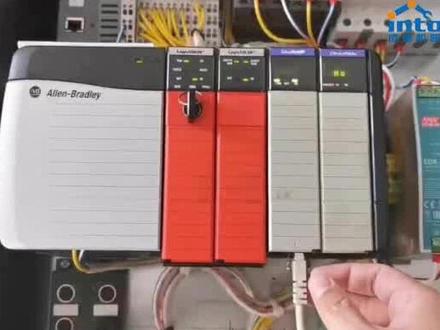
嗯,我们先要,嗯,通过那个 snix 把我们的电脑跟 plc 连接在一起,我们现在我们这里看到的是一套电木箱里面的一套 ctrltyplc, 他这里的,嗯,这个第三草这个模块呢是叫做 ac 的,他 ip 的以探网模块,目前他这个,嗯已经通过网线连接到了交换机上面,那么我们的电脑的网线呢, 现在也插到这个交换机上面,这样的话呢物理上面我们电脑跟这个,呃,这个飘 c 已经是连上了。那么另外我们再来看一下这个以探网模块的 ip 地址,上面在滚动显示的幺九二点幺六八点一点一零零。 好,我们现在打开电脑界面,这台电脑上呢我已经把我们所需要用的那个,嗯, 几个软件都已经装好了,嗯,桌面上有他们的快捷方式,第一个呢是 ice links, 第二个呢是 ice logics, 五千,嗯,第三个呢是 ice view, 第四个呢是 ice networks, 第五个呢是 soft logics。 那我们现在这个课程里面呢需要用到的呢就是前面三个。我们先来看 ice link。
49成途机器人 04:29查看AI文稿AI文稿
ps, 给它上电了哈,我们可以看到 m s 灯长亮, power 灯长亮,然后我们用用,先用一个 usb 啊连,看看能不能连上它。 我现在已经是 usb 线已经插到这个虚拟机上了。然后我们用 other links other links 软件扫一下看 这个 iz links class 是 a b 的,它,呃,一个通讯软件啊,只要是 a b 的一些设备都可以用这个通讯软件去连接啊,它可以创建一些驱动,我们可以点这边有一个像蛇一样的这 个创建驱动设备,然后点击下了窗,可以看到所有的驱动都在这边,是吧?一般我们常用的话是这个 resonator ip drive 啊,点开以后你可以添加。 添加以后这个是以创建仪态网的啊,你可以点击你自己默认的网关啊,一般点你自己默认就就可以了啊,点确定啊,像这个添加好以后,他会在左边这边自动会添加一个仪态网的驱动啊,只要你只要你这个网线连接到 p u c 并并且这个 p u c 有这个。 呃,设好了 ip 地址以后,它直接自动会扫出来。还有一个呢,就是 isolate, 像像这个上面这个啊 device, 这个设备呢,添加呢, 它需要你直接输入你设备的 ip 地址,然后你添加啊,也可以啊, 然后我这边是连的这个 usb 的啊, usb 是不需要添加驱动你,他直接会在下面显示显示这个驱动啊 usb, 然后我们点击点开它啊,现在是能扫上来的,扫上来以后是八七零 八七年通道二,对吧?看一下他的属性 模块配置,它的版本是十二版本的。 嗯,我装的是二十一的,然后它的端口啊, ip 地址它已经设了幺九二点幺六八点幺点幺六三。 好的,我们现在把 usb 给它拔了,换成以太网式看看啊。我先把自己的网段设成跟它 p o c 同一个网段。 好,我们插下网线, 我们这边可以点一下刷新啊,刷新一下,或者你可以把它移除掉, 再刷新一下。啊,扫出来了点幺六三,对吧?啊?上面也能扫,这里有两个驱动啊,或者我们可以说给他留下一个也可以啊,没必要用 两个。我们如果说想把这个驱动删掉的话,首先点击这个驱动,然后点击 stop, 然后再把它 delete 一下,好了,现在就留下一个驱动,对吧? 好了,我们现在。
11AB行者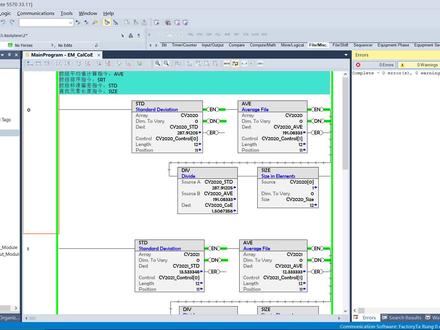 10:49查看AI文稿AI文稿
大家好,今天呢我们把这个数组的处理指令讲完啊,呃数组处理指令呢?现在就是我们在讲的话,就是讲四个啊,呃,一个是呃数组的平均值计算指令啊,第二个就是排序指令, 第三个就是这个呃标准偏差指令,还有一个就是这个元素长度指令啊,这个排序指令呢,我这个例子里面没有做啊,因因为他就是指的是 呃条件成立的时候呢把会把数组内的啊,这个一维、二维啊,三维啊,这种数组呢,呃他会进行一个递增的排序啊,所以说我这里边也就没有再再去拍,大家可以自己试一下。呃这里边呢就是第一个我们 就看这个平均指令啊,数组的平均指令,嗯,他呢会把数组内的这个呃一维、二维或者三维的这个数组呢求出这个平均值来。 呃他的计算结果呢?呃一定是一个双整啊,或者说是实数啊,这里我们就定义了一个是一个实数啊,在这里 呃他的操作会影响到算数标志位啊,希望大家再回忆一下。算数标志位啊,这是平均指令。呃第二个呢就是这个标准偏差, 标准偏差指令呢,是在统计学里用的比较多的一个指令啊,或者说是概概率啊,概率和统计学都用的比较多。嗯,然后 这条指令呢,其实我们在应用当中也有可能啊,在控制器里,比如说对一些产品的质量啊,或者说是对一些设备的质量,这个故障啊,会有的时候会用到这条指令去做一下计算。 这条指令呢主要计算的就是标准差啊,它是作为一个统计分布程度上的一个测量仪序存在啊, 他指的主要是这个数组里的这一组数据啊,他的平均值的一个分散程度啊, 一个比较大的标准差呢,就代表着这个大部分数据和这个平均值之间之间的差异,比较大小的标准差呢,则代表这个数值比较接近平均值。 嗯,他可以当做一个,呃,就是模糊的,或者说是不确定的一个测量。 呃,你比如说我们要做一些重复性测量的时候啊,测量的数值的一个记号的标准差,是可以代表这个我们所测信号的这个一个精确度啊,这是这个标准差。另外还有一个呢,我们在这里还计算了一下这个编译系数啊, 变异系数呢,主要是观测这个变异程度啊,你的变异系数越小啊,这个变异的程度就越小, 比起这个标准差而言呢,变异系数的好处呢,是不需要参考这个平均值啊,变异系数也没有亮钢。 以此呢,在比较两两组量刚不同啊,或者均值不同的数据的时候呢,我们一般都是采用这个便宜系数,而不是用这个 std 这种算出来的标准叉啊来去做参考, 这是他的一些含义啊,这个这个例子呢,是这样哈,就是 这里边呢,在这个书组里面有一些这个默认纸啊,他这是十二个,一共十二个。然后呢,他已经算出来的这个标准叉和这个变异系数呢,都在这里,都都存在,从这里边我们就能看出一些这个物理含义,对吧?刚才我们讲的 啊,你比如说这个 c 院二零二幺啊,这个便衣系数呢就比较低, 然后的话,呃, c 院二零二零的变异系数呢?这十二组数据呢,他的变异系数要大于他 c 员二零二零呢,它的变异系数是最高的啊,这个这些数据呢都是我们这个手动输进去的哈,然后我们现在呢要做,要做一个实验,要来填充这个数组,大家可以看一下啊,就是我在这里有一个这个上一集的画面 啊,这就是这个数据源啊,就是我们就是从网上截取到的一部分数据源, 他是针对某种这个呃几个地区的啊,某种某种病毒的一个一个计算啊。你比如说这个第一列是这个呃死亡人数,第二列是确诊人数啊, 第三列是指的是这个呃恢复的啊,就是这个治愈的啊,这是二零二零、二零二一以及二零二二的这些数据啊,当然不全,哎呀,地区也也不全啊,所以说这个第四季度呢,它是统计到了十月份,而且呢有这这这个 在二零在二零二一年的这个第三个季度开始呢,就是就没再去计算这个恢复的,这也可以看每个季度啊,他们的一个比较。 呃,其实这些数据呢,我们都可以分明别类的啊,其实在这里计算也可以啊,这个标准叉和这个变异系数,它基本上就是一个呃一个计算方式。我们这里主要是给大 讲的就是我们用这个呃 xl 呢当成一个上飞机啊,把这个数据呢传给这个控制器,让控制器呢算这个数据啊。 这里边主要要给大家讲的就是,呃,大家先可以看一下这个结果 啊,你比如说我们把这个数据下传传给控制器, 我们会把每个月的确诊人数传下去啊,这这一个 啊大家可以看到就全填进来了,填进来以后呢我们可以算出来这个标准叉,包括这个变异的这个系数啊, 啊,就是这么一个一个过程啊,这就是这个对这个指令的一个讲解。呃,顺便说一句的呢,就是这个表格和他的一个通讯啊,这里边就是 啊,我们要用到这个利克斯,利克斯这里呢有 dde 和这个 opc 啊,我们这里呢去建立这个, 哎,我们这一个拉伊特啊,这个这个去新建一个这个快捷方式去关联到这个控制器上, 这里锁住呢,是因为已经建立连接了啊这里所以说他就没法再看后面呢有一些他的设置,比如说我们的采养时间啊,包括这些一些基本的通讯设置。呃,这个快捷方式建立完以后,关联完以后呢, 我们就在这里去靠配啊,靠配的时候呢,我们就可以选控制器里的这个离线啊,或者说在线的这个数据,比如说我们需要 c o e, 我们就就是二零二二,是吧?二零二零的 c o e, 我们就靠配一下, 然后在这里呢我们粘贴啊,特殊粘贴啊,粘贴这个链接 啊,这样这个数据呢就就就进来了,我们呢可以随时去计算啊,去随时适时的去看到这个数据。另外一个呢我们也可以继续啊,再再再再来贴一个, 而且我们可以根据这个数据呢画出我们的生产线的这个图表,也是没有问题的, 这是标准偏差。 是这样啊,所以说呢就是这样我们就可以适时的去看这个呃生产线的数据啊,同时呢我们可以把 xl 啊得来的这个数据源也可以下传给 这个控制器啊,这这里面呢这个呃,这是直接连接,我们也可以做成这种按钮方式啊,来读成批次的读取这个控制器的信息。这里给大家看一下这一个 这个 vba 的代码。 xl 是支持 vba 的 啊,这一段呢就是代码,这里边比较重要的就三个啊,第一个就是先建立一个通道啊,通道完了以后呢,我们会在这个啊扑克的这个函数里边啊,去指定我们变量 以及 x 赛奥表格对应的单元啊,这个赛奥啊,这样呢就完了啊,这样呢就就可以完成。 哎,这里面呢 vba 也可以写这个循环哈,我是为了方便就直接把它贴上了, 大家可以看到这一键啊,就把这个所有的这个确诊全部下传下来,然后去计算啊, 哎,我们可以看到这个变异系数其实在 c y 二零二二,它的变异程度是大于 c y 二零二一的啊。嗯,但这只是针对某个地区的这个 部分人群啊,他的一个采样,呃,就是举这么个例子啊,谢谢大家。
 05:05查看AI文稿AI文稿
西门子温 c c 如何通过 o p c u a 访问迅扰网关?首先我们打开温 c c, 双击变量管理, 点击连接参数, 点击证书, 将网关的证书拷贝至 win c c 的指定文件夹下。 下面我们给 win 十操作系统添加证书。 现在我们填入网关 ip 级 o p c u a 的端口号, 选择安全 设置, 点击浏览 o p c 服务器, 可以看到我们已经成功地读取到网官撰发的 o p c u a 的数据。 更多去聊产品信息和操作技巧,您可以在微信公众号去聊官网以及各大视频网站中获得。
19迅饶信息-商务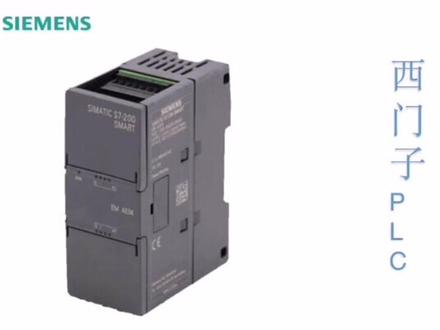 01:41查看AI文稿AI文稿
今天给大家介绍一款这个市面用的比较多的细分子的 plc, 这 plc 的那个型号呢?是 s 七两百四码头,那这里边他能适用的这个温度范围是零下六十度到零上六十度,那再给大家看一下这边他的出厂的序列号,这保证肯定是原厂了,那他的出厂的这个地点呢?是在这个四川省成都市。 好,接下来我就把这个打开,打开来呢是这个样子的,面板上有他的型号 s 七到两百,那这个呢是一个二四四八五的一个窗口,那在这块呢有一个二十四五的一个管口,那背后呢?他是支持这个工业的这个导轨安装,那整个差不多一个手掌这么大。 好,现在通过这个三台设备给大家演示一下这个 plc 的其中的一项功能,那么这台设备呢,是一个呃继承 obc 血液的一个网关,这个是咱们开箱过后的那个西门子的 plc sms 七杠十八的两百。那这个呢是一个四 g 的终端,那我们主要用它的 灯来显示这个通过 prc 来控制他的量里面。好,接下来我把这个线接好。 好,接下来通下电源,好,片塞已经成功供电,网关已经成功供电。 好,现在给这个四 g 终端供应圈点啊,现在没有亮,对吧?好,接下来就是通过电脑来去通过网线去 opc 练习来控制这个灯进行点亮。接下来这是一个中心的控制软件,这软件叫做萨普定和 pc, 那么通过这个软件我们配置好以后,那就通过改这块的歪油纸,我们可以实现这台设备的灯的点亮与熄灭。下面我给大家演示一下啊,把这个零改成一,写入,现在这个灯亮了, 那么再把这值改成零,再写入,现在这个灯熄灭了。好,这就是基本的过程。
 01:44
01:44![Swisse双蛋白粉,一袋一袋的出门带太方便啦!融化也好快,随便搅一搅[胜利]没有任何怪味腥味,配料表简单又放心,虽然清淡,但是越喝越觉得爱[哇]
以后就坚持喝它了!#双蛋白粉 #维生素e身体乳测评 #奶酪棒测评 #swisse葡萄籽 #胶原蛋白肽饮料测评](https://p3-pc-sign.douyinpic.com/image-cut-tos-priv/af6967327a8a280b9769b1d122baf2c9~tplv-dy-resize-origshort-autoq-75:330.jpeg?lk3s=138a59ce&x-expires=2094969600&x-signature=4kAN9itS5wNGH07L8iMmc%2FjdVQg%3D&from=327834062&s=PackSourceEnum_AWEME_DETAIL&se=false&sc=cover&biz_tag=pcweb_cover&l=202605241622284AF48383E142CE0CFA1E) 01:29查看AI文稿AI文稿
01:29查看AI文稿AI文稿哈喽,姐妹们,我强烈给你们推荐这一款的蛋白粉啊,这是 swisse 他们家的一个新款,这个蛋白粉的营养非常非常的全面,那他适合什么样的人呢?他适合所有人,那这里面的 它含有的是动植物蛋白双补的这样的一个,我们来看一下它的配料表哈,前面呢是呃动蛋白,然后乳清蛋白呢,达到了百分之二十一的这个含量,然后它还有什么呢?燕麦,我们的燕麦的膳食纤维比较多对不对?然后呢还有橘粉,橘粉是什么?哈? 橘粉是益生元,益生元是什么?益生元是给益生菌提供营养,提供食物的,尤其针对胃肠不好的朋友们,特别特别适合,而且它的味道真的是好好。那我强烈推荐它的还有一个原因就是因为它是 独立包装的。给你看一下蛋白粉这个东西,你吃少了没有用,吃多了又会有负担,所以说定量是最好的,尤其给老人家,你就吃这种定量的就很高。蛋一次一袋,那身体比较差的呢,可以每天吃两袋,那一般正常保健的话,一天吃一袋就够了哈。这一盒呢,一共是二十一袋,那我们这一次是二九九,一共是三大盒到 六十三袋,整整可以喝两个多月,这款的买法特别特别好冲泡,我现在来用冷的矿泉水给你们泡一下,而且他真的很好喝,你们想想他放的什么菊粉,是益生元对不对?然后呢?啊,还有大豆蛋白酒,喝起来有豆香味,有股奶香味,冷的矿泉水哦, 盖上盖子来摇一摇,看一下是不是瞬间就溶解了,而且味道真的是很好喝,有一种豆香味,有一种奶香味,就是对蛋白粉口味比较挑剔的朋友们就选择它没错的。 嗯,很好喝,我们都知道哈。好的奶粉可以用冷水冲,好的蛋白粉一样是可以用冷水冲的。
 16:32查看AI文稿AI文稿
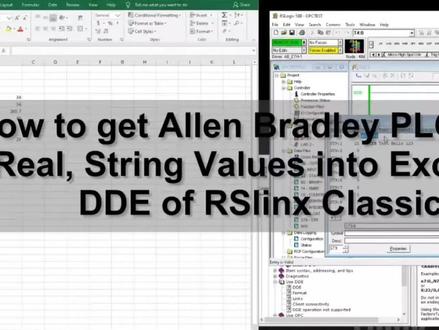
hello, everyone today, i would like to share a test that is use a excel to read the data from allen branley micrologic controller fourteen hundred and one key software that is rs link software we will use dde function in the rs link, so rs link will acquire the data from the plc and use its building dde function transfer the data to the excel allows the excel read the data from the plc in this test, i will transfer some integer value real float value to the excel also, i will transfer some strange value to the excel as shown in the screen let me show some important steps in this test one important software we will use that is a rockwell rs link software all its full name is rs link classic software for this software it mainly has a full versions one is rs link enterprise rs link classic single node, rs link classic oem and rs link classic gateway so by default if we install the studio five thousand standard or factory talk well uh, we will install one basic version that called art link light for the rcling light it cannot transfer the data from plc to excel because it doesn't have a dd function inside to use the d e function we have to use the version above the rs link light so that means we have to purchase the license at least we need to use the single note the basic difference between those different version so the lowest version the lowest price that is a single note from the rockwell description this software can only connect one device that means this software can only connect one controller transfer this controller to the opc client or to the dd client the higher one that is a ice link classic oem, so this oem can connect multiple devices or multiple controllers, but the client software has to play with the same pc with this an icling classic software if your client is a remote station need to read the icling classic or reversely your icelink need to provide data to a remote station, so you need a icelink classic gateway or if arselink worked in a a big plant or basically that is an enterprise level so this arselink need to connect multiple devices or multiple controllers and provide data to multiple clients especially the remote client, so you need a ice link under price to check off the different version and different functions we could search nine three four four difference rs link classic versions and features metrics so from this description, we can look at these matrix to find out what the difference between the light single note, oem and gateway versions also the detailed description about the single note oem version as well as the gateway the detailed descriptions are showing here so if you need to order the rs link based on your application you could check out this a catalog number and ask your local distributors so in this test, i will use rs link classic gateway, but i'm using a grease mode also in this window system, i install the excel and the actual controller what i'm using that is a micrologics fourteen hundred as a test controller so next, please follow me for the detail process so let's open the rs link classic gateway and let's firstly add the internet channel my controller that is a cca so from this a configure driver, i configure the ip address of the controller it this project named opc test right click this icon and select configure new dde opc topic so we create a channel it named the opc test after this, we highlight this channel opc test channel name and select the right side of the controller one ninety, two one sixty eight dot one dot ten and by default for micrologic we can leave this islc five zero three plus this selection if you controller that is a complagics, we can select logic five thousand the poor message cycle time we leave the one thousand the limited maxim packages by default that is the twenty from rockwell description recommend this value would be from twenty to one hundred so from here the communication driver we are using that is a easier night connection so this channel is running we click done finish the settings is very easy basically we won't change anything after we set up this channel we select added select copy dde opc link keep in mind if you are using is link a classic light version you will find in light version there's no selection named added that means the light version it doesn't has this a copy d d e o p c linked function so we selected that so from this left column ice link o p c server notes we can browse the tax or values that all the tax and values come from the plc, so we shift back to rs logic five thousand look at the value inside the micrologic fourteen hundred so in this controller f8 this date area the flowed value f8 zero that is a twenty point seven so we can after we browse we can find f eight zero zero one two d has a value here okay i will select zero as a first test value select this zero and click ok once you click ok this link will copied we open the excel and we paste special select paste link and select unique test click ok once we paste this link we will find the actual value from plc already shown in the excel we can drag this link and manually ride the next address we will see the format behind this column that is a one format link rs link that is a the typical name opc test that is the channel name we set up you can rename this f eight column zero that is a the key address of this value so zero this is the first float value the first value that is a thirty point five, second thirty point five third value that is a one hundred point five and the fourth value and we will write number three because it start from the zero, so from here we change the zero to three remove the exhale here we roll the forty, so we can see the left side from the exhale forty is reading on the exhale, so now we will transfer to offline mode i will create a new page date file, so i will create a strain date file it named number nine date file leave the element to ten save the project and we download so next we will test reading the screen file, so we ride the strings, so we ride the string system task, so back to the ice link let's see if we can browse this the number nine data file we found it haven't update yet so from this list we cannot find this st nine the number nine date page we cannot find it because the system haven't update yet i cannot find the date file so i create a an intent that is the integer number ten date file for a test, so i drag this anten the first one zero address grab this zero to the excel, so i checked it i found excel can read this, so i found maybe i can use manually way to manually ride the address in the excel, so let's see if it can read so this is the s t nine address channel still the opc test, so immediately change to s t nine try to read this istini the zero address of the value so it got a successful and i change the number one try to read the system test this string, so we can see the excels is reading this address so that means if we might change the dress name it's okay we do not need to go to that opc browser to grab the tack from that browser once we grab one successfully we can manually change the dress in the excel, so i'm trying to rewrite the value in this string, so we can see once i rename a delayed value is updating in the excel, so from this test, we test the integer value we test of the float value and screen value that is it nine zero the screen value address the next one as t nine one so i'm trying to read the next string value so here's a question we can see i tested successfully on the string zero and number one and then i try to read the the esky, nine, colin two and colin three but however we can see from the excel it got an a seems once it greater than two it cannot read so far i don't know why it happens i guess the main problem come from because i'm using the grace mode if i use the activation lessons it should be okay so if i delayed the number two and number three it got a success read again but once i try to read the st nine column two it got an a even i ride the value into this value into this address it does work if i delete it zero and one immediately read out from test wheel is already enough so in this test we used the micrologic under the controller as a test controller and use the rs link gateway grace mode we just do a test and in this test we use the excel to read the data from the micrologic forty hundred we read the integer value that is twenty value here and we read the four float value from the date page number eight and also we read the strings value from the st nine date page number nine we read the two strings and we also find maybe because i'm using the grace mode, so i can only read two value here, so also we reviewed basically there are four versions on the rs link if you try to read one controllers and transfer this controls value to a client in one pc, so you can use the single node or if you need to read multiple controllers, but still the client still stays the same pc with the rs link you can use the oem version but if your system is has a multiple layer your client need to remote connect to this rcling pc so you need to use the gateway or enterprise version so that's it for today thank you for watching if you like this video, please give me a thumb up if you like to watch more videos in my channel please subscribe see you in next video。
18流浪地球🌍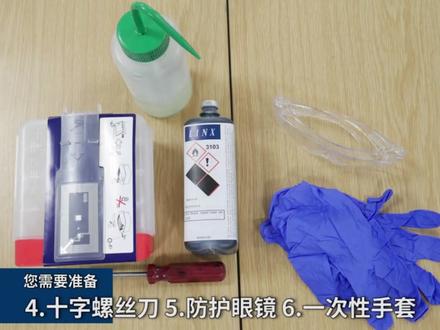 01:12查看AI文稿AI文稿
linx 八八零零系列喷码机服务模块更换教程一如何更换服务模块?您需要准备一清洗壶二服务模块三墨水四十字螺丝到五防护眼镜六一次性手套。 进入菜单,登录, 选择管理员,点击确定进入维护菜单,选择更换服务模块, 点击下一步, 再次点击下一步, 点击确认插入服务密药,等待机器识别完成。


