aspen怎么查看组分的物性结果

粉丝2545获赞3118
相关视频
 01:36
01:36 20:39
20:39 01:48
01:48 06:07查看AI文稿AI文稿
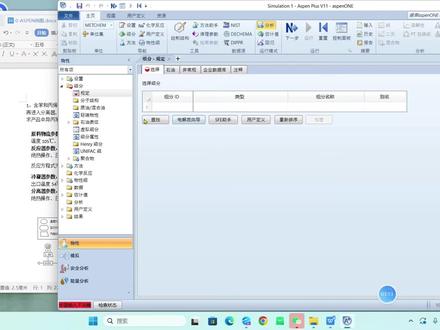
接着呢我们看这个悟性查询的一个举例,这个举例呢是要查询硫化氢和硫磺的一个基础悟性。那么对于七点三这个版本来说呢,他已经非常老了,我们可以看到这个界面啊,他已经非常老的一个版本了,跟现在的高版本啊,差别是非常大的, 差别是非常大的,因为这个新新的教材呢,就说一般情况下软件的教材呢,都不会出新版本的。 呃,老版本的,他的就说包容性更强一点,就是说你高,你高版本的可以兼容兼容低版本的,但你低版低版本的兼容不到高版本的。 那么咱们就是用 s 版,我用 v 十四这个版本来把这个立体一点一给展示一下,然后呢立体一点一呢,由于它是 七点三这个版本做的啊,然后呢前面这一点一,一点二这两个例题呢,主要我也把这个两个版本之间的不同给他说一下 这个立体中关于关于这个立体中的一些不同。然后第二个他要求是打开软件吧,打开软件之后,然后呢我们要选择这个就是 timeline 的模板开启,就是用模板模式开启,模板模式开启在靠版本中是什么呢?你点击新建, 点击新建。然后呢他说的是我们可以看到啊,用的是 general waste。 呃, max 哥用的这个是公制单位下的计量模板,然后呢也是一个就是朴实的通用的一般的公制模板。然后呢你在哪儿呢?就是用户这儿 就是常规常规的模板,这是音质单位,我们看到这是 v 十四跟 v 十三,不对, v 十四跟 v 十二不同的地方就是 这个其他的版本呢,有可能这个你点用户,然后呢直接就给你几个模板去选公,这边是两个公制的,这边两个英制的,现在是公制和英制的,需要你自己点,所以说你点一下这,你点这旁边就可以看到这个单位变了, 那么在旁边他是说了默认计算模式是 flows 的, 这个其实他也是默认了,他默认了,他不管你了。以前的时候这边下拉菜单还可以选择,现在是不需要选择,他直接会进入这个啊,运行类型的,就模拟类型的这个地方。 接着第二个他要命名,就是说这个标题和单位置,标题和单位置呢,平时很多人也不会注意的,比如说我模拟的时候不会注意这个单位置,我会自己自己设置一个单位置,默自己默认使用,那么这个我们用 这个单位置,然后呢标题 我用就是 e、 x i 一点一,然后你想要描述呢,这些你可以往下面加一些描述 这些记录,呃,账号、 id、 名称,甚至你都可以,嗯,有些地方你可以加密,可以设置加密都可以, 这个地方呢就设置一个单位就可以了。接着就输入组分,这边输入组分定义化学组分的时候呢,他告诉你说是在规定选择这个页面输入硫化氢和硫磺的化学结构式, 这呢对于简单的东西,硫化氢和硫,嗯,硫化氢和这个硫单质你可以直接输入就可以了, 其他的你可以选择点击这个查找,那么这个是简单的,我们就直接输入, 第二个是流,你可以直接输入 s, 这就这就可以了,那么老版本的时候呢,输入完之后你就可以点这个 review 按钮了查询了, 但是在新版本里面不行, 在这这句话啊,这句话的意思是是在这这是一个就是说数据库嘛,输入数据库,那么你点查找 数据库,在这边里面有很多的数据库,这就是我咱们前面收到的四种默认的数据库,你需要的你可以把它调过去,二十五就是七点三这个版本的数据库, 这句话的意思就是这样的,然后呢 review 这个按钮, review 这个按钮呢在老版本里面可以点,现在你看它是 混合的检查可用的纯组分参数,但是他是隐藏的,就是现在点不了,为什么点不了呢?在新版本里面呢,你必须必须输入 悟性方法,点击悟性方法之后你就可以检查了,就是 review 了, 你可以点击检查,然后呢他就会自动的跳出来了,跳到这个 review, 那么你不想从那儿检查你,你从哪儿检查呢?你就是纯主分这儿在方法下面的一个参数,参数下面的一个 review 就在这儿,你也可以查看。 还有一个就是数据库,你比如说这些数据库你感觉还是不够全,你可以点击解锁, 在这个你点击是的话,他就会自动跳过去,跳过去这个有个计算,计算 结果在这结果里面有这个纯组分,这里面有更多的一个数据,其实差不多的还有温度相关的一些数据, 这呢就是立体,立体一点一,他给我们展示出来的这个东西。
28渡鸦12345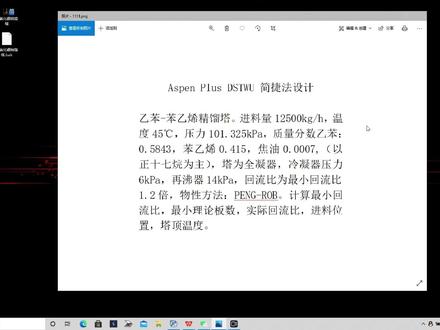 04:13查看AI文稿AI文稿
阿斯芬 plus 金流塔简洁房设计一本奔逸西净流塔,净流量一万两千五百公斤,每小时温度四十五摄氏度,压力一百零一点三万五千瓦质量分数一本零点五八四三奔一七零点四幺五,郊游零点零零零七, 计算最小回流笔最小理论板数,实际回流笔尽量位置卡点温度,打开 sunplus 点击新建选员工 怎么办? 输入一半分析 交友以正时正时期玩为主,探时期 请三十六,点击 nice 方法,选择 pr 方向,点击 nice 进入模拟环境,选择停留他添加无聊信息, 更改无聊信息名称, 天津的 气流量,温度和压力温度四十五度压力一百零一 一点三二五千胖质量很爽。 零点五八四三,零点四幺五零点五八四三零点四幺五零点零零零七这样流量 一万两千的 比是实际回流比的一点二倍。两年气和在飞气,两年气压力六千八,在飞机压力是四千八六千八 十四,前爬轻关键组分一磅零点九九九一 分析零点零一四二,点击那个 进入模拟环境,点击查看结果,最小 六比四点二,实际回六比五点一,最小理论版数三十四点五,实际理论版数六十四点八,进料位置是在第二十四点九排位置, 金字塔的分离温度是五十四摄氏度。
272刘璧 05:45查看AI文稿AI文稿
啊,现在我们来学习一下 hysys 里面如何找到纯主份的一些啊属性,比如说临界温度和蒸汽压力,在某个温度的蒸汽压力和它的标准沸点。 最后我们来学习一下利用灵敏度分析工具啊,可以丢丢兔来生成啊,一段蒸汽的温度压力曲线。 好,下面我们转到我们的那个界面,这就是我们很简单的一个流程。好,下面我们简单来啊说一下他是如何创建的,我们首先把它关闭, 新建一个 kiss 梳我们的头发 有吗? 好,然后我们去掉我们的那个 lot 咨询包,我们选用我们的喷罗布逊。 好,我们进入我们的那个模拟界面,把我们的那个物量由股投进来,这样就可以了,我们 转换到我们的手心界面,我们可以看到双击这个屏幕,我们就在里面可以看到我们的一些啊属性,比如说他的那个摩尔分量啊,分子量啊, 他那个标准沸点啊,标准正标准沸点,还有他的一些临界的一些属性啊,临界温度,临界压力等等。 现在我们来学习一下啊如何利用 k 六六来创建他的那个蒸汽的那个温度压力曲线。 我们先输入一定的数据啊,我们输入他的那个温度,假如说我们的温度是零度的时候, 他的模啊流量是为一啊,随便设为,然后输入他的组成啊为一, 还有它蒸汽分量啊,气象分率零, 这样我们就完成了他的那个常数的设置,我们可以看到在零度的时候,他整齐压力为十七三点五 k 八。好,我们输入我们的数据之后,我们就可以利用我们的 case 十九穿进我们的那个 温度压力曲线,我们点击 k studio, 然后点击添加这里面,对下,我们选择我们的, 我们选择我们的牛股一流体衣,它里面的温度添加,然后选择我们的压力 添加。好孔冰糖,这里面我们添加了两个片料,我们看这部 看看。现在我们要求穿进的是我们的从那个标准沸点到临界温度这一段曲线,我们刚才可以看到 这里面他的那个标准会顶负四十二度啊,他的临界温度是九十六,就是出这两者之间就可以了, 好舒坦,最低值为负四十二度,最高值为九十六, 好,他的步径值就是说他每隔多少度就选取一个点,哎,你合成我们的曲线,我们十五度, 当我们十五度之后就会出现这里面一共在这个温度八百面,他可以啊,添加到二点,好,当我们完成之后,我们点击下面运行 好,运行完成之后我们可以点击我们的 plot 分成图,好,这就是我们的那个啊温度压力曲线图啊,这是丙黄的温度压力曲线图,我们也可以在结果里面可以用啊数据表格来显示啊, 修改下他的那个曲线。好再讲,我们讲的就是最主要讲的是利用我们的黎明 灵敏度分析工具来生成纯主份的一个蒸汽压力温度曲线表。曲线好再讲,讲到这里谢谢大家。
 01:27查看AI文稿AI文稿
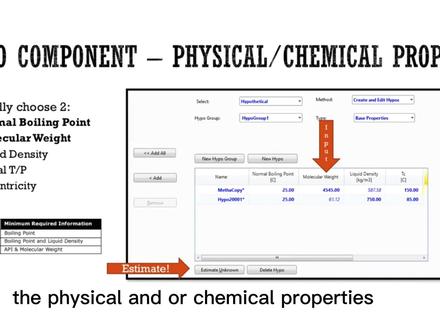
so the first way to model a hype component will be the physical and or chemical properties so first things first will be to determine two at least two points either the normal boiling point and the molecular weight which are the most common one but still you can add liquid density the critical temperature and pressures even accentuate the factory if you have it so typically aspen heises will calculate all other data so let's say well i don't want to go into the workshop already but once you open the componently you can work with the hypothetical selecting method you want to work with and the hyper group this is hyper group number one and this is component to one in component to stated before you need at least one component for one hyper group so in this specific case, i added the normal boiling point and the molecular weight of my species and therefore density critical temperature and all data is calculated theoretically always click on estimator known once you have stated the data so i stated these two data and clicked on estimator known we will see that in the next workship。
14马后炮化工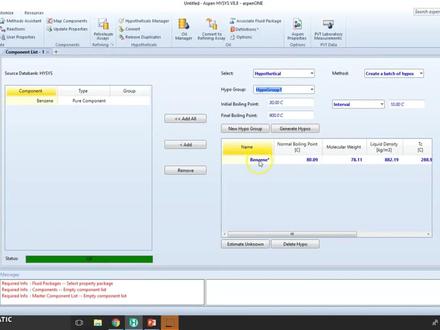 04:07查看AI文稿AI文稿
so welcome to wardrobe number three we will be working with hyper components and in this specific case we are going to convert from an existing company from aston issues so we're going to model the spin tina, lake and as the name in place it's a very similar molecule to pencil even though it has a little bit different properties and we do not know destruction so we cannot modulate the previous processes what we're going to do is to add the pencine to the company list then convert it convert a new hypo component and then change the composition now these are the properties of pencine and what we've got to do is change them according to our data that say that someone in the lab has find out that the actual molecular weight, normal value point and ideal liquid densities are these right here and we as modelers we will assume this is true and we will work it out let's go here with a new component list first, we need to add the pencil in order to model it so as you can see double clicking we cannot modify this we cannot modify the molecular weight now the number one point and all these critical products we cannot may find them because this is a database compact so what we need to do is to convert so let's go here to the hyper manager down here you will find out the combat or cloning to select this right here i don't want to replace all instances actually, i want to create a new one so click out and click here combat you can see a new hyper group has been created so be sure to find out hyper group number one and we will find our copy of pencil so let's hear hyper group and we need to go have a group number one and here is our species so let's take it will change the name first and see now you have to ensure that i'm not confusing with the actual pc so i could change the chemical formula but remember that i don't know the chemical formula and we are going to assume this is very similar to bensin so i'm going to leave that alone i can use this structure builder because i don't know the structure so what i do know is that the base properties were given to me so let's change these out so now that we have changed this we can continue modeling now please note that if our let's say lap partner would have given us different typical properties we can still change them so click here estimate your notes and as you can see it has been estimated all here critical pressure extendicity, normal boiling point and so on so remember to add it to the stream we can get rid of the bands in if we want the important part is that we have our container like ready to model so state it we are going to use a free package and one as you can see we got these coefficients and we are ready to simulate these string we can now model mention alike with the given properties。
 06:33查看AI文稿AI文稿
so let's continue with wardrobe number one we were already working with hyper components and now we're going to sign a food package to the hyper components in this specific case, i'm going to use antoine, but i am also going to use peng rubbins so you can see how the binary conficients are calculated and then we're going to start a stream and we're going to work with all the hyper components even these conditions let's move out here stated before we got component list with all the hypos, the batch group and the single hyper group now let's go to the basis select component list number one and the first one to b selected is going to be anton so as you can see once we click on tone all the coefficients had been calculated for each of the component groups now i also want to create a new basis let's work with the penguins so once we select ping robinson we can check out the binary confusions we can compare them and see how they interact between each other so depending on the type of free package you select the criteria will be different so basis number one will not have baneric efficients rather it will have coefficients for the antoine model and basis number two will have baneric efficients now let's continue to simulation and click on create a new stream right here as you can see the most important part is the composition now we can model the foot right here and add all the mall fractions or whatever composition we have right here so from here i'm not going to select them, but you can model already this right here as a normal stream which is awesome you can already change the composition conditions fifty celsius one on one kilo pascals hundred kilomo and eventually you can edit all the compositions i'm just going to select them in order for you to see that we can already work with them i'm going to normalize, so these gets to one and pull cape and as you can see the stream is now fully defined because i already added the temperature pressure, the mold, flow or flowery and the compositions so this in place that i can use this already if i have i don't know maybe a flash or a pump or even a destination unit i can already work on it, so this is the way we can work with hypo complex it's not that complex the most complex part will be to actually select and model all the hypo according to either batch or single edition, so let's continue with wardrobe number one we were already working with hyper components and now we're going to sign a food package to the hyper components in this specific case i'm going to use antoine, but i am also going to use peng rubbins, so you can see how the binary conficients are calculated and then we're going to start a stream and we're going to work with all the hyper components even these conditions let's move out here study before we got component list with all the hypos, the batch group and the single hyper group now let's go to the basis select component list number one and the first one to be selected is going to be anton so as you can see once we click on top all the coefficients had been calculated for each of the component groups now i also want to create a new basis let's work with penguins so once we select ping robinson we can check out the binary cofficients we can compare them and see how they interact between each other so depending on the type of food package you select the criteria will be different so basis number one will not have baneric efficients rather it will have coefficients for the antoine model and basis number two will have baneric efficients now let's continue to simulation and click on create a new strain right here as you can see the most important part is the composite now we can model the food right here and add all the mall fractions or whatever composition we have right here so from here i'm not going to select them, but you can model already this right here as a normal string which is awesome you can already change the composition conditions fifty celsius, one hundred kilo, pascals, hundred kilomo and eventually you can edit all the compositions i'm just going to select them in order for you to see that we can already work with them i'm going to normalize so this gets to one and okay and as you can see the stream is now fully defined because i already added the temperature pressure, the mold, flow or flowrid and the compositions so this in place that i can use this already if i have i don't know maybe a flash or a pump or even a destination unit i can already work on it so this is the way we can work with hypo complex is not that complex the most complex part will be to actually select and model all the hypo according to either batch or single addition。
 06:42查看AI文稿AI文稿
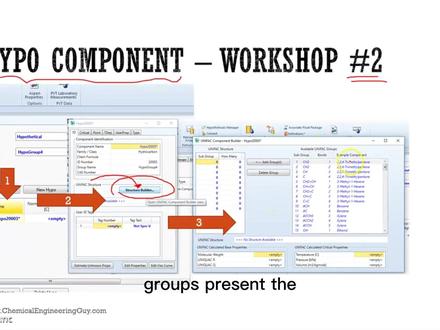
welcome to wordship number two in which we will be creating a hyper component based on its chemical structure we're going to be using this structure builder which is given by the only fact component builder now this is very interesting, because instead of actually guessing or inputting data where husband heises is going to model all the thermodynamic properties with the chemical structure so it accounts for the groups, present the bonds, present the type of atoms, the arrangement and so on so it's very important to actually build up the structure correctly now in this specific exercise, we're going to work with for nona nomna as you can recall on a stands for the ketone group four stands for the position of that group and nounan implies that there are nine carbons this is a ketton so it's very important to define in the hyper manager that we are working with a keto group so let me introduce you to what we are going to do first things first we need to define the group's present so we got two material groups so that it will be by two x we got one here four so a total of five x c h two groups and this is very interesting guys that we don't have the carboxy group we have the a field carb ketong group which is this one right here the blue one so that's very important that you must ensure that you are inputting the correct in this specific case, this is in reality c h two c o this will be one x so you can see here is seven carbons and here has two carbons a total of nine carbons the non land group then we're going to select the free package for instance, anton and work with it so let's go here let's go to the ant new create a hypo mana here we need to create a hypo compound remember that this is not a batch we're going to create a single hypo that's called hypo group number one we're going to be working with its space properties and now that we have defined hypo let's go to hypotheticals and very important guys that we need to ensure that the company class is not a hydrocarbon but a ketone group so this will have different calculations modeling and so on so it's very important to state this now let's work with it first things first let's rename this as for no man own we stated this is a katong if you see that this is not what you are going to model go back and check out the hypomann air right here change the family now instead of actually inputting this data all this right here terminal data i'm going to structure or build up this structure so this is the unifact component builder now recall that we need to build up these so first things first we need to stay the methyld group right here add the group then comes this ch two group which is right here? so let's add it and now the interesting part right here guys is that we must state once again these atheal parabox which is number twenty for you methyl ethyl at it and as you can see we have already added four comments so these this is one two three four we already have built this part right here now this part will be very very easy because it's only c h two and c h three groups so let's go back and the state that we must add c h two but we need to add four groups so instead of actually adding one by one we can state already that this is a set of four groups as you can see this is now or this implies that this has four groups and finally c, h, three let's add it oops back four and at these ones again okay so now we have our structure as you can see the most particular with west calculated automatically the unifac, r and q factors had been calculated temperature pressure volume the critical practice had been calculated as well, so we are down we just need to pick close as you can see we need to run the model we can still add more data we're not going to do that we need to estimate the unknown properties and as you can see all the properties have checked particular values we've got now the molecular weight, normal volume point, the ideal, liquid density, critical properties and all of these you can see this is blue so we can still change it so for instance we know that the actual density is maybe hundred five we can still model we're not going to do this in this specific case because we want husband heises to model the full structural formal now if you have more data, you can input it as well, but the overall idea is to know how to use the structure builder and to understand that aston heisses will make us the favorite model all data okay now that we have it it's very important to add it to our component least and select a food package so i'm going to select and twink and you can see all the coefficients for anton at the mod so you could now go in simulation at a stream with these species。
 14:51查看AI文稿AI文稿
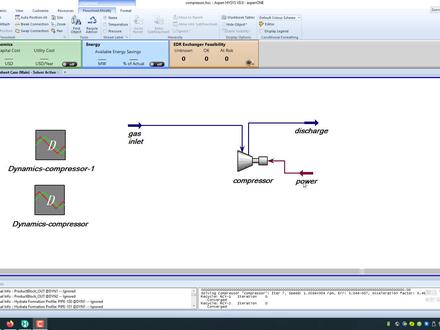
好,今天我们用 husband hysvs 来模拟一下压缩机的闯,正 当我们压缩机由于不同的原因啊,进行啊,发生闯震现象的时候啊,我们压缩机该如何调整?这是一个动态的模拟。好,我们下面来一步一步来讲解,首先我们呢搭建我们的压缩机的流程。 好,这个流程很简单,我们首先双击我们的压缩机,来看一下他的那个连接,他的入口啊,我们起个名字 s, 它的出口以 charge 排出,它的能量输入为 power, 压缩机 如果是透屏的话就是啊,蒸汽,如果是电动的话就是电力。好,我们再来看一下 他的参数,我们点击第三这个面板里面的啊,第二个参数,我们需要看一下, 我们选择的是我们的压缩机操作模式,显著为离心操作啊,这是反复。好,我们再来看一下勒顶里面,我们重要的常数是在这里面随物的勒顶 啊,他的下律方式我们选择啊,这是绝要下立,这是多变下律,我们选择多变下律, 这里面有四条曲线,四条曲线,我们先来看一下四条曲线代表什么东西, 我们啊,根据我们的转触啊,每一级转触,我们设置他的那个体制流量和鸭头啊,还有那个效率的一个曲线,我们是去输,根据我们的那个压缩机的那个 参数来输就行了,输,我们输这些就是为了确定我们的那个曲线。好,这是第一条,在七百五十 七千五百三十二钻的时候,他的那个啊,体质流量和我们的那个丫头的关系。我们再来看第二条参数, 第二条曲线啊,他是在一万多转的时候,他的一个参数,同样我们看第三条曲线, 在一万二千五百五十五十钻的时候,可能一些参数压头和流量的参数啊,这是第四条曲线啊,这是一万三千一百八十一钻时候, 这些他是我们可以根据我们的那个压缩机来进行输。好,我们 在这右手边,我们设定他的参数,那个压缩机的转速啊,为一万二千五百五十四转,当前的那个啊,正常运行的时候那个转速,我们把这个 apple 克,把那个四条曲线允许他。 好,下面参数我们把它缺少就可以了,好,这一部分就是我们压缩机的参数,我们先把它关掉,我们再来看一下我们的那个物量,我们选中我们的属性变法,我们看一下我们的物量, 我们木料有五种啊,一种是甲王,乙王,还有丙王,还有肝气,还有发烫,我们选择的流行特性包为盆萝卜逊,这次进行采用用到了。 好,我们再回到我们的那个模拟窗口,模拟窗口我们再来看看第一股物量啊,进口物量,我们看看它的食物参数,蓝色为食物啊,我们它的食物的那个 个尽量那个气体为四十五度啊,他的压力为一千一百 k 帕,还有看看那个 入口流量为啊三千二百每小时 k g 末。好,这是他的那个组成啊,每个纯主份的组成,甲网,乙王,丙王,二七二氧化碳的组成,我们全部输入保持为百分之总量为一就可以了, 这就是我们的那个入口,我们保证他的出口和压力为三千开炮,这就行了,根据我们腰粗的那个参数,我们这些黑色痣的 他就是他根据我们的消息,我们的书的参数得出来的,计算出来的。好, 我们输入了我们正常运行的一些参数之望之后,我们可以双击这个压缩机,我们可以在我们的流量 设计参数这个面板里面,我们可以看到这个下面一个蓝色字体显示的一个按钮,这里面就是我们的闯正分析啊,当我们进入我们的闯正分析这个设置面板之后, 我们可以对我们的压缩机进行啊,一个场景的场景的选择啊,场景什么意思呢?就是我他以里面已经设置好了三个啊, 三个压缩机的一个流程,当然我们也可以自己根据我们工厂的那个 压缩机现场的那个布布布布布线,我们可以选择我们自己的模型啊,这里面我们选择他自带的一个模型啊,我们可以进入他的流程图进行看一下啊,我们点击右下角恩德福拉 shift 啊,我们可以进入到他的那个流程图来看一下, 好,这就是我们啊系统啊自带的第一个啊模拟的一个流程啊,这是压缩机啊,我们看到这个排放吧,这个最小防卫线啊,这是排放, 等下我们要啊,这就是管道,在这个画面,我们啊,根据我们 我们自己的需要,我们要对各种阀门啊,沃尔阀门进行一个啊, cv 值的那个 cv 值的啊,实物,比如说我们对于我们的楼顶沃尔都是加载阀,还有我们的那个啊, 防闯撞,防闯正阀门等机位置进行一个设置,还对我们的那个容器啊,说断牵挂啊,还有管道,他的,他的管径长度, 还有他的那个呃标高,我们都要进行一个啊详细的设置,这里面我们只需要啊直到一下就可以了。 好,我们点击 run, ctrl 啊运行控制,这个, 这里面这个长,这里面啊给出了四种啊啊,我们连我们系统啊可能会发生闯阵的一个啊原因啊,比如说我们的排放阀故障啊,就是我们的出口阀故障,比如说我们的紧急啊, 紧急迅速关阀啊,突然间关闭啊,或者控制阀啊关闭,还有我们的能量啊损失,比如说我们的蒸汽突然间啊降低了,压力降低了,或者没有了,他 系统是如何通过我们的那个排放阀等等不同的那个最小防卫线来把我们的船正压缩的船正占到最低最低的限度。好,我们首先关掉我们 欧洲 parent 围在我们的主画面,因为这里面我们已经啊输了啊,一个两个把刚才那个给上架。再来,我们双击这个啊动态压缩机模拟, 我们点击我们的 star, 因为我们啊是要进入到我们的那个动态模拟环境,所以呢我们要点击这个,他模拟那个时间长度为大概三十分钟啊,我们是从他是有趋势图的,我们先点开 star 让他进行进行,进入到我们的那个真正的那个动态魔力场景。 好,我们看下,看到动态菜单里面他那个一 运行状态是运行,它是个动态的模式。好,这里面我们要把我们的那个 进入到我们的那个啊空间,然后我们选选到我们的 is pay 以上,我们看一下他的那个操作结果曲线, 这是最小返回线的那个操作,当我们出现刚才那个排放法出现故障的时候,我们可以看到出现故障的时候,他会怎么 一个最佳防护线,他是 怎么来开关呢?我们的重坐标在这是单前的位置,我们的盘路最小防护线单前的位置,这是时间坐标。我们再来看一下这个是质量流量曲线, 这是压缩机的一个反转针的曲线, 我们最重要的是看这个,因为他模拟比较耗费资源,所以显示的 十吨,我们可以看到当我们发生啊故障的时候,他那样根据我们的那个系统,根据我们的调整啊,使我们的那个压缩机啊,尽量 你远离我们的那个闯针线,我们看到 这条啊带三角形向上的这一条线就是我们的 闯针线,如果我们的那个曲线这个黑点代表我们现在那个压缩机正在运行那个点这个位置啊,如果在这个底这条曲线的附近或者超过的这一边,他就会发生闯闯正发生闯正, 这四条线分别是是我们四条船啊,四个,在四个啊返出的时啊的时候,他的那个丫头和流量的一个曲线,我们这里选择丫头,我们还可以选择我们的啊效率 效率曲线的流量和效率的曲线 啊,这一条线就是我们的石,就是所谓的石头效应,就是我们的所谓石头效应,就是压缩机在某个转处,在一定压力和温度下,他最大的排出啊流量 这四条线,这四条线,这条线是啊转正线,我们靠近他或者啊在这边他就会发生转正啊,这就是我们的那个系统,我们可以根据我们的那个啊, 这四条啊曲线这四个。其次我们来得出我们发生啊,排放阀,排出阀发生故障的时候,比如说突然间关了,或者其他的 原因不能动作的时候,他系统是怎样调整的,来指导我们应该怎么做好这四条曲线。刚才我漏讲了,他是在我们的那个压缩机的那个面板来输入的,好,我们先把它暂停 好,暂停我们可以通过啊动态模式把它这些已经断放,暂停了等于外啊部位,我们可以看到回到我们的那个 主画面,我们来看一下压缩机里面还有两条线还没有说,刚才又讲了,好,这个是闯针线,我们可以看到 在每个转速他的最小流量啊,看见没有?就是刚才我们所说的那个啊,上面那个左边那个黑色线是转针线,这个是使头曲线,是使头效应就是最大,在这个转速下他的最大流量啊,这个转速下他的最大流量啊, 我们要把我们的能控制点啊,啊,尽量控制在我们的两条曲线之间啊,就是效力比较好的了, 好,这就是我们的那个压缩机动态模拟如何反转正的一个全过程。


